Website maintenance is the ongoing work of keeping a website secure, updated, backed up and running properly after it launches. It covers software updates, security monitoring, regular backups, speed optimization, uptime checks and fixing things when they break. A website is not a finished product you build once and walk away from. It is live software connected to the internet, and like any software it needs regular care to stay safe, fast and functional.
Most business owners picture a website as a project with an end date: you hire someone, they build it, it goes live, done. That mental model is exactly what gets sites hacked, slowed down and quietly broken over the following year. The build is the beginning. Maintenance is everything after, and for a site that brings in leads or sales, it matters more than the build ever did.
This guide explains what website maintenance actually involves, task by task, why it stops being optional the moment your site earns money, how often each job needs doing, and what it looks like specifically for WordPress, the platform that powers a huge share of the web. By the end you will know exactly what the work is, whether you can do it yourself, and how to judge anyone you pay to do it for you.
What is website maintenance, really?
At its simplest, website maintenance is the set of recurring tasks that keep a website healthy over time. But that definition hides the important part, which is why a website needs ongoing care at all when a printed brochure or a business card does not.
The answer is that a website is software, and it does not sit still. It runs on a stack of code, the core platform, a theme, and plugins, that is constantly being updated by the people who make it, largely to patch security holes as they are discovered. The moment one of those holes is made public, automated bots begin scanning the entire web for sites that have not yet applied the fix. Your site is also connected to services that change underneath it: a payment gateway updates its API, a host migrates a server, a browser changes how it renders a page. And it accumulates its own clutter as it runs, database bloat, oversized images, broken links, expired certificates.
Maintenance is the practice of staying ahead of all of that. It is the difference between a website that quietly keeps working and one that slowly decays until, on some ordinary Tuesday, it breaks, gets hacked, or drops out of Google. Think of it the way you think of a car: buying it is the start, and if you never change the oil or check the brakes, it will eventually fail at the worst possible moment. Maintenance is the oil change your website needs on a schedule.
What does website maintenance include?
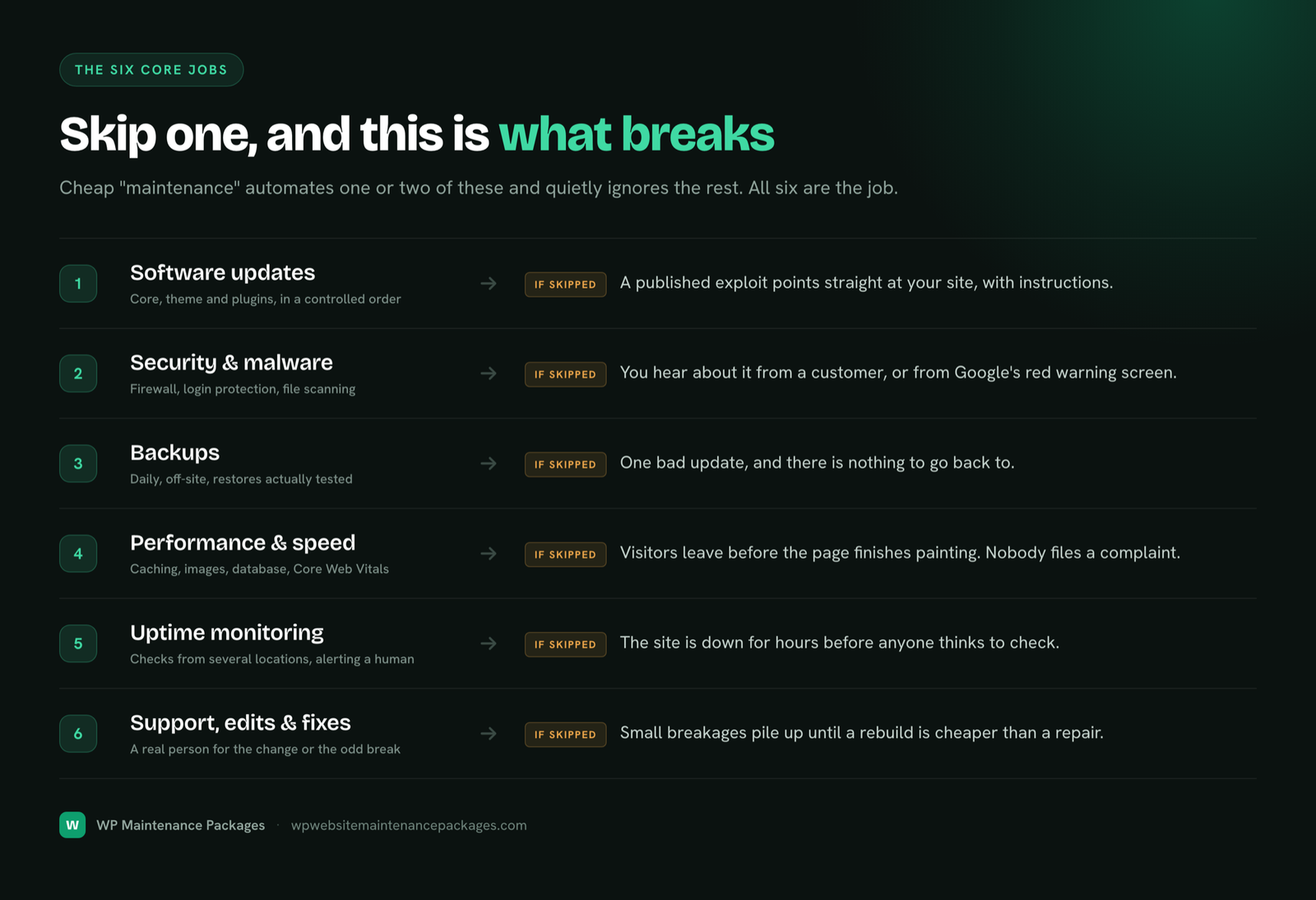
Real maintenance covers six distinct jobs. Cheap “maintenance” often means one or two of them automated and the rest ignored, which is why understanding all six lets you judge any provider or plan on the market. Here is the full picture, and what separates doing each one properly from doing it badly.
1. Software updates (core, themes and plugins)
Your website runs on software: the core platform, plus the theme that controls how it looks and the plugins that add features. All of it releases updates constantly, and a large share of those updates exist to close security vulnerabilities that attackers already know about. Applying them promptly is the single most important maintenance task, because outdated software is how the overwhelming majority of websites get compromised, according to security researchers who track these breaches year after year.
The catch is that updates can also conflict with each other or with your specific setup and break the site. So updates cannot be applied blindly. Professional maintenance means taking a full backup first, applying updates in a controlled order, testing the site afterward, and rolling back immediately if anything misbehaves. For any site that earns money, updates should be tested on a staging copy, a private duplicate of the site, before they ever touch the live version. That single practice is the difference between updates as a routine and updates as a gamble.
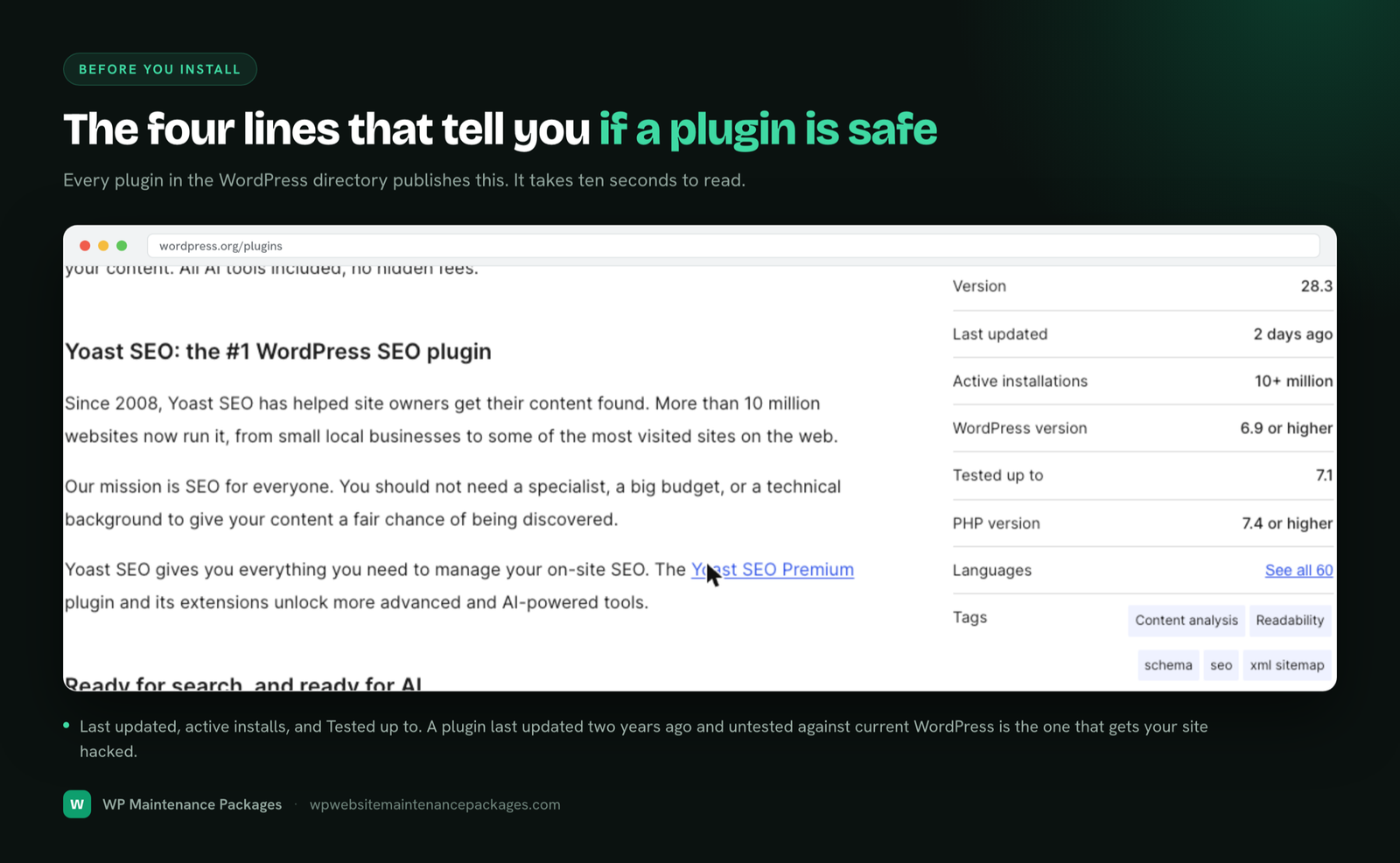
Warning: Never install “nulled” or pirated premium plugins to save money. They are one of the most common ways malware gets onto a site, because the code is frequently modified to include a backdoor. The saving is an illusion; the cleanup costs far more.
2. Security and malware protection
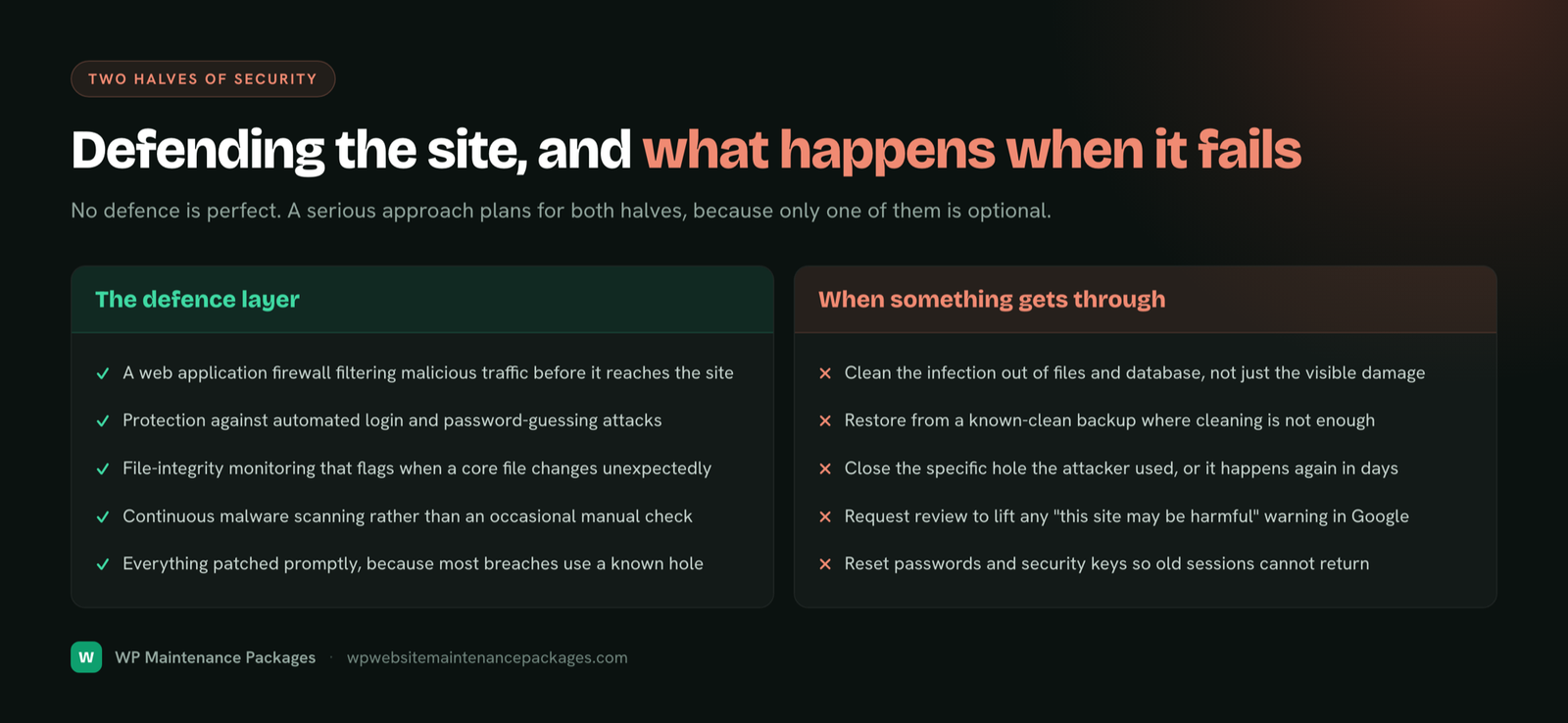
Security maintenance means actively defending the site rather than hoping it is left alone. In practice that is several layers working together: a web application firewall filtering malicious traffic before it reaches your site, protection against automated login attacks, file integrity monitoring that flags when a core file changes unexpectedly, and continuous malware scanning. The OWASP guidelines and services like Cloudflare underpin the practices most professionals use here.
Just as important is what happens when something gets through, because no defense is perfect. A serious approach cleans the infection, restores from a clean backup if needed, closes the specific hole the attacker used so it cannot happen again, and handles the request to have Google lift any “this site may be harmful” warning. Cleaning the visible damage without closing the entry point simply invites reinfection within days, which is the mistake that turns one incident into a recurring nightmare.
3. Backups
A backup is a saved copy of your entire website, files and database, that lets you restore everything if something goes wrong. Good maintenance means automatic daily backups stored somewhere separate from your website’s own server, because a backup that lives on the same server disappears if that server fails. It also means keeping a rolling archive of recent restore points, and, crucially, actually testing a restore now and then. A backup nobody has ever restored is a hope, not a plan, and the day you need it is the wrong day to discover it was empty.
Backups are also what make every other job safe. Every update, every change, every experiment is reversible because a clean copy always exists from moments before. This is why backups are not just insurance against disaster; they are the foundation that lets maintenance happen confidently at all.
4. Performance and speed
Websites slow down over time. Databases fill with post revisions and expired data, images get uploaded at full camera resolution, plugins pile scripts onto every page, and caching drifts out of configuration. Performance maintenance keeps the site fast through caching, image compression and modern formats, database cleanup, and front-end tuning.
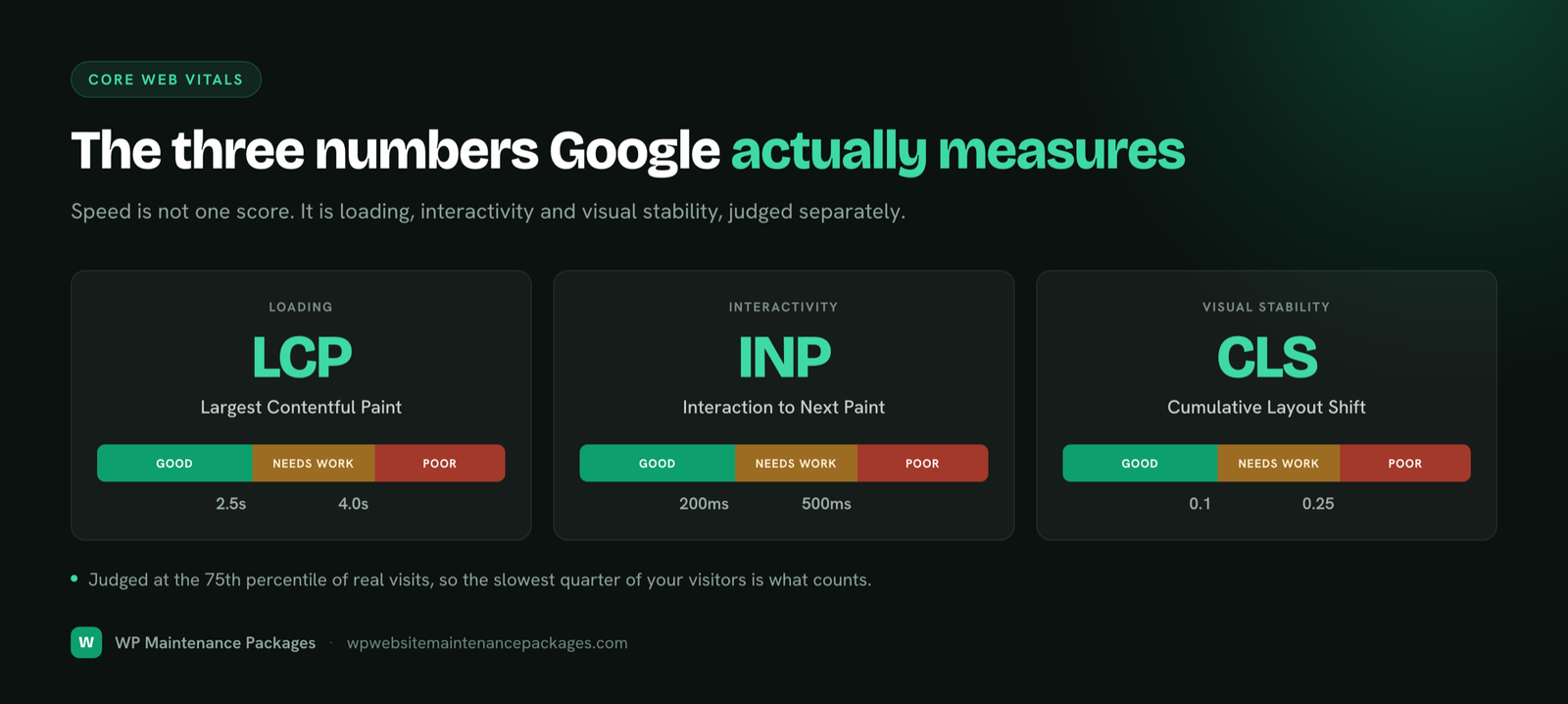
This is not only about visitor experience, though a faster site does convert more visitors. Speed is a ranking factor Google uses directly, measured through Core Web Vitals, the real-world metrics for how fast a page paints, how quickly it responds to interaction, and how much it shifts while loading. You can measure your own site any time with Google PageSpeed Insights. A well-maintained site holds those scores up as it grows; a neglected one drifts slower every quarter and quietly loses rankings without anyone noticing the cause.
5. Uptime monitoring
Monitoring means your site is checked continuously, from multiple locations, and a human is alerted the moment it stops responding. Without it, downtime is usually discovered by a customer rather than by you, sometimes hours or days after it began. With it, most outages are caught and resolved before they cost you anything. Good monitoring also watches the things that fail silently and take a site down without warning: an SSL certificate about to expire, a domain about to lapse, or a contact form that quietly stopped delivering email.
6. Support, edits and fixes
The part you actually feel day to day: a real person who can handle the content change, the new page section, the plugin behaving strangely, or the dreaded blank white screen. Good maintenance includes access to someone who can make these fixes quickly, ideally someone who already knows how your site is built rather than a ticket queue reading from a script. This is where a maintenance relationship either feels like a safety net or feels like shouting into a void, and it is worth weighing heavily when you choose one.
Beyond the six: the jobs good providers also cover
The six above are the core, but thorough maintenance reaches a little further. It includes keeping your full maintenance checklist of smaller tasks on schedule: broken link and 404 monitoring, reviewing Google Search Console for coverage and security issues, checking analytics for unexplained traffic drops, basic accessibility checks so the site works for everyone, database optimization, spam and comment moderation, and periodic content reviews so information stays accurate. None of these is dramatic on its own. Together, done consistently, they are the difference between a site that stays sharp and one that slowly frays at the edges.
Why website maintenance matters
The cost of maintenance is small and predictable. The cost of neglect is large and arrives at the worst possible moment. That asymmetry is the entire argument, and it is worth seeing what neglect actually looks like rather than treating it as an abstract risk.
A hacked site can be defaced, filled with spam links, or quietly turned into a tool to attack its own visitors. When Google detects this, it flags the site in search results or removes it entirely, and traffic collapses overnight. A professional malware cleanup from a specialist firm typically runs several hundred to over a thousand dollars, and that is on top of the damage already done: lost sales while the site served spam, and the slow climb back once Google has flagged the domain.
An unmonitored site can go down during your busiest hour, and you find out from an annoyed customer. Every hour offline is lost leads, lost sales and wasted ad spend. A slowly decaying site loses visitors and rankings gradually, which is the most expensive failure of all precisely because nobody notices it happening; you just watch traffic drift down over months with no obvious cause. And a site with no proper backup can lose months of work to a single failed update or server fault, with no way to recover it.
Expert tip: If your budget only stretches to one thing, make it reliable off-site backups. Almost any other disaster is survivable if you can restore a clean copy of the site quickly. It is the cheapest, highest-leverage protection you can have.
Put simply, maintenance is the cheapest insurance a business website buys, and unlike insurance, it also actively improves the thing it protects by keeping it fast, secure and healthy. The businesses that learn this the hard way, through one hack or one lost site, never run an unprotected website again. Maintenance is how you skip that lesson.
How often should a website be maintained?
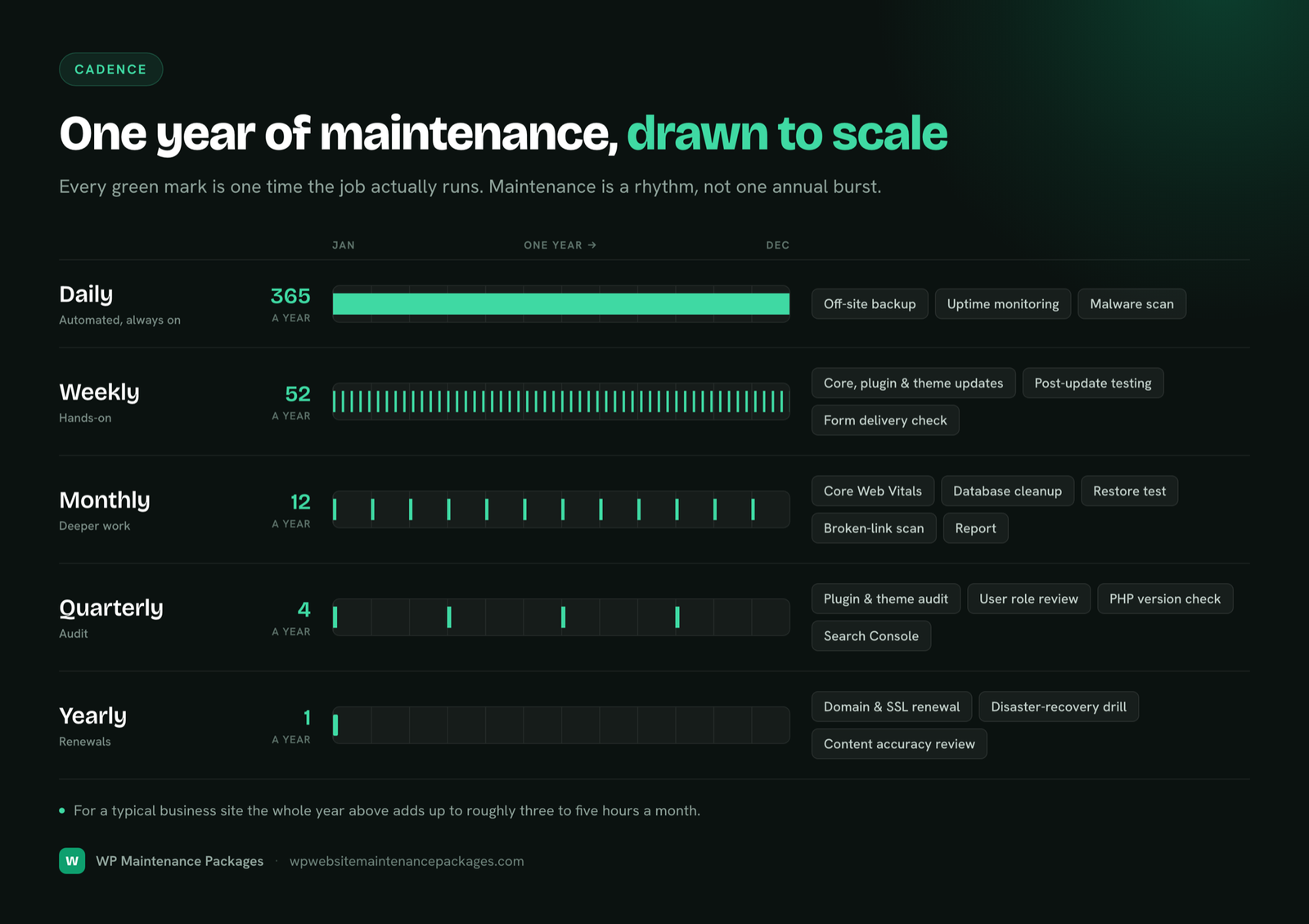
Maintenance runs on a schedule, not in one annual burst: backups and monitoring daily, updates and scans weekly, deeper cleanups monthly and quarterly, and major upgrades yearly. For a typical business site that comes to roughly three to five hours of focused work a month, and the consistency matters far more than the total hours. For the full breakdown of exactly what to update and how often, see our guide on how often to update a WordPress site, or use our website maintenance checklist to tick off every task yourself.
Website maintenance for WordPress specifically
WordPress powers a huge share of all websites, which makes it simultaneously the best-supported platform available and the most attacked. Its enormous ecosystem of themes and plugins is its greatest strength and its biggest maintenance challenge: tens of thousands of plugins of wildly varying quality, any of which can introduce a vulnerability or a conflict. The official WordPress hardening documentation is a good baseline, but keeping a real site secure and fast takes ongoing judgment, not a one-time setup.
Maintaining WordPress well means knowing which plugin combinations tend to conflict before they take a site down, testing major updates on a staging copy before applying them live, telling a genuine security threat apart from a false-positive scanner alert, and keeping a database lean after years of accumulated revisions and transients. It is a genuine specialty, which is why generalist “we maintain any website” providers tend to miss things a WordPress-focused team catches. If you run WordPress, our WordPress website maintenance services page breaks down exactly what that specialist care involves week to week.
Maintenance looks different for different websites
Maintenance is not one-size-fits-all. The right emphasis depends on what your website actually is, because each type fails differently and each failure costs differently.
Brochure and local business sites change rarely, which fools owners into thinking they need nothing. The opposite is true: because nobody logs in for months, a breach or a broken form goes unnoticed the longest. These sites need the invisible layer most, monitoring, updates and backups running whether anyone is watching or not. Lead-generation sites live or die by their forms, which are fragile: a plugin update changes an email setting and leads silently stop arriving while the thank-you page keeps smiling. Testing the conversion path after every change is essential.
Ecommerce and WooCommerce stores are the highest-stakes category, with payment gateways, checkout flows and inventory that all need testing after every update, plus a direct dollar cost per minute of downtime. This is specialist work, covered in depth on our ecommerce maintenance page. Membership and course sites combine store-level stakes with heavy database load and a delicate restore strategy, since restoring an old backup can wipe out recent signups. And blogs and content sites depend most on speed, broken-link hygiene and content freshness.
How much does website maintenance cost?
Across the US market, monthly website maintenance ranges from around $25 at the automated-only bottom to $600 and beyond at the enterprise end. The spread is wide because “maintenance” covers everything from a script that clicks the update button to a dedicated developer team on retainer. Most small businesses are well served in the $75 to $250 range for genuinely human-handled care. The one reliable trap is the cheapest tier: a $50 automated plan looks like a bargain until the first incident, when the emergency work is billed hourly on top and a single hack cleanup erases years of the “savings.”
The honest way to judge a price is to look at what happens when something goes wrong, not just the monthly number. For a full market breakdown by tier and provider type, see our website maintenance cost guide.
Should you do it yourself or hire help?
If you are technically capable, genuinely enjoy the upkeep, and can commit to the weekly discipline without fail, you can maintain a WordPress site yourself. The task list is knowable, the tools exist, and our checklist lays out every step. There is no shame in the DIY route for a site where the stakes are low and your time is cheap.
For most business owners, though, the honest answer is that their time is worth more than the cost of having it handled, and consistency is the thing they cannot guarantee. Studies of DIY maintenance tend to find the same pattern: people keep the routine going for about six weeks, then the weekly update starts slipping, and slipping is precisely the state attackers scan for. That is why managed maintenance exists, a team handles the six jobs on schedule so you never have to think about the calendar. If that sounds like the right trade, our website maintenance packages and WordPress care plans cover everything in this guide from a flat monthly fee, with no contracts.
How to choose a maintenance provider
Every provider’s marketing looks the same, so judge them on the things that actually matter when something breaks. Ask any provider you are considering these questions, and listen for confident, specific answers.
- Where are my backups stored, and how often do you test restoring them? Off-server storage plus periodic restore tests is the only acceptable answer.
- What exactly happens if my site is hacked on your watch? Listen for whether cleanup is included, how fast they respond, whether they close the vulnerability, and whether they handle Google blocklist removal.
- Do you test updates on staging before the live site? Staging-first is the professional answer for any site that earns money.
- Who does the work, a developer or a script? Both get sold as “maintenance.” They are very different products.
- What is your response time, and is it a commitment? Get the number in writing.
- Can I leave whenever I want? Month-to-month terms mean they keep you by being good, not by trapping you in a contract.
Common website maintenance mistakes
Nearly every website emergency traces back to a handful of avoidable mistakes. Auto-updating a live site with no backup is the most common and most damaging; it works fine ninety-nine times and takes the site down the hundredth. Trusting a backup nobody has ever restored is a close second. Treating a security plugin as a complete strategy, when its alerts go unread, is a third. Keeping abandoned plugins that the developer stopped updating leaves open holes. And the quiet killer: only reacting after something breaks, when routine prevention costs a fraction of an emergency fix. Avoid those five and you have sidestepped the large majority of website disasters.
Signs your website needs maintenance now
Not sure whether this applies to you? A few clear signals mean the answer is yes. You are nervous to click “update” because last time it broke something. You are not sure when the site was last backed up. It has felt slower lately, or your rankings have quietly slipped. You found out a form was broken from a lost lead rather than an alert. Nobody is currently responsible for the site’s upkeep since the person who built it moved on. Any one of these means the site has outgrown neglect; two or more, and it is overdue.
The bottom line
Website maintenance is not an optional extra or a nice-to-have. It is the ongoing care that keeps a business website secure, fast and online after launch: updates, security, backups, performance, monitoring and support, handled on a schedule rather than in a panic. Skip it and the site slowly becomes a liability, slower, more vulnerable, and one bad day away from an expensive emergency. Handle it, whether yourself or through a service, and the site stays the asset it was built to be. The only real decision is who does the work: you, following a disciplined checklist every single week, or a team you trust to do it for you.
Frequently asked questions
What is website maintenance in simple terms?
It is the ongoing work of keeping a website secure, updated, backed up and running properly after it launches. Because a website is live software connected to the internet, it needs regular care, the same way a car needs servicing, rather than being a one-time project you finish and forget.
What does website maintenance include?
Six core jobs: software updates (core, themes, plugins), security and malware protection, daily off-site backups, speed and performance optimization, 24/7 uptime monitoring, and support for edits and fixes. Thorough providers also handle SEO health checks, broken links, accessibility, database cleanup and content reviews.
How often should a website be maintained?
On a schedule, not all at once. Backups and monitoring run daily and continuously; updates, scans and form tests are weekly; performance and restore tests are monthly; security and plugin audits are quarterly; and domain renewal and disaster-recovery drills are annual. For most business sites this totals three to five hours of work a month.
How much does website maintenance cost?
Typically $25 to $600+ per month depending on how much human attention is involved. Most small businesses land between $75 and $250 for professional, human-handled care. The cheapest automated plans often cost the most in the long run, because emergencies get billed hourly on top.
Can I maintain my website myself?
Yes, if you have the time, the technical comfort, and the discipline to follow the routine every week without fail. The hard part is not any single task but doing them consistently. Many owners start strong and let it slip after a month or two, which is exactly when problems creep in.
What happens if I don’t maintain my website?
It gets slower, less secure and more likely to break over time. Outdated plugins are the most common way sites get hacked, a slow site loses visitors and rankings, and without backups a single bad update can wipe out the site with no way back. The damage stays invisible until it becomes an expensive emergency.
Is website maintenance different for WordPress?
Yes. WordPress’s huge plugin and theme ecosystem makes it powerful but also creates a three-way compatibility problem between core, themes and plugins, and makes it the most attacked platform. Maintaining it well means staging-tested updates, knowing which plugins conflict, and keeping the database lean, a genuine specialty that generalist providers often miss.
Do I still need maintenance if I have good hosting?
Yes. Hosting keeps a server running; maintenance keeps your website running. Your host will not update your plugins, test your forms, clean malware from WordPress files, optimize your database or fix a broken layout. Even managed WordPress hosts only cover part of the job. Hosting and maintenance are two different things.