Free site audit · No lock-in contracts · US-based WordPress team hello@thinkflow.agency Book a call
Founder-led · 8+ years in WordPress & SEO

WordPress Website Maintenance Packages That Pay for Themselves

Flat-rate monthly care that keeps your website updated, secure, backed up and fast, handled by real WordPress developers. One hack cleanup or one day of downtime costs more than a year of maintenance. We make sure you never pay for either.

Quick answer: A website maintenance package is a flat monthly service that keeps your WordPress site updated, secure, backed up, fast and monitored, handled by real developers from $59/mo with no contracts.
No contracts, cancel anytime Same-day emergency fixes From $59/mo flat
Same-day fix guarantee Replies under 4 hrs
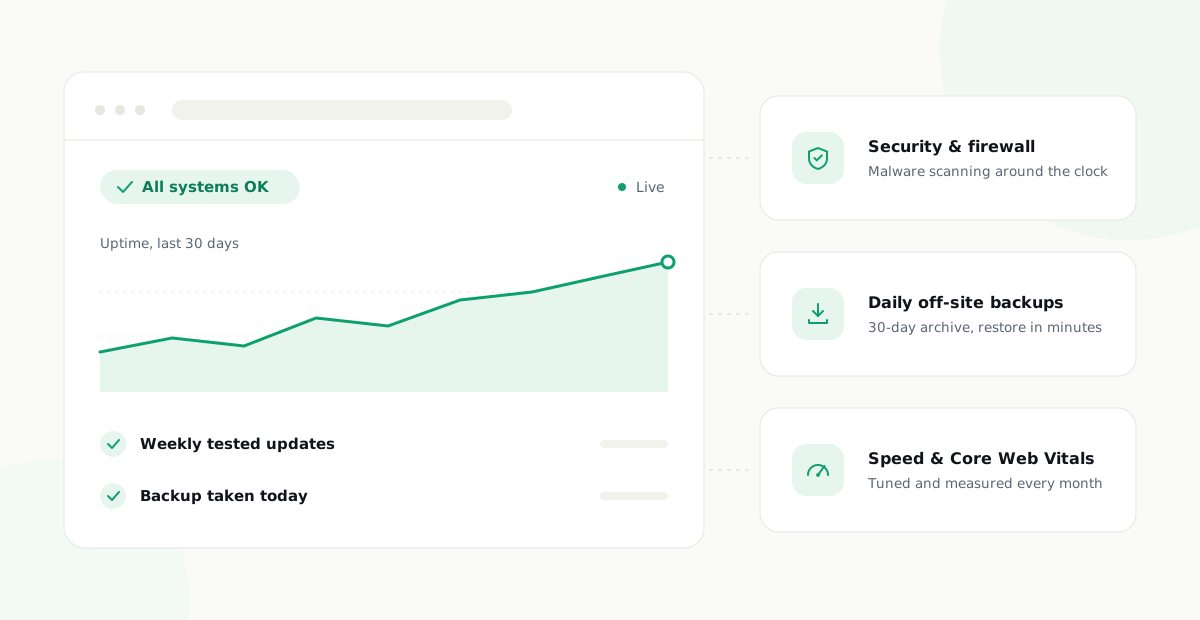
Every package includes Always on
Weekly tested updates Included
Security & malware protection Included
Daily off-site backups Included
Speed & Core Web Vitals Included
24/7 uptime monitoring Included
Real developer support Included
Everything WordPress needs to stay healthy, in one flat monthly fee.
8+
Years in WordPress & SEO
24/7
Uptime monitoring
<4 hr
Support response
Daily
Off-site backups

Works with your entire WordPress stack

Start here

What Is a Website Maintenance Package?

A website maintenance package is a fixed monthly service that keeps your website updated, secure, backed up and running properly, without you having to hire a developer every time something needs attention. Instead of reacting to problems after they happen and paying emergency hourly rates, a maintenance package handles the work proactively on a schedule: software updates every week, backups every day, security monitoring around the clock, and a real human to call when something breaks.

The names vary between providers. You will see the same service sold as website maintenance packages, WordPress care plans, support plans, or website management plans. The label matters less than what is inside: updates, security, backups, speed, monitoring and support are the six jobs any serious package must cover.

WordPress powers more than 40% of all websites, which makes it both the best-supported platform on the web and the most attacked. Plugins and themes release security patches constantly, and attackers actively scan for sites that have not applied them. That is the entire reason maintenance exists as a category: a WordPress site is not a finished product you launch and forget, it is software that needs ongoing care like anything else your business depends on.

Packages are almost always structured in tiers, and the tiers map to how much human attention your site gets. The entry tier automates the fundamentals: scheduled updates, daily backups, monitoring, baseline security. The middle tier adds the judgment layer, where a developer verifies updates, works on speed, and puts hands on the site every month. The top tier adds depth for complexity: staging environments, store support, dedicated hours, white-label reporting for agencies. Understanding that structure makes every provider on the market easier to evaluate, because beneath the branding, nearly all of them tier the same way. The question is never really which provider has the longest feature list; it is which tier of attention your website actually warrants, and whether the people behind the package are developers or a dashboard.

Simple flat pricing

Our Website Maintenance Packages & Pricing

Three packages, no hidden fees, no lock-in contracts. Every plan puts a real WordPress developer on your side for less than the cost of a single emergency call-out.

Essential Care

The safety net. For brochure sites and blogs that need to stay updated, backed up and online.

$59/mo
  • Weekly WordPress core, theme & plugin updates
  • Daily off-site backups (30-day archive)
  • 24/7 uptime monitoring with alerts
  • Security hardening & malware scanning
  • Monthly plain-English health report
  • Email support
  • 1 SEO blog post per month
Start Essential

Pro / Agency

For WooCommerce stores, high-traffic sites and agencies that need white-label care at scale.

$249/mo
  • Everything in Growth
  • Unlimited small content edits
  • WooCommerce & payment gateway support
  • Dedicated account manager
  • White-label monthly reports for your clients
  • Priority emergency support
  • 3 SEO blog posts per month
Talk to us

Not ready for a monthly package? We also do one-time WordPress fixes from $99, no plan required.

What’s included

Everything Your Website Needs, in One Package

No juggling separate plugins, hosts and freelancers. One team owns the entire maintenance job so nothing falls through the cracks.

Core, theme & plugin updates

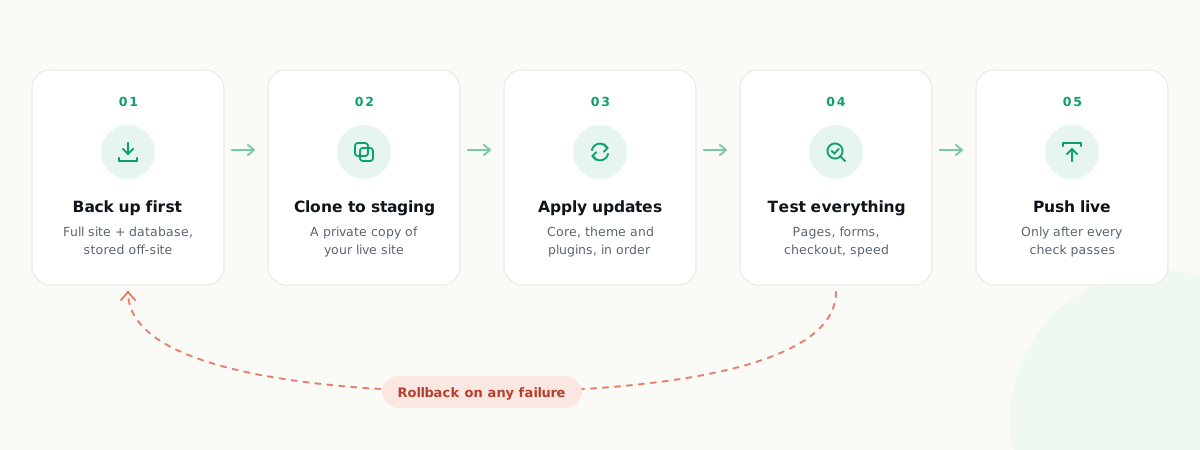
Tested weekly updates with a full backup taken first and instant rollback if anything misbehaves.

Security & malware protection

Firewall, login protection, file integrity checks, continuous scanning and same-day cleanup if you are ever hit.

Daily off-site backups

Automatic daily backups stored away from your host, restorable to any recent point in one click.

Speed & Core Web Vitals

Caching, image compression, database cleanup and front-end tuning that keep pages fast and Google happy.

24/7 uptime monitoring

Your site checked around the clock. We usually know it is down before you or your customers do.

Content edits & fixes

Text changes, new sections, broken layouts, white screens: send it over and a real developer handles it.

Monthly reports

What we updated, what we blocked, uptime, backups and speed scores in plain English. No jargon.

WooCommerce support

Checkout, payment gateways and product catalogs kept current, secure and fast during peak traffic.

The details

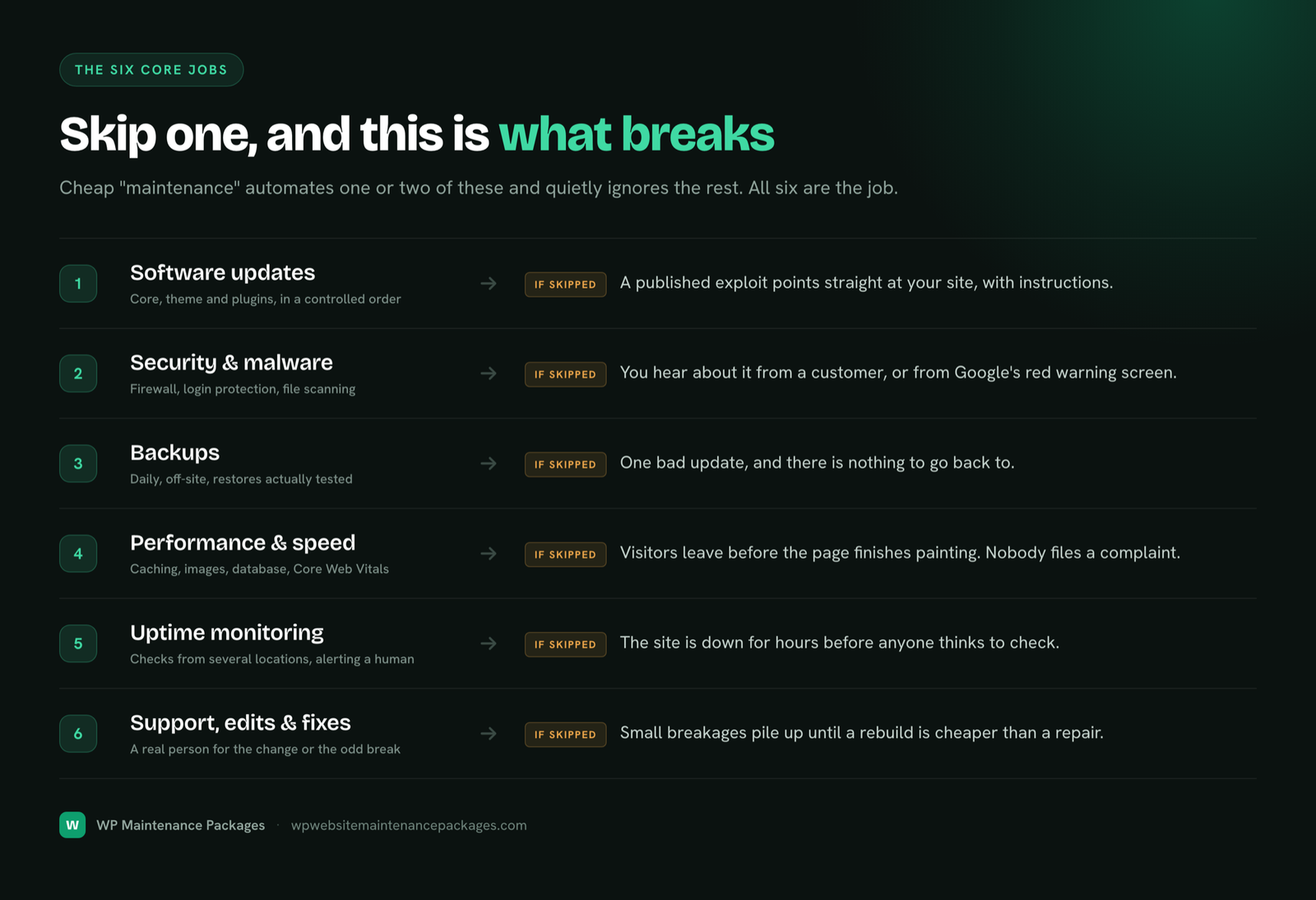
Inside a Professional Maintenance Package: The Six Jobs Explained

Most providers list the same bullet points. What separates a professional maintenance package from a cheap automated one is how each job is actually done. Here is what each area involves and what to look for.

1. WordPress core, theme and plugin updates

Updates are the single most important maintenance task, because outdated software is how the overwhelming majority of WordPress sites get hacked. But blindly auto-updating is how sites break. Professional maintenance means every update round starts with a fresh backup, updates are applied in a controlled order, the site is checked afterward, and anything that misbehaves is rolled back immediately. On our Growth and Pro packages, updates are tested on a staging copy of your site before they ever touch the live version. That is the difference between updates as a risk and updates as a routine.

2. Security, malware scanning and cleanup

Security in a real package is layered: a web application firewall filtering malicious traffic, login protection against brute-force attempts, file integrity monitoring that flags any core file that changes when it should not, and continuous malware scanning. Just as important is what happens when something gets through. A serious provider cleans the infection, restores from a clean backup if needed, closes the hole the attacker used, and handles Google blocklist removal so your traffic recovers. Ask any provider what their hack response actually includes; vague answers mean you will be paying extra when it happens.

3. Daily off-site backups

The word that matters is off-site. A backup stored on the same server as your website disappears with the server. Professional packages back up your files and database daily to independent storage, keep a rolling archive of at least 30 days, and can restore the whole site to any recent point in minutes. Backups are also what make safe updates possible: every change we make is reversible because a clean copy always exists from minutes before.

4. Speed and Core Web Vitals

WordPress sites slow down over time. Post revisions pile up in the database, images get uploaded at full camera resolution, plugins add scripts to every page, and caching gets misconfigured. Speed work inside a maintenance package means server-side caching, image compression and modern formats, database cleanup, and front-end tuning measured against Google’s Core Web Vitals, the metrics Google itself uses as a ranking signal. A fast site converts more visitors and ranks better. This is maintenance that directly earns money rather than just preventing loss.

5. Uptime monitoring, 24/7

Monitoring means your site is checked around the clock from multiple locations, and a human is alerted the moment it stops responding. Without it, downtime gets discovered by customers, sometimes hours or days later. With it, most incidents are resolved before anyone outside the team notices. Monitoring should also cover the things that fail silently: SSL certificates about to expire, domains about to lapse, forms that stopped delivering email.

6. Support, edits and fixes

The part you actually feel month to month: a real person who answers. Text changes, a new section on a page, a plugin behaving strangely, the dreaded white screen. In a good package these go to a developer who already knows your site, not a ticket queue offshore reading from a script. Our packages include set response times, and Growth and Pro plans include dedicated developer hours every month for improvements, not just repairs.

Why it matters

What Unmaintained Websites Actually Cost

Neglect is invisible until the invoice arrives. These are the four ways it shows up.

Hacked & blacklisted

The vast majority of WordPress hacks exploit outdated plugins. A breached site can land on Google blocklists, killing traffic and trust overnight.

Downtime you find out about last

Without monitoring, the first person to notice your site is down is usually a customer. Every hour offline is leads, sales and ad spend gone.

Slow decay, lower rankings

Bloat creeps in quietly: revisions, spam, oversized images, plugin conflicts. Speed drops, visitors bounce, rankings slide.

No backup when it matters

One failed update or server fault can erase months of work. A backup that lives on the same server that just crashed is not a backup.

Put numbers on it and the case makes itself. A professional malware cleanup from a specialist firm typically costs $300 to $1,000 or more, and that is after the damage: lost sales while the site served spam or redirects, and the slow climb back if Google flagged the domain. A day of downtime costs whatever a day of your leads or orders is worth. A site that drifts from fast to sluggish loses rankings gradually, which is the most expensive failure of all because nobody sees it happen. Against any one of those, a maintenance package at $59 to $249 a month is not an expense. It is the cheapest insurance your business buys, and unlike insurance, it also actively improves the asset it protects.

Buyer’s guide

How Much Do Website Maintenance Packages Cost?

Across the US market, monthly website maintenance packages range from around $25 at the bottom to $600 and beyond at the enterprise end. The spread is wide because the word “maintenance” covers everything from a script that auto-clicks the update button to a dedicated developer team on retainer. Here is how the market actually tiers, so you can see where any quote fits.

$25–$75Automated-only

Software runs updates and backups unattended. Nobody checks whether an update broke your site. Fine for hobby sites, risky for a business.

$75–$250Professional

Human-verified updates, layered security, real support and speed work. Where most small businesses should be. Our packages sit here.

$250–$600Premium / store

WooCommerce depth, staging workflows, dedicated developer hours, faster response commitments. For sites where an hour offline is real money.

$600+Enterprise

Retainer-level teams, custom infrastructure, SLAs. Overkill for most businesses; the right call for large or mission-critical platforms.

One warning from inside the industry: the cheapest tier is usually the most expensive. A $50 automated plan looks like a bargain until the first incident, at which point the emergency work is billed hourly on top, and a single hack cleanup or downtime crisis erases years of the “savings.” When you compare packages, compare what happens when something goes wrong, not just the monthly number. That is the scenario you are actually buying protection for.

Our own pricing is deliberately flat and public: $59, $129 or $249 per month depending on how much hands-on work your site needs, with emergency fixes included rather than billed as surprises.

Compare your options

Maintenance Package vs DIY vs Hourly Freelancer

What you getWP Maintenance PackagesDoing it yourselfHourly freelancer
24/7 uptime monitoringIncludedOnly when you lookRarely offered
Daily off-site backupsIncludedPlugin to configureExtra cost
Tested weekly updatesYes, backed up firstHours of your weekWhen available
Same-day hack cleanupIncluded (Growth+)Risky DIY$300–$1,000 per incident
Speed & Core Web VitalsEvery planSpecialist skillBilled hourly
Developer who knows your siteYesJust youStarts over each hire
Predictable monthly costFlat rateHidden time costVariable, spiky
Break/fix guaranteeSame day, no chargeNoneNone
Who it’s for

Built for Websites That Earn Their Keep

Small & local businesses

HVAC, legal, medical, trades, home improvement. Your site brings in leads, and it needs to be up, fast and trusted every single day.

WooCommerce stores

A broken checkout costs money by the minute. We keep the register open, gateways current and the store quick under load.

Agencies & freelancers

White-label maintenance for the sites you build. Your brand on the reports, our team doing the 2am firefighting.

Content & lead-gen sites

Blogs, media and affiliate sites where uptime and speed are the business model. We keep performance tight as traffic scales.

WordPress specialists

Why WordPress Maintenance Is Its Own Discipline

Generic “we maintain any website” providers treat WordPress as one platform among many. That is exactly backwards. WordPress’s scale, powering over 40% of the web, means it has its own threat landscape, its own update rhythm, its own performance quirks and its own ecosystem of tens of thousands of plugins with wildly different quality. Maintaining it well is a specialty.

Practically, that means knowing which plugin combinations conflict before they take a site down. Knowing that a major WooCommerce release needs staging first, always. Knowing the difference between a false-positive scanner alert and the file change pattern of a real injection. Knowing how to tune a database that has accumulated five years of revisions and transients. Our team works on WordPress and WooCommerce exclusively, which is why our packages catch problems that generalists miss.

If you want the full breakdown of the WordPress-specific service, our WordPress website maintenance services page covers exactly what our developers do week to week, and how our care approach handles stores, membership sites and high-traffic builds.

Choosing well

How to Choose the Right Maintenance Package

Match the package to what your website does for your business, not to the length of the feature list. Three questions get you there.

What does an hour of downtime cost you?

If the honest answer is “not much,” a basic package with solid updates, backups and monitoring is enough. If your site books appointments, captures leads or takes orders, downtime has a real hourly price, and you want the tier with priority response and same-day emergency work. Store owners should count abandoned checkouts, not just visits.

How often does your site change?

A brochure site that changes quarterly needs protection more than production. A site with weekly content updates, landing pages and campaigns needs a package with monthly developer hours built in, otherwise every small edit becomes a separate invoice and a separate wait.

Do you sell anything through the site?

Ecommerce changes the stakes and the work. Payment gateways, checkout flows and inventory systems need their own testing after every update round. If you run WooCommerce, choose a package that names it explicitly, ours is the Pro tier, because generic maintenance quietly skips the store-specific checks that matter most.

Still unsure? Send us the site. The free audit tells you which tier actually fits, and we will say so honestly, including when the cheaper plan is the right answer.

Do it yourself?

The Website Maintenance Checklist (If You Want to Handle It Yourself)

Fair is fair: not every site needs a paid package, and you deserve to know exactly what the job involves before deciding. This is the actual working checklist, the same cadence our team runs for clients. If you can commit to all of it, every week, without fail, you genuinely do not need us.

Daily

  • Verify last night’s backup completed and is stored off-server
  • Check uptime alerts and investigate anything that flagged overnight
  • Scan the security log for repeated failed logins or unfamiliar admin activity

Weekly

  • Take a fresh full backup, then review and apply core, theme and plugin updates
  • Click through the site afterward: forms, checkout, menus, key pages
  • Run a malware scan and check Google Search Console for security warnings
  • Clear caches after updates and confirm pages render correctly

Monthly

  • Test page speed and Core Web Vitals; compress any oversized new images
  • Clean the database: post revisions, expired transients, spam comments
  • Test a backup restore on a staging copy, because an untested backup is a hope, not a plan
  • Review user accounts and remove anyone who no longer needs access
  • Check for abandoned plugins that have not been updated by their developers in 6+ months

Quarterly

  • Audit every installed plugin: remove what you no longer use, replace what is abandoned
  • Check SSL certificate and domain expiry dates
  • Review site search queries and 404 logs for broken content
  • Update passwords and confirm two-factor authentication is on for every admin

Total that up honestly and it comes to three to five hours a month of disciplined, slightly tedious technical work, more in weeks when an update misbehaves. That is the real trade. Most business owners who start this checklist keep it up for about six weeks, then updates start slipping, and slipping is precisely the state attackers scan for. If your time is worth more than the price of a package, the math answers itself. If not, this checklist is yours, no hard feelings.

By website type

What Maintenance Looks Like for Different Kinds of Websites

Maintenance is not one-size-fits-all. The right package depends on what your website actually is, because each type fails differently and each failure costs differently.

Brochure and local business sites

The classic five-to-fifteen page business site: services, about, contact. These change rarely, which makes owners assume they need nothing. The opposite is true: because nobody logs in for months, breaches and breakage go unnoticed the longest. A brochure site hacked in January is often still serving spam links in June. What these sites need most is the invisible layer: monitoring, updates and backups running whether anyone is watching or not. Essential Care exists for exactly this.

Lead generation sites

If your site exists to fill a pipeline, its forms are the whole business. And forms are fragile: a plugin update changes an email routing setting, and leads silently stop arriving while the thank-you page keeps smiling at visitors. Nothing looks broken. Lead-gen maintenance means testing the conversion path itself after every change, form submission through to email delivery, plus keeping pages fast, because every second of load time measurably cuts conversion. This is Growth-tier work.

WooCommerce and ecommerce stores

Stores are the highest-stakes category. More moving parts (payment gateways, shipping calculators, inventory, tax rules), more sensitive data, and a direct dollar cost per minute of downtime. WooCommerce also updates aggressively, and its extensions must stay compatible with each other, with WooCommerce itself, and with WordPress core, a three-way compatibility problem that generic maintenance ignores. Store maintenance means staging-tested updates, checkout testing after every round, PCI-conscious security and performance work that holds up under sale-day traffic. This is why our Pro tier names WooCommerce explicitly.

Membership, LMS and community sites

Sites where users log in, learn or pay recurring fees combine store-level stakes with heavy database load. User records, course progress and payment subscriptions make backups both more critical and more delicate: restoring yesterday’s backup can mean losing today’s signups, so restore strategy has to be thought through before an incident, not during one. These sites need the same tier of care as a store, with particular attention to database health and update testing.

Hold every provider to this

Seven Questions to Ask Before Buying Any Maintenance Package

Including ours. Feature lists all look the same; the answers to these do not. Any provider worth paying will answer all seven without flinching.

1. Where exactly are my backups stored, and how often do you test restoring them? The only acceptable answer is off-server storage plus periodic restore tests. A backup nobody has ever restored is a guess.

2. What happens, specifically, if my site is hacked while on your plan? Listen for: cleanup included or billed, response time, whether they close the vulnerability, and whether they handle Google blocklist removal. Vague answers here become invoices later.

3. Do you test updates before or after they hit my live site? Staging-first is the professional answer for anything that earns money. “We auto-update and monitor” means your live site is the test environment.

4. Who actually does the work? A developer who knows WordPress, or software with a support inbox in front of it? Both are sold as “maintenance.” They are not the same product.

5. What is your response time, and is it a commitment or an aspiration? Get the number in writing and ask what happens when it is missed.

6. What is not included? The honest providers tell you plainly. The others let you discover the boundaries through surprise invoices.

7. Can I leave whenever I want? Month-to-month terms mean the provider retains you by being good. Twelve-month contracts mean they retain you with paperwork. Draw your own conclusion about which provider expects to keep you happy.

Our answers, for the record: off-site daily with monthly restore tests; same-day cleanup included on Growth and Pro with blocklist removal handled; staging-first on Growth and Pro; real WordPress developers; under four hours committed; one-time projects and full redesigns are the main exclusions; and yes, month to month, leave whenever.

How it works

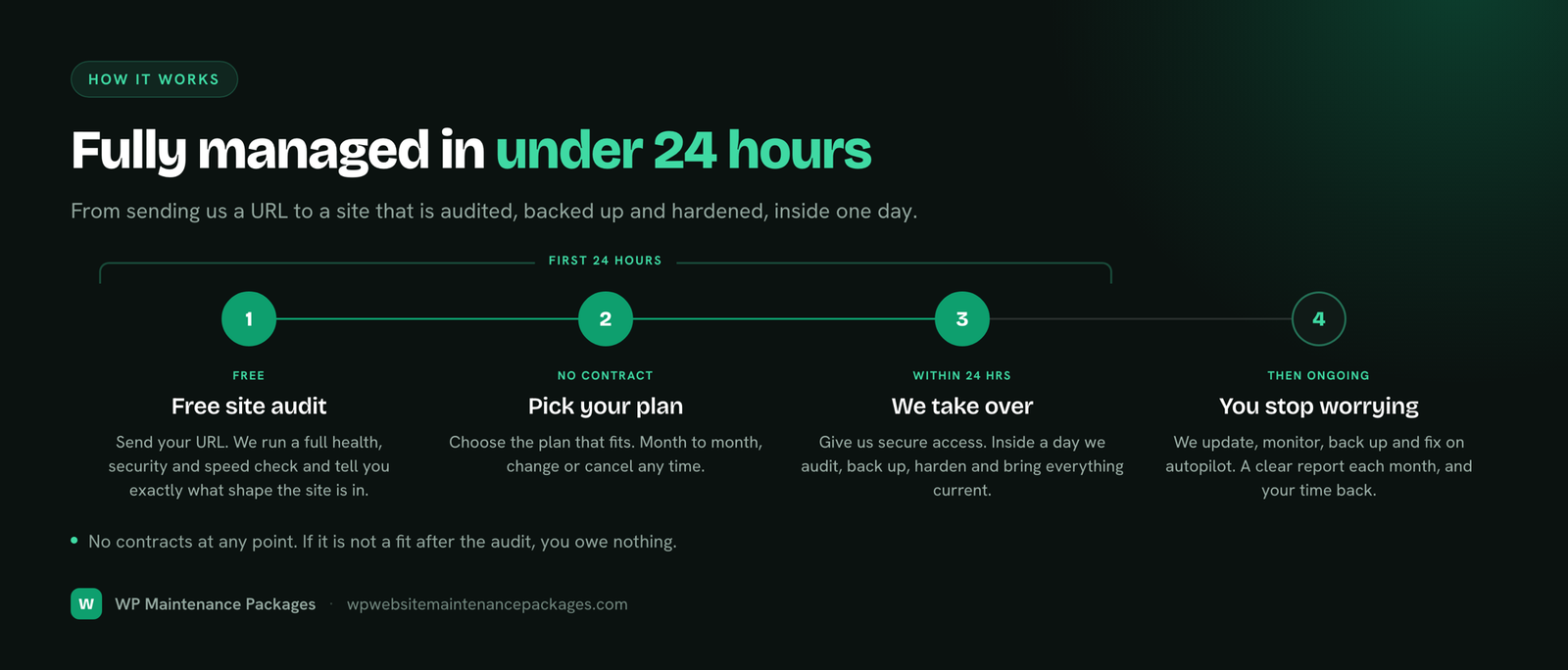
Fully Managed Within 24 Hours

Free site audit

Send your URL. We run a full health, security and speed check and tell you honestly what shape the site is in. No charge, no strings.

Pick your package

Choose the maintenance package that fits your site and budget. Month to month. Upgrade, downgrade or cancel any time.

We take over

Grant us secure access and within 24 hours everything is backed up, hardened, updated and monitored.

You stop thinking about it

Updates, security, backups and fixes run on autopilot. You get one clear report a month and your evenings back.

The compounding effect

How Website Maintenance Affects Your Google Rankings

Maintenance is usually sold as damage prevention. That undersells it. Several of the things a good package does are direct or near-direct Google ranking inputs, which means well-maintained sites do not just avoid losses, they quietly compound gains.

Speed is a ranking signal, officially. Google’s Core Web Vitals, how fast your page paints, how quickly it responds to taps, how much it shifts while loading, feed into rankings and are measured from real visitor data. Maintenance that keeps images compressed, caching tuned and the database lean holds those scores up as the site grows. Sites without it drift slower every quarter and never notice the ranking cost, because it arrives gradually.

Downtime and crawl errors erode trust. If Google’s crawler repeatedly hits an unreachable site, crawl frequency drops and rankings follow. Uptime monitoring keeps outages short enough that crawlers rarely see them.

A hack can erase years of SEO in a week. When Google detects malware or spam injection, it flags the site in search results or removes pages entirely. Traffic falls off a cliff, and recovery after cleanup can take weeks of reduced trust. The businesses that experience this once never run an unprotected site again. Maintenance means you skip the lesson.

Broken pages leak authority. Redesigns, deleted pages and expired plugins leave behind 404s and broken internal links that waste the link equity your content earned. Routine maintenance catches and redirects them, keeping the authority you built flowing to pages that can use it.

None of this replaces an SEO strategy. But every dollar spent on SEO is partially wasted on a slow, unstable or compromised site. Maintenance is the foundation that makes the rest of your marketing spend actually count.

Switching is easy

Already Have a Provider? Switching Takes One Day

Moving between maintenance providers is far simpler than owners expect, and you do not need to involve your current provider at all. The whole process needs three things from you: WordPress admin access, hosting access, and fifteen minutes to fill in our onboarding form. From there we take a full independent backup, document how the site is configured, harden security with our own stack, and take over the update and monitoring schedule. Your site stays live throughout; visitors never see a thing. If you are locked into a contract elsewhere, we will honestly tell you whether it is worth buying out early or riding out the term with us shadowing, we have seen both make sense.

When You Genuinely Do Not Need a Maintenance Package

Selling everyone is how providers lose trust, so here is the honest boundary. You probably do not need a paid package if your website is a hobby or personal project with nothing at stake when it breaks; if you are technically capable, actually enjoy the upkeep, and demonstrably keep the checklist above running month after month; or if your site lives on a closed platform like Squarespace or Wix, where the platform itself handles the software layer. And if your site is on managed WordPress hosting with a very simple build, a cheaper package covers the gap between what the host does and what the site needs, you do not need our top tier and we will say so in the audit.

Everyone else, meaning any WordPress site that generates leads, sales or reputation, needs the six jobs handled by someone. The only real question is whether that someone is you, a freelancer on call, or a team with a system. You now know exactly what the job involves; choose with clear eyes.

Why trust us

Founder-led WordPress care, done properly

A specialist team, not a dashboard and not a generalist agency. Here is what that means for your site.

WordPress specialists only. We work on WordPress and WooCommerce exclusively, so we catch the plugin conflicts and update risks that generalists miss.

8+ yearsin WordPress & SEO

Real developers, real accountability. A human who knows your site handles every fix, backed by our guarantee: if we break it, we fix it the same day, free.

Same-dayfix guarantee

No lock-in, ever. Every plan is month to month. We keep your business by being good at the job, not by trapping you in a contract.

Month to monthcancel anytime
Our promise

If We Break It, We Fix It. Same Day. No Charge.

Every update is backed up first and verified after. If anything ever goes wrong on our watch, we roll it back and make it right at no cost. That is the deal on every package, every time.

Get Protected
FAQ

Website Maintenance Packages: Every Question Answered

What is a website maintenance package?

A website maintenance package is a fixed monthly service that keeps your website updated, secure, backed up, fast and working. Instead of paying a developer by the hour every time something needs attention, one flat fee covers software updates, security monitoring, daily backups, uptime monitoring, performance work and support, handled proactively on a schedule.

What is included in a website maintenance package?

A complete package covers six jobs: weekly WordPress core, theme and plugin updates; security hardening with malware scanning and removal; daily off-site backups; 24/7 uptime monitoring; speed and Core Web Vitals optimization; and support for content edits and fixes. Higher tiers add dedicated developer hours, staging-tested updates, WooCommerce support and white-label reporting.

How much do website maintenance packages cost?

Across the US market, website maintenance packages range from roughly $25 per month for automated-only plans to $600 or more for enterprise care. Most small businesses land between $75 and $250 per month for professional, human-handled maintenance. Our packages run $59 to $249 per month, flat rate, with no contracts and no surprise hourly bills.

Are website maintenance packages worth it?

If your website generates leads or sales, yes. Compare the monthly fee against the cost of one incident: a hack cleanup typically runs $300 to $1,000+, a day of downtime costs whatever a day of your leads or orders is worth, and a slow site quietly bleeds rankings all year. Maintenance is cheaper than any single one of those going wrong once.

What is the difference between a maintenance package and a care plan?

Nothing meaningful. "Website maintenance package," "care plan," "support plan" and "website management plan" are different names for the same category of service: recurring monthly care for your website. Some providers use "care plan" for WordPress-specific service, but the deliverables (updates, security, backups, support) are the same.

Do I need website maintenance if I have good hosting?

Yes. Hosting keeps a server running; maintenance keeps your website running. Your host will not update your plugins, test your forms, clean malware out of WordPress files, optimize your database or fix a layout that broke after an update. Even managed WordPress hosts only cover a slice of it. Hosting and maintenance are two different jobs.

How often should a WordPress website be maintained?

Software updates should be reviewed at least weekly, since plugin vulnerabilities are patched constantly and attackers exploit them within days. Backups should run daily. Uptime monitoring should be continuous. Performance and database work is typically monthly. That cadence is exactly what a maintenance package automates so you never have to think about the schedule.

Will updates break my website?

Sometimes updates conflict, and that is precisely why professional maintenance exists. We take a complete backup before every update round, test changes on staging for higher plans, and roll back instantly if anything misbehaves. If we ever break something, we fix it the same day at no cost.

Do you only maintain WordPress websites?

WordPress and WooCommerce are our specialty, and it is where our packages deliver the most value. WordPress powers over 40% of the web, which also makes it the most attacked platform, so focused expertise matters more than a generalist who maintains everything shallowly.

Can I cancel my maintenance plan anytime?

Yes. Every package is month to month with no lock-in contract. Upgrade, downgrade or cancel whenever you want. We keep clients by being useful, not by trapping them in agreements.

What happens if my website gets hacked while on a plan?

We clean it, same day, at no extra cost on Growth and Pro plans. That includes removing the malware, restoring from a clean backup if needed, closing the vulnerability that let the attacker in, and requesting blocklist removal from Google if the site was flagged.

Do you offer white-label maintenance for agencies?

Yes. Our Pro / Agency package includes white-label monthly reports with your branding, so you can sell maintenance to your clients under your own name while our team does the work. Volume pricing is available for agencies managing five or more sites.

How long does website maintenance take each month?

Done properly, expect three to five hours a month for a typical business site: weekly update rounds with backups and post-update checks, daily backup verification, monthly database and performance work, and quarterly audits. Ecommerce sites take more because every update round needs checkout and payment testing. That time commitment, applied consistently and without skipped weeks, is exactly what a maintenance package replaces, which is why the professional tier of the market prices where it does.

Can I do website maintenance myself?

Technically yes, and our maintenance checklist above shows the full task list if you want to. The honest catch is consistency: the checklist only protects you if it runs every single week, and most owners keep it up for about six weeks before updates start slipping. Outdated plugins are precisely what attackers scan for. If you are disciplined and your time is cheap, DIY works. If your site earns money and your time is worth more than a package costs, the decision makes itself.

How do I get started?

Request the free site audit. We check your site's health, security and speed, send you an honest report, and recommend the right package. If you would rather just get going, pick a plan and we take over within 24 hours.

Do you work with my hosting provider?

Yes, we work with every major host: Kinsta, WP Engine, SiteGround, Cloudways, Bluehost, GoDaddy and the rest. If your hosting is what is actually holding your site back, we will tell you straight and can migrate you somewhere better as part of onboarding.
Go deeper

Explore Our Maintenance Services

Get started

Get Your Free Website Audit

Send us your URL. We reply under 4 hrs with an honest health, security and speed report, and the package that actually fits, even if that is the cheapest one.

Site Audit Request
Packages Book a call