Free site audit · No lock-in contracts · US-based WordPress team hello@thinkflow.agency Book a call
Plans, pricing & what's included

Website Maintenance Plans That Keep Your Site Safe

Flat monthly plans that keep your website updated, secure, fast and online, handled by real WordPress developers so you never have to think about the technical side. Compare exactly what each plan includes, see what a month actually looks like, and pick the one that fits your site. No contracts, cancel anytime.

By Bhupesh Rathore, ThinkFlow Media Updated August 2026 Plans from $59/mo

The short version

A website maintenance plan is a fixed monthly service that keeps your site updated, secure, backed up, fast and working, so you never have to think about the technical side of running it. Ours run from $59/mo for small sites to $249/mo for stores and agencies, all with no contracts. This page walks through what a plan should include, what each of our plans covers, how to choose, and what it all really costs. If you want general market pricing across every provider, start with our website maintenance cost guide, and WordPress owners can compare WordPress care plans.

Start here

What is a website maintenance plan?

A website maintenance plan is an ongoing, done-for-you service that keeps your website healthy after it goes live. Rather than treating your site as a finished product the day it launches, a plan treats it for what it actually is: software connected to the internet that needs regular care to stay secure, fast and functional. For a fixed monthly fee, a team handles the recurring technical work on a schedule, and steps in when something breaks.

The work falls into six areas that every serious plan should cover: keeping the software updated, defending the site against attacks, backing everything up daily, keeping pages fast, watching for downtime around the clock, and fixing problems when they appear. Cheaper offers that only automate one or two of these, usually just updates, are marketed as maintenance but leave you exposed on everything else. The label matters far less than what is actually inside.

People search for this service under several names. You will see it sold as website maintenance plans, website maintenance packages, WordPress care plans, support plans, or website management plans. Underneath the branding, they are the same thing: a monthly arrangement that trades a predictable fee for the assurance that the boring, critical work gets done every week whether or not you are watching. That predictability is the whole point. A plan turns an unpredictable stream of emergencies and hourly bills into one line item you can budget for.

The alternative to a plan is not "no maintenance." It is reactive maintenance: doing nothing until something breaks, then paying emergency rates to fix it. That model feels cheaper right up until the day it is dramatically more expensive, which is exactly why maintenance exists as a category.

Why it matters

Why you need a website maintenance plan

The honest way to judge a plan is against the cost of not having one. That cost is easy to underestimate because neglect stays invisible right up until it lands, and when it lands, it is expensive. The numbers from 2025 and 2026 make the case better than any sales pitch.

11,000+WordPress vulnerabilities logged in 2025
90%+of them in plugins, not core
~5 hrsmedian time to first exploit after disclosure
~$14.5kaverage all-in cost of a hack

WordPress powers well over 40% of the web, which makes it the single most attractive target for attackers, not because it is uniquely insecure, but because attacking it at scale is economical. Build one scanner, run it against the internet, and almost every site it finds is WordPress. The reassuring part is that WordPress core is very well maintained; only a handful of core vulnerabilities appeared in all of 2025. The risk lives almost entirely in plugins and themes, where security researchers logged more than eleven thousand vulnerabilities in a single year, over ninety percent of the total.

The speed is what makes maintenance non-negotiable. Once a vulnerability is publicly disclosed, the median time to the first exploit attempt is roughly five hours. By the time you read about a new flaw, automated bots are already scanning for it, and around half of all web traffic now comes from bots. A meaningful share of these vulnerabilities require no login at all to exploit. This is why "I'll update when I get around to it" is a genuine gamble: the window between a patch being announced and your site being probed is measured in hours, not weeks.

When a site does get compromised, the bill is rarely just cleanup. Studies of hacked WordPress sites put the average all-in cost, malware removal, emergency developer time, downtime, lost revenue and the months of SEO work to recover from a Google security flag, at around fourteen thousand dollars. The average hacked site is offline for a day or two during cleanup, and Google's "this site may be hacked" warning can linger in search results for weeks afterward. Recovering a site that has been neglected for six months typically runs several thousand dollars; one left more than a year often needs dozens of professional hours to bring back safely. Notably, the majority of hacked sites in 2025 had at least one plugin running an outdated version, the exact thing a maintenance plan prevents.

Security is only half the story. Speed decays too. Databases fill with clutter, images get uploaded oversized, and plugins pile scripts onto every page, so a site that launched fast slowly slows down. Only about a third of mobile WordPress sites currently pass Google's Core Web Vitals, and since Google uses page speed as a ranking factor, a neglected slow site quietly loses rankings and conversions while you focus on running the business. A plan keeps both the security and the speed handled, which is why maintenance is best understood as insurance that also improves the thing it protects.

The simplest way to think about it

A plan from $59/mo costs a fraction of a single hack cleanup, a day of downtime, or the lost revenue from a slow site. You are not really buying software. You are buying the assurance that the expensive day never comes.

The six core jobs

What's included in a website maintenance plan

Whatever tier you choose, a genuine plan covers six jobs. Here is what each actually involves, so you know what you are paying for and what to demand from any provider.
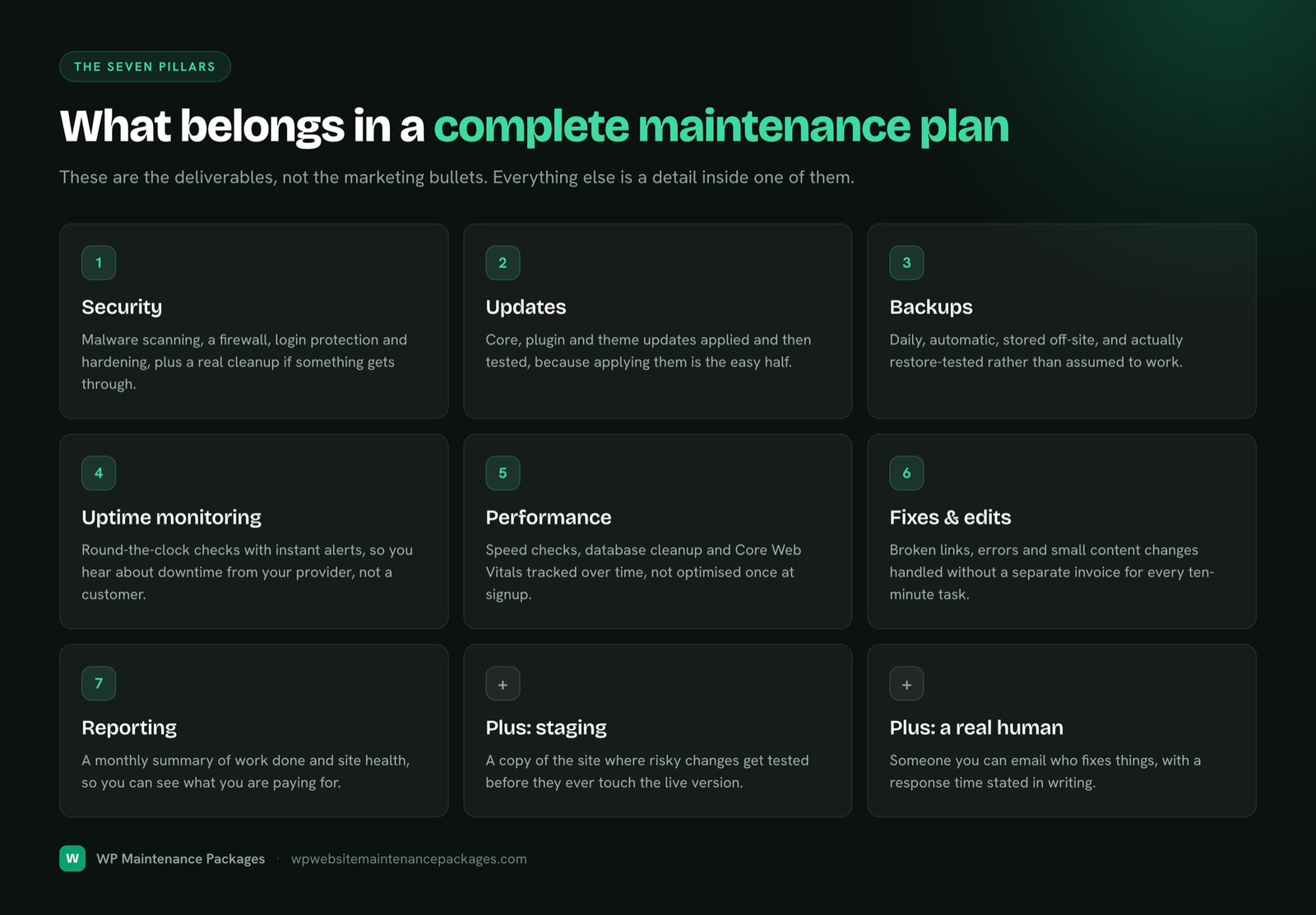
Software updates

WordPress core, themes and plugins update constantly, often to patch security holes attackers already know about. A plan applies those updates on a schedule, backing up first and testing after, and on higher tiers staging major updates before they touch your live site, so an update never quietly breaks something.

Security

Active defence, not just hope: a firewall filtering malicious traffic, protection against automated login attacks, file-change monitoring, and regular malware scans. It also means a plan for when something gets through, cleaning the infection, restoring clean files, and closing the hole that let it in.

Daily backups

Automatic daily backups stored off-site, away from your host, because a backup on the same server disappears if that server fails. Backups are also what make everything else safe: every update and change is reversible because a clean copy always exists from moments before.

Speed & Core Web Vitals

Caching, image optimization, database cleanup and front-end tuning to keep pages fast and Core Web Vitals healthy. This is not just about experience: speed is a Google ranking factor, so a well-maintained fast site quietly earns better rankings than a neglected one.

Uptime monitoring

Continuous checks that alert the team the moment your site goes down, usually before a single customer notices. Without monitoring, downtime often gets discovered by an angry visitor long after it started; with it, most outages are caught and resolved before they cost you anything.

Fixes & support

The part you feel day to day: a real developer to handle the content change, the new section, the plugin acting up, or the dreaded blank white screen, ideally someone who already knows how your site is built, not a ticket bot.

Two extras separate a good plan from a great one. A monthly report in plain English proves the work is actually happening, what was updated, what was blocked, uptime and speed scores, and backup status. And developer time included in the plan means small edits and fixes do not turn into separate invoices. Our WordPress website maintenance services page goes deeper on how each job is performed.

Choose your plan

Compare our website maintenance plans

Three plans, no hidden fees, no lock-in. Every plan puts a real WordPress developer on your side for less than the cost of a single emergency call-out.

Essential Care

The safety net for small sites that need to stay updated, secure and online.

$59/mo
  • Weekly core, theme & plugin updates
  • Daily off-site backups
  • 24/7 uptime monitoring
  • Security hardening & malware scans
  • Monthly health report
  • 1 SEO blog post per month
Start Essential
Most popular

Growth

Full maintenance plus speed work and real developer time every month.

$129/mo
  • Everything in Essential
  • Speed & Core Web Vitals tuning
  • Advanced firewall + same-day malware cleanup
  • Priority support (under 4-hr response)
  • 2 hours of edits / dev work monthly
  • Staging-tested updates + 2 blog posts
Start Growth

Pro / Agency

Hands-on care for stores, high-traffic sites and agencies at scale.

$249/mo
  • Everything in Growth
  • Unlimited small content edits
  • WooCommerce & payment gateway support
  • Dedicated account manager
  • White-label monthly reports
  • Priority emergency support + 3 blog posts
Talk to us
Side by side

Plan feature matrix

The exact differences between the plans, so you can see what you get at each tier without reading the fine print.

FeatureEssential
$59
Growth
$129
Pro
$249
Weekly updates (core, theme, plugins)
Daily off-site backups
24/7 uptime monitoring
Security hardening & malware scans
Monthly performance report
Speed & Core Web Vitals tuning
Same-day malware cleanup
Priority support (under 4 hrs)
Staging-tested updates
Developer / edit time2 hrs/moUnlimited small
WooCommerce / store support
Dedicated account manager
White-label reports (agencies)
SEO blog posts / month123
ContractNoneNoneNone
In plain English

Which plan does what

Essential Care ($59/mo) — the safety net

Essential is built for sites that need to stay protected and online without a lot of ongoing changes: brochure sites, small local business sites, and simple blogs. It covers the four things that prevent disasters, weekly tested updates, daily off-site backups, 24/7 monitoring and baseline security, plus a monthly report so you can see it is working. What it does not include is hands-on developer time or speed optimization; it is protection, not a retainer for regular edits. For a low-maintenance site that mainly needs to not get hacked and not go down, it is often all you need.

Growth ($129/mo) — the most popular

Growth is the tier most business sites land on, because it adds the judgment layer on top of the fundamentals. You get everything in Essential plus active speed and Core Web Vitals work, advanced security with same-day malware cleanup, priority support with an under-four-hour response, staging-tested updates, and two hours of developer or edit time every month. That developer time is the difference maker: small content changes, a new page section or a quick fix get handled inside your plan instead of becoming separate invoices. If your site drives leads or sales, this is usually the right balance of protection, performance and hands-on help.

Pro / Agency ($249/mo) — for complexity and scale

Pro is for sites where the stakes and the moving parts are higher: WooCommerce stores, high-traffic content sites, and agencies maintaining many client sites. On top of everything in Growth, it adds full store support (keeping checkout, payment gateways and extensions current), unlimited small content edits, a dedicated account manager, priority emergency support, and white-label monthly reports so agencies can deliver maintenance under their own brand. When downtime means direct lost sales, or when you are responsible for other people's sites, the faster response and deeper coverage pay for themselves quickly.

A worked example

What a website maintenance plan looks like in a month

Plans can feel abstract until you see the month-to-month reality, so here is exactly what a small business on our Growth plan gets in a typical month. This is the "website maintenance plan example" people look for before buying, the actual work behind the fee.

Growth plan — a typical month

Small business WordPress site, ~15 plugins, contact forms, moderate traffic
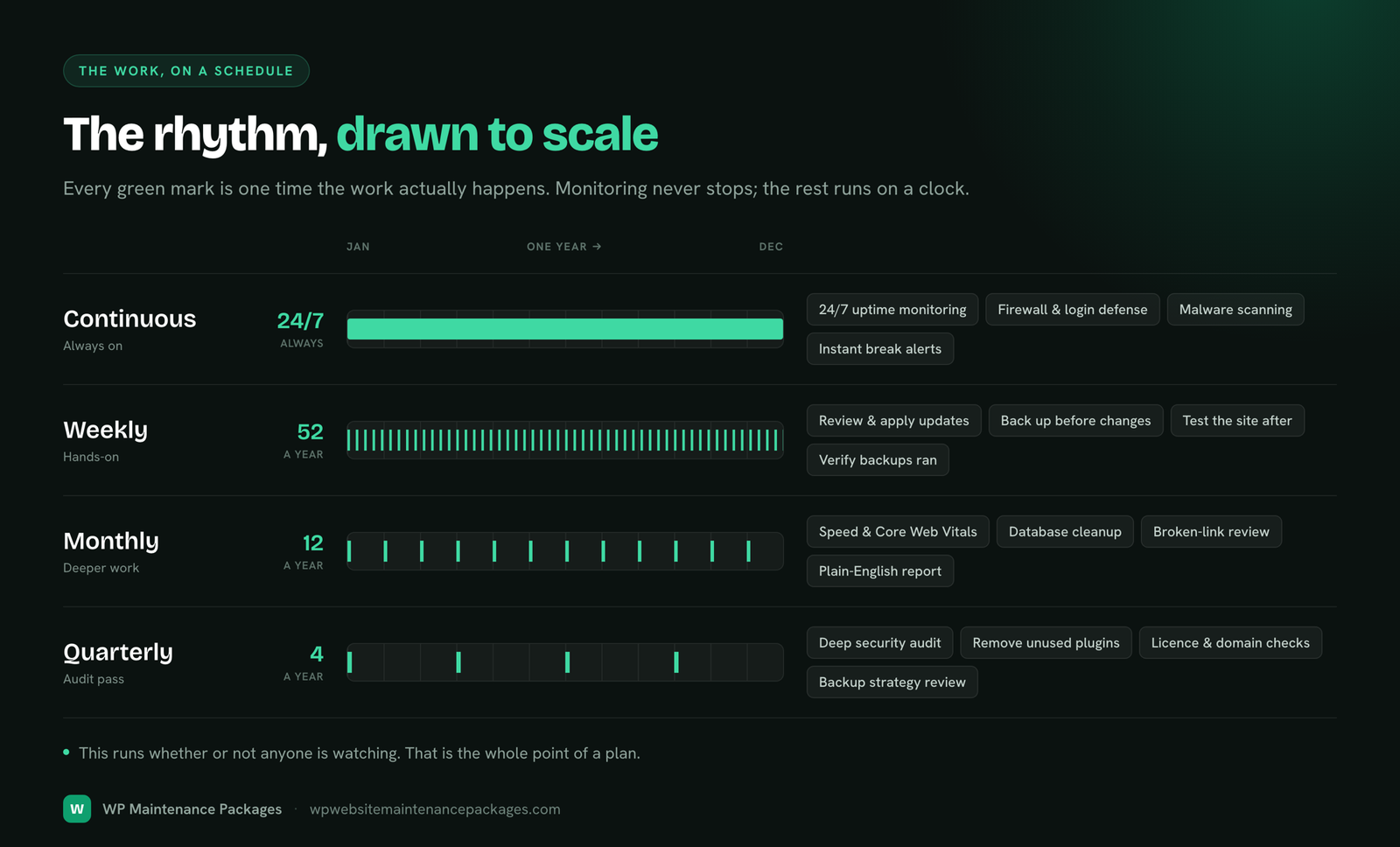
  • Four weekly update cycles: core, theme and plugins reviewed, backed up and tested before going live
  • Thirty daily off-site backups taken and verified, ready to restore in one click
  • Continuous uptime monitoring and malware scanning, with one blocked login-attack spike handled silently
  • One speed pass: caching refreshed, three oversized images optimized, the database cleaned of clutter
  • Two hours of developer time used to update a services page and fix a broken contact-form style
  • A plain-English monthly report: what changed, what was blocked, uptime and speed scores, backup status

That is roughly five to seven hours of skilled work spread across the month, for $129. Doing the same yourself would cost at least that much of your own time, and that is before the risk: one untested update on a live site can turn a quiet Tuesday into a scramble and a paid emergency fix. The plan is not just cheaper than your time in most cases, it removes the downside entirely. To see how that fee compares to the wider market, our website maintenance cost guide breaks down real 2026 pricing by site type and provider.

Match it to your site

Which plan is right for your website?

The right plan is the one that matches what your site is worth and how much it does. A brochure site and a busy store have very different needs, and paying for more than you need is as much a mistake as paying for too little. Here is a simple guide by site type.

Your siteBest planWhy
Personal / brochure siteEssentialNeeds protection and uptime, not ongoing developer time
Small business (leads & forms)Essential → GrowthGrowth if you want speed work and monthly edits handled
Blog / content siteGrowthSpeed and regular edits matter for protecting SEO traffic
WooCommerce / storeProStore support and fast response protect real-time sales
High-traffic / SaaSPro or customComplexity and uptime stakes justify hands-on care
Agency (many client sites)Pro / AgencyWhite-label reports and volume-friendly coverage

A useful rule of thumb: if losing your site for a day would cost you more than the annual price of a plan, you are underinsured on Essential and should be on Growth or Pro. If your site earns little or nothing and rarely changes, do not overpay, Essential or even careful DIY is fine. When you are genuinely unsure, send your URL for a free audit and we will tell you honestly which tier fits, including if that is the cheapest one.

Is it for you?

Who needs a website maintenance plan?

The clearest signal is simple: if your website does a job for your business, it needs maintenance. The more directly it touches money, the more a plan matters, because the cost of it failing is higher and the failure always seems to arrive at the worst moment.

Local service businesses like HVAC, plumbing, roofing and dental practices rely on their site to capture leads. A broken contact form or a day of downtime is a day of missed calls, so uptime, working forms and fast response are the priority. Ecommerce and WooCommerce stores have the most to lose: every minute of downtime is lost sales, and checkout, payment gateways and inventory add moving parts that need constant attention. Content and blog sites live and die by SEO traffic, which means speed and consistent updates protect the rankings you have worked to build. Professional services, legal, medical, financial, carry reputation risk where a hacked or defaced site damages trust with high-value clients. And agencies and freelancers who manage sites for others need reliable, white-label maintenance so they can offer care without doing every update themselves at 2am.

There is an honest flip side. If your site is a low-stakes personal project that earns nothing, rarely changes, and you enjoy the upkeep, you may not need a paid plan at all, careful DIY can be enough. Do not buy maintenance out of guilt. Buy it when the site is worth protecting, and you will always come out ahead.

Don't confuse these

A plan vs one-time fixes vs a redesign

Three different things get lumped together, and mixing them up leads to buying the wrong one. A maintenance plan is ongoing, recurring care that keeps your current site healthy month after month, from $59. A one-time fix solves a single problem right now, a hacked site, a broken feature, a failed update, with no commitment, from $99; it is the right call when you have one specific issue and do not want a plan. A redesign is a one-time project that rebuilds how your site looks or works, typically $2,000 to $15,000 or more, and you only need it every few years.

Here is the connection worth knowing: good maintenance actually delays the need for a redesign. A site kept fast, updated and secure ages far more gracefully than one left to rot, so you rebuild less often and protect the larger investment you already made. A plan is not competing with a redesign; it is what makes your redesign last. If you are weighing the pure economics of each option, our cost guide lays out the numbers side by side.

How you pay

Monthly vs annual plans

The coverage is identical whichever way you pay; the choice is about flexibility versus a discount. Monthly billing keeps you flexible with no commitment, which is ideal when you are trying a provider or want to manage cash flow. Annual billing typically saves ten to twenty percent and suits established sites where you already know you want ongoing care. We keep every plan month to month by default, with no lock-in, so you can start on monthly and switch to annual once you have seen the value first-hand.

MonthlyAnnual
PriceStandard10–20% off
CommitmentMonth to monthOne year, prepaid
FlexibilityCancel anytimeBest if you're committed
Best forTrying us out, cash-flow flexibilityEstablished sites, lowest total cost

One thing to check with any provider, us included, is whether hosting is bundled or separate, because it materially changes the total. Our plans keep hosting separate by default so the price stays clean and you keep the host you already have; if your host is holding the site back, we can help you move during onboarding.

Plan vs no plan

DIY vs a managed maintenance plan

You can absolutely maintain a WordPress site yourself. The real question is whether it is cheaper once you count your own time and the risk of getting it wrong. Done properly, maintenance on a typical business site is around five hours of work a month: reviewing and testing updates, checking backups, running security scans, cleaning the database, and handling small fixes. Priced at even a modest hourly rate for your own time, that is $250 or more a month, before you factor in the risk. One bad update on a live site, or a missed security patch during that five-hour exploit window, can turn into a lost weekend and a paid rescue.

What you getManaged planDIY
Weekly tested updatesIncludedYour time, ~5 hrs/mo
Daily off-site backupsIncludedPlugin + setup + checks
24/7 monitoringIncludedRarely set up properly
Same-day fix when it breaksIncludedPanic + paid emergency
Real costFrom $59/mo$250–$500/mo of your time + risk

DIY genuinely makes sense for a low-stakes personal site, or for an owner who is technical and enjoys the upkeep. For a site that earns money, a plan almost always costs less than your own hours and removes the risk entirely, which is why most business owners eventually switch.

Buy smart

What to look for in a good maintenance plan

Not every plan at the same price is equal, and the cheapest one is rarely the right one. Before you sign anything, check these five things, they separate real protection from a plan that only looks like protection.

Red flag

A plan that only runs automatic updates and calls itself "maintenance" leaves you exposed on security, backups and real support, the exact things that matter when something goes wrong. A slightly higher price that covers all six jobs almost always beats a cheap plan that covers one; the first emergency erases the saving.

Getting started

How to start a plan with us

Onboarding is deliberately simple, and there is no long form or hard sell. It runs in four steps and we take over within 24 hours.

If you only need one thing fixed rather than ongoing care, that is fine too, we handle one-time WordPress fixes from $99, no plan required. And if a plan would genuinely serve you better, we will say so honestly rather than sell you a one-off.

Why us

Why choose our maintenance plans

WordPress specialists

We work on WordPress and WooCommerce only, so we catch what generalists miss.

No contracts

Month to month, cancel anytime. We earn your business every month.

Fast response

Priority and same-day support on higher plans, with monitoring that catches issues first.

Real developers

A human who knows your site handles fixes, not a ticket queue or a bot.

Our promise: if we break it, we fix it. Same day. No charge.

Every update is backed up and tested. If anything ever goes wrong on our watch, we roll it back and make it right at no cost, every plan, every time.

Answers

Website maintenance plan FAQ

What is a website maintenance plan?

A website maintenance plan is a fixed monthly service that keeps your website updated, secure, backed up, fast and working properly after it launches. Instead of you reacting to problems as they happen and paying emergency rates, a team handles the recurring technical work, updates, security, backups, speed, monitoring and fixes, on a schedule. It is the difference between a site that quietly earns for you and one that becomes an expensive emergency at the worst possible time.

How much does a website maintenance plan cost?

Most website maintenance plans cost between $20 and $500 per month in 2026, with ecommerce and high-traffic sites running higher. Ours start at $59/mo for essential care, $129/mo for full care with speed work and developer time, and $249/mo for stores and agencies. The biggest cost driver is not the provider, it is your site\u2019s complexity, especially the number of plugins and whether it takes payments. For the full market breakdown, see our website maintenance cost guide.

What is included in a website maintenance plan?

A real plan covers six core jobs: software updates (core, theme and plugins), security (firewall, monitoring, malware cleanup), daily off-site backups, speed and Core Web Vitals optimization, 24/7 uptime monitoring, and fixes from a real developer. Higher tiers add staging, priority support, monthly developer hours, and WooCommerce support. Any cheaper plan that only automates updates is not really maintenance, it just looks like it.

Do I really need a monthly website maintenance plan?

If your website brings in leads, bookings or sales, yes. In 2025 alone, security researchers logged more than 11,000 WordPress vulnerabilities, over 90% of them in plugins, and the median time from a flaw being disclosed to the first exploit attempt is about five hours. A monthly plan keeps you patched and monitored so those gaps never open. For a low-stakes personal site that earns nothing, basic DIY care can be enough.

Which plan is right for my website?

Match the plan to what your site is worth and how much it does. Brochure and small business sites usually fit Essential or Growth; content sites that publish regularly fit Growth for its speed work and edits; stores, high-traffic sites and agencies fit Pro for store support, fast response and white-label reporting. If you are unsure, send your URL for a free audit and we will recommend the honest fit, even if it is the cheapest plan.

Is there a contract, and can I cancel any time?

No lock-in contracts. Every plan is month to month, and you can upgrade, downgrade or cancel any time, with changes taking effect at your next billing cycle. We would rather earn your business every month than trap you in an annual commitment. Annual billing is available at a discount if you prefer, but it is never required.

Bhupesh Rathore, founder of ThinkFlow Media
Written & reviewed by

Bhupesh Rathore

Founder, ThinkFlow Media & Linkflow.agency · 8+ years in WordPress & SEO

Bhupesh Rathore is the founder of ThinkFlow Media and Linkflow.agency, with 8+ years in WordPress, SEO and website operations. He has built, scaled and maintained WordPress sites across business, ecommerce, SaaS and content niches, and speaks on SEO, most recently at the Chiang Mai SEO Conference 2025. He writes here to share practical, no-nonsense guidance on keeping WordPress sites secure, fast and profitable.

Full profile LinkedIn X
Free, no obligation

Ready to stop worrying about your website?

Send us your URL for a free health, security and speed audit, and we'll recommend the plan that actually fits, even if it's the cheapest one.

Get a free site audit
Packages Book a call