Specialist maintenance for online stores, where a broken checkout costs money by the minute. We keep your WooCommerce store secure, fast and fully working: staging-tested updates, checkout and payment monitoring, daily backups, and peak-traffic readiness. No contracts, free store audit, plans from $59/mo.
Online stores need more than standard website maintenance because they have more that can break and a direct cost per minute of downtime. Our ecommerce website maintenance adds the store-specific layer, checkout testing, payment gateway and order monitoring, staging-tested WooCommerce updates, and peak-traffic readiness, on top of security, backups and speed. Store-focused care sits in our Pro plan at $249/mo. Compare all plans or see the cost guide.
Every website needs maintenance, but a store needs a stricter version of it, because the consequences of neglect are immediate and measured in lost revenue. When a brochure site has a problem, it looks bad. When a store has a problem, it stops making money until someone fixes it, and often nobody notices until the day\u2019s sales come in far below normal.
The reason is simple: a store is not a set of pages, it is a transactional application. A customer has to land on a product, add it to a cart, reach checkout, enter payment details, have a gateway authorise the charge, receive a confirmation, and trigger an order in your system. Every one of those steps is a separate piece of software that can break on its own, and a single failure anywhere in the chain means no sale. A plugin update that quietly changes how the cart behaves, a payment gateway that starts rejecting cards after an API change, a confirmation email that stops sending, none of these throw an obvious error on the homepage. The store looks fine. The money just stops.
Ecommerce maintenance exists to protect that chain. Beyond the standard jobs every site needs, it means testing the actual purchase path after every change, watching orders and payments for anything abnormal, and treating the store as the revenue engine it is rather than a website that happens to sell things. That is a different discipline from general website maintenance, and it is why stores deserve their own approach.
WooCommerce powers a huge share of the world\u2019s online stores because it is flexible and open. That same flexibility is why it needs specialist care. A WooCommerce store is typically WordPress core, the WooCommerce plugin, a payment gateway extension or two, shipping and tax plugins, often a subscriptions or bookings extension, a theme built for commerce, and a stack of supporting plugins, all of which must stay compatible with each other at once.
That creates a three-way compatibility problem that generic maintenance ignores. WooCommerce updates frequently, sometimes with changes that affect how extensions hook into it. WordPress core updates on its own schedule. And each extension updates independently. An update to any one can quietly break another, and the place it shows up is usually checkout, the one page you cannot afford to have broken. This is exactly why blind auto-updating is dangerous for stores: the update that installs cleanly at 2am can leave your checkout throwing errors by the time customers arrive.
Proper WooCommerce maintenance handles this deliberately. Updates are backed up first, tested on a staging copy of the store, applied in a sensible order, and followed by a real checkout test on the live site before the round is considered done. It also means knowing WooCommerce-specific behaviour: which extensions are known to conflict, that a major WooCommerce release needs staging first every time, and how to keep a store\u2019s database healthy when it has accumulated thousands of orders, sessions and transients. Generalists who maintain any website rarely have that depth, which is where stores get burned.
Never let anyone auto-update WooCommerce or its payment extensions directly on your live store. One incompatible update to a gateway can stop every sale with no visible error. Staging-first is not optional for a store, it is the whole point.
The case for store maintenance is easiest to see in the cost of going without it, which for an online store is measured directly in lost orders. Three failures do the damage, and all three are preventable.
Downtime is the most obvious. Every minute a store is unreachable or has a broken checkout is orders that do not happen, and unlike a content site, that revenue does not arrive later, the customer buys elsewhere. On a normal day this is painful; during a sale it is severe. A breach is worse. Stores are prime targets because they process payments, and over eleven thousand WordPress vulnerabilities were logged in 2025, more than nine in ten of them in plugins and extensions, exactly the kind a store runs many of. Once a flaw is public, exploit attempts often begin within hours. A hacked store faces cleanup costs, lost sales, a possible Google security flag, and the nightmare scenario of a payment skimmer quietly harvesting customer card details. The average hacked WordPress site costs around fourteen thousand dollars all in, and a store sits at the higher end of that range because of the payment and trust damage.
Slow decay is the quietest and, over a year, often the most expensive. As a store accumulates products, images and orders, pages get slower, and slower pages convert fewer shoppers while ranking lower in Google. Nobody sees the day it happens; you just notice sales are softer than they should be. Against all three, maintenance at $59 to $249 a month is not a cost, it is the cheapest protection a store buys, and it keeps the store fast enough to earn while it protects.
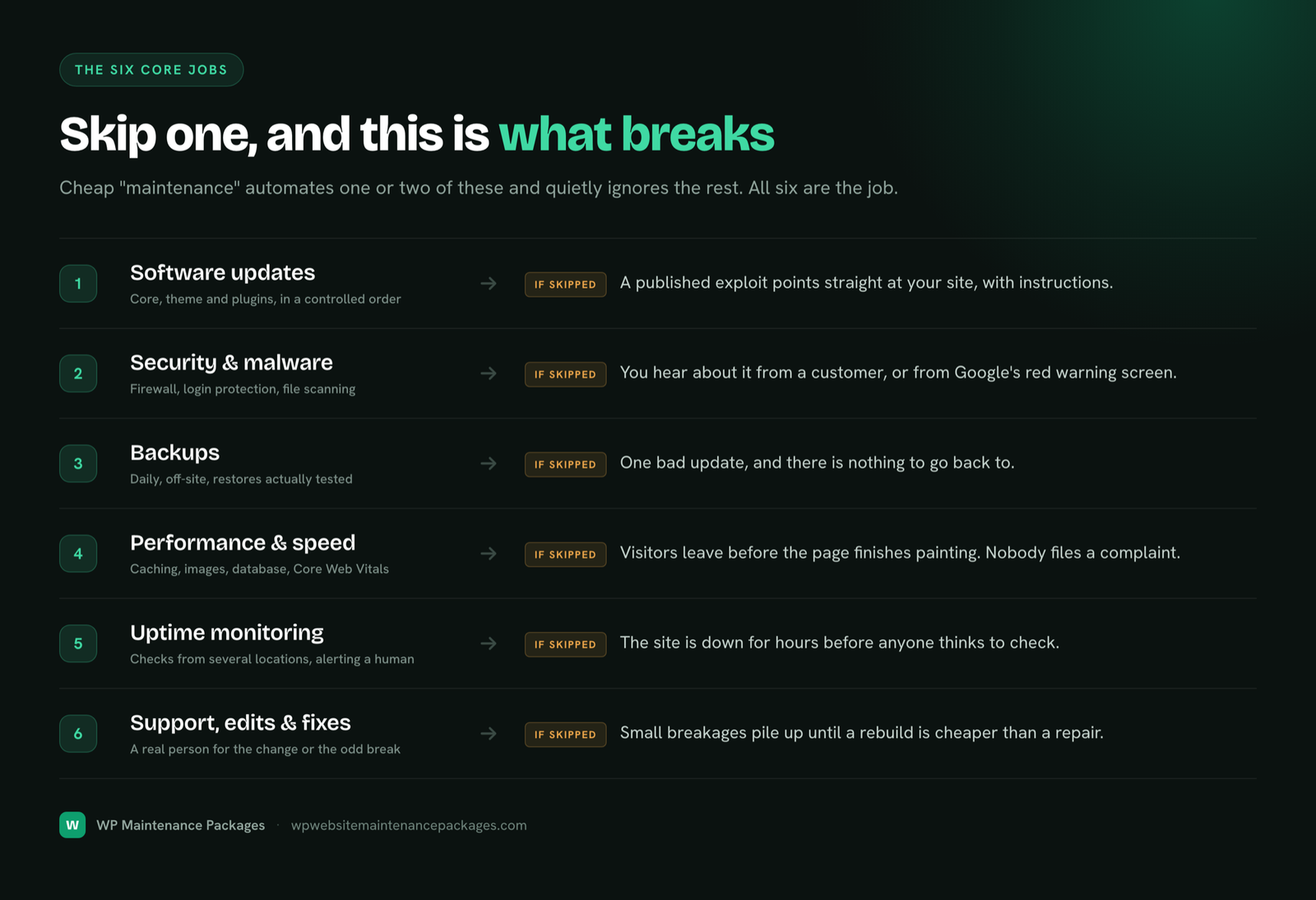
Store maintenance covers the six core jobs every site needs, each done with the store in mind, plus the ecommerce-specific work that protects your orders and revenue.
WooCommerce, extensions, theme and core updated on staging first, then verified on the live store.
A real test purchase and gateway check after every update round, so a broken checkout never ships unnoticed.
Firewall, malware scanning, hardening and same-day cleanup, with payment-integrity checks after any incident.
Off-site daily backups of files, database and orders, restorable fast to minimise lost transactions.
Caching, image and database optimization tuned for stores, where load time directly affects conversion.
24/7 monitoring of uptime and order flow, so a stall in sales gets caught quickly, not at day\u2019s end.
Load review, caching tuning and update freezes ahead of Black Friday and major sales.
Product pages, promotions, layout and functionality changes handled by a WooCommerce developer.
Payment, shipping and order-email integrations tested so confirmations and fulfilment keep firing.
A store is a more attractive target than a typical website because it processes payments and holds customer data. That raises the stakes on security and adds a compliance dimension most site owners would rather not think about. Good store maintenance handles the technical side of both.
On security, the layers are the same as any site but the consequences are sharper: a web application firewall filtering malicious traffic, login protection, file integrity monitoring, and continuous malware scanning. The specific ecommerce threat to watch for is payment skimming, where injected code quietly captures card details at checkout. That is why, after any security incident on a store, we do not just clean the malware, we verify the integrity of the checkout and payment path to confirm nothing was tampered with. It is the worst-case scenario for a store, and the one generic cleanups can miss.
On PCI compliance, the honest picture is this: the simplest and safest approach for most WooCommerce stores is to let a trusted payment gateway like Stripe or PayPal handle card data, so sensitive card numbers never touch your server. That keeps you in the least burdensome compliance category. Our role is to support that with the technical hygiene compliance depends on, valid SSL at all times, current and patched software, security hardening, and keeping the payment flow with the gateway rather than storing card data yourself. We are not a formal PCI auditor, and we will never claim to make you "PCI certified" with a checkbox, but we handle the ongoing technical practices that keep a store on the right side of the line.
| Store security check | What it protects |
|---|---|
| Valid SSL monitoring | Encrypted checkout and customer trust; a lapsed certificate can block sales |
| Firewall & malware scanning | Blocks attacks and catches infections early |
| File integrity monitoring | Flags injected code, including payment skimmers, fast |
| Gateway kept with Stripe/PayPal | Keeps card data off your server and compliance simple |
| Current, patched software | Closes the plugin holes most store hacks exploit |
| Post-incident checkout verification | Confirms payments were not tampered with after any breach |
For a store, speed is not a vanity metric, it is a conversion lever and a ranking signal at the same time. Shoppers abandon slow product and checkout pages, and Google\u2019s Core Web Vitals, measured from real visitor data, feed into search rankings. A store that gets slower over time loses sales twice: fewer visitors convert, and fewer visitors arrive as rankings slip.
Stores also slow down faster than other sites. They carry more images, more scripts from commerce plugins, and databases that balloon with orders, sessions, and abandoned carts. Left alone, a store that felt quick at launch becomes sluggish within a year. Performance work inside store maintenance means server-side caching configured correctly for a dynamic cart (which is trickier than caching a static site), image compression and modern formats, a lean and regularly cleaned database, and where useful, a CDN to serve assets closer to shoppers. All of it measured against Core Web Vitals so the gains are real and visible, not guesswork.
Caching a store is not the same as caching a blog. Cart, checkout and account pages must stay dynamic while the rest is cached, or customers see each other\u2019s carts or stale stock. Store-aware caching is a common thing generalists get wrong, and a common thing we fix.
The busiest sales days are when an unmaintained store is most likely to fail, and when failure is most expensive. A store that handles normal traffic fine can buckle under a Black Friday surge, and every minute down during a peak sale is money that does not come back. Preparing for that is a deliberate part of store maintenance, not an afterthought.
Ahead of a major sale period, we review your hosting headroom to confirm it can take the expected load, tune caching and the database for peak conditions, and freeze risky updates during the sale window so nothing new can break at the worst moment. Through the event itself, we watch the store closely so any problem is caught and handled while it is small. The goal is boring: your biggest sales day should be uneventful from a technical standpoint, so all the drama is in the sales numbers and none of it is in the site falling over.
A modern store is rarely self-contained. It talks to a payment gateway, a shipping provider, a tax service, an email platform, often an ERP or inventory system, and analytics or ad pixels. Each of those connections is a point that can fail silently, and when one does, the store usually keeps looking fine while something important stops working behind the scenes.
The classic example is order-confirmation emails. A plugin update changes an email setting, confirmations stop sending, and customers who just paid hear nothing, so they either panic, dispute the charge, or flood your support. The store never showed an error. Store maintenance means testing these integrations, not just the visible site: confirming the payment gateway authorises and captures correctly, that shipping and tax calculators return the right numbers, that order and confirmation emails actually deliver, and that any inventory or fulfilment sync is still passing data. For stores that rely on APIs, we watch that those connections stay authenticated and responsive, because an expired API key or a provider-side change can quietly break fulfilment. Testing the whole connected chain, not just the pages a visitor sees, is a core part of keeping a store genuinely working.
Store maintenance costs a little more than standard site care because there is more to test and more at stake. Our pricing stays flat and public, with emergency fixes included rather than billed as surprises. Store-focused care lives in the Pro / Agency plan, which names WooCommerce explicitly.
| Plan | Price | Best for |
|---|---|---|
| Essential Care | $59/mo | Very small or new stores needing core protection |
| Growth | $129/mo | Growing stores wanting speed work & staging-tested updates |
| Pro / Agency | $249/mo | WooCommerce stores & agencies needing full store care |
See full inclusions on the maintenance plans page, or understand the wider market in our cost guide. Want a written agreement for your store? Use our free contract template.
Onboarding a store takes care because we never want to disrupt live selling. We take over within 24 hours with zero downtime.
Send your URL. We check health, security, speed and the full checkout path, and report honestly what needs attention.
We take a full independent backup and set up a staging copy so future updates are tested off the live store.
Security hardening, store-aware caching and a database clean-up bring the store to a healthy baseline.
Staging-tested updates, checkout tests, monitoring and backups on schedule, with a clear monthly report.
We work with online stores of every shape, from a first WooCommerce shop to a high-volume operation, and adjust the care to how each one sells.
| Store type | What we focus on |
|---|---|
| Small & new WooCommerce stores | Solid fundamentals: secure, backed up, fast, checkout working |
| Established & high-volume stores | Staging discipline, performance under load, tight monitoring |
| DTC & brand stores | Speed, mobile experience and flawless checkout for paid traffic |
| Subscription & membership stores | Recurring billing integrity and careful backup/restore strategy |
| Marketplace & multi-vendor | Heavier database care and extension compatibility management |
| Agencies with store clients | White-label store maintenance under your brand |
Not sure your store is a fit? We also maintain non-store WordPress sites, see our website maintenance company page for the full picture.
| What you get | Our store care | DIY |
|---|---|---|
| Staging-tested updates | Yes, then live checkout test | Update live & hope |
| Checkout & payment testing | Every round | Rarely, until a sale is missed |
| Daily off-site backups | Included | Plugin to configure & verify |
| Same-day hack cleanup | Included (Growth+) | Panic + paid rescue |
| Peak-traffic prep | Before every major sale | Fingers crossed |
| Store-aware caching | Configured correctly | Easy to break the cart |
| Predictable cost | Flat monthly | Hidden time + incident cost |
DIY can work for a tiny, low-order store run by someone technical who genuinely keeps up. For any store where lost sales matter, the testing discipline and coverage of professional care pay for themselves the first time an update would otherwise have broken checkout unnoticed.
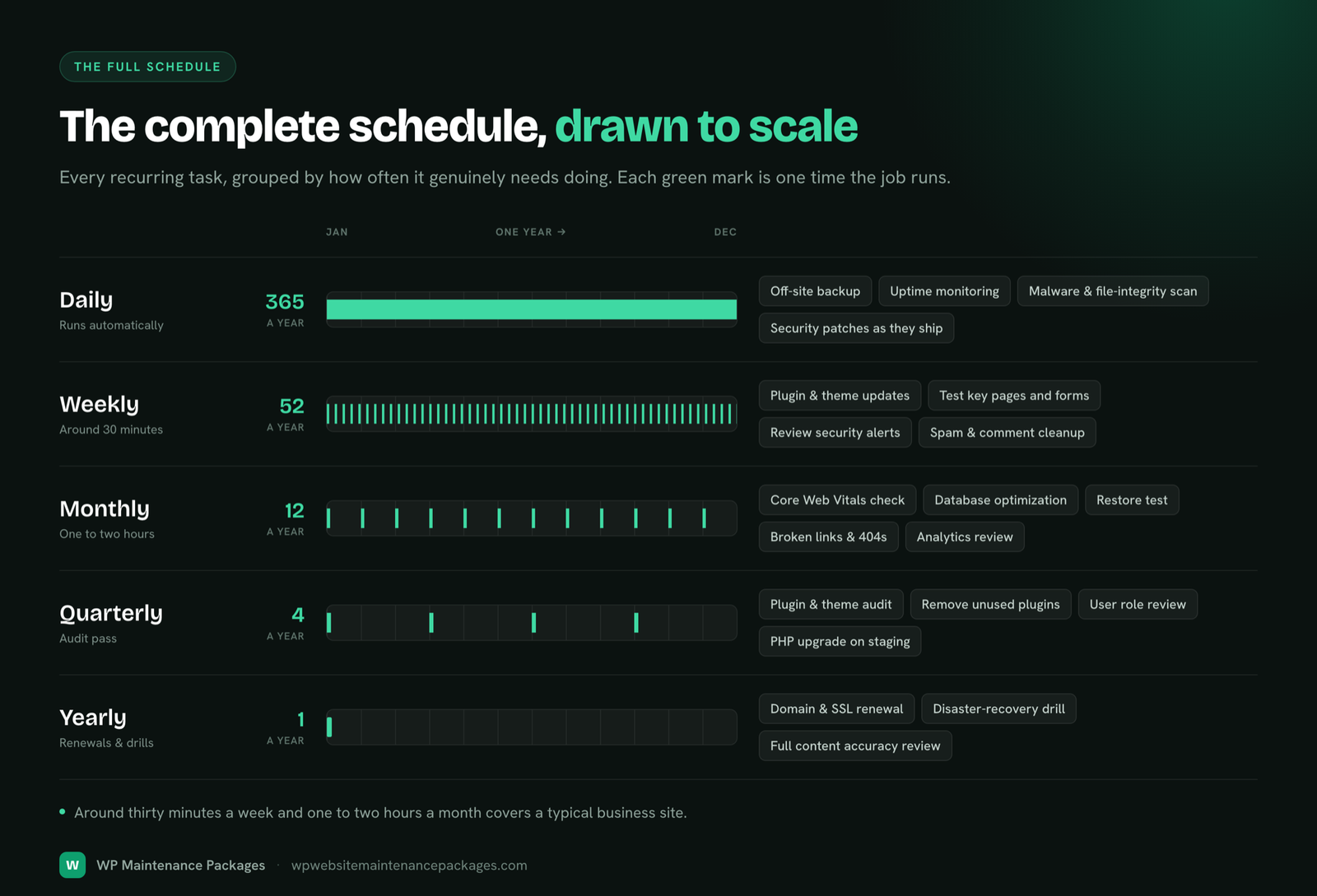
This is the cadence a well-maintained store actually runs. If you handle it yourself, this is the bar; if we handle it, this is what runs in the background.
| Frequency | Store maintenance tasks |
|---|---|
| Daily | Verify backups completed; check uptime and order-flow alerts; scan security log; confirm payments are processing |
| Weekly | Backup, then apply core/WooCommerce/extension updates on staging; test full checkout on live; malware scan; clear caches correctly |
| Monthly | Core Web Vitals & speed test; database cleanup (orders, sessions, transients); test a restore; review plugins for abandonment; check SSL & domain expiry |
| Quarterly | Full extension audit; review integrations (payment, shipping, email); test order-confirmation emails; check 404s and broken product links; review admin accounts & 2FA |
| Before peak sales | Hosting load review; caching & DB tuning; freeze risky updates; heightened monitoring through the event |
Most store problems we are called in to fix trace back to the same handful of avoidable mistakes. Knowing them helps whether you hire us or handle maintenance yourself.
Stores are our focus, so we know where they break and how to keep checkout solid.
Same-country support in your business hours, real people who know your store.
Month to month, cancel anytime. We keep your store by being good at the work.
Priority and same-day support on higher plans, with monitoring that catches issues first.
Every update is backed up and checkout-tested. If anything ever goes wrong on our watch, we roll it back and make it right at no cost.
Ecommerce website maintenance is the ongoing technical care an online store needs to stay secure, fast and fully working after launch. On top of standard maintenance (updates, security, backups, speed, monitoring), it adds store-specific work: testing checkout after every change, monitoring payment gateways and order flow, watching stock and pricing, and keeping the site stable under sale-day traffic. It exists because a store has more moving parts and a direct cost per minute of downtime.
Because when a store breaks, it loses money immediately, not eventually. A brochure site with a broken layout is embarrassing; a store with a broken checkout is losing every sale until it is fixed. Stores also carry payment data, more plugins, and a three-way compatibility problem between WooCommerce, its extensions and WordPress core. Generic maintenance that just runs updates misses the checkout and payment testing that actually protects revenue.
WooCommerce turns a website into a transactional application: carts, checkout, payment gateways, tax and shipping calculators, inventory, customer accounts and order emails. Each of those can break independently, and WooCommerce plus its extensions update aggressively and must stay compatible with each other and with WordPress core. WooCommerce maintenance means staging-tested updates and a full checkout-to-confirmation test after every round, not just clicking update and hoping.
Ecommerce maintenance typically runs higher than standard site maintenance because there is more to test and more at stake, usually $100 to $500+ per month in the US market. Our store-focused care sits in the Pro / Agency plan at $249/mo, which names WooCommerce explicitly. For the full market picture, see our website maintenance cost guide.
Yes, and this is the single most important part of store maintenance. After every update round we run a real test purchase through checkout, confirm the payment gateway processes correctly, and verify the order confirmation and email fire. A checkout that silently breaks after an update is the most expensive failure a store has, because nothing looks wrong while sales quietly stop.
Yes. Before major sale periods we review your hosting headroom, tune caching and the database for load, freeze risky updates during the peak window, and watch the store closely through the event. Peak traffic is exactly when an unmaintained store falls over, and it is the worst possible time for that to happen, so we prepare for it deliberately.
We support PCI-conscious practices: valid SSL, current software, security hardening, and keeping card handling with your payment gateway (Stripe, PayPal and similar) so sensitive card data never touches your server. That keeps most WooCommerce stores in the simplest compliance category. We are not a formal PCI auditor, but we handle the technical hygiene that compliance depends on.
Carefully and in order. Every update round starts with a full backup, is tested on a staging copy of your store for higher plans, and is followed by a checkout test on the live site. If anything misbehaves, we roll back immediately. That staging-first, test-after discipline is the difference between updates as a risk and updates as routine.
Yes. Subscription and membership stores add recurring billing and customer data, which makes backups and restore strategy more delicate, since restoring an old backup can lose recent signups or payments. We treat these with extra care around database health, update testing and restore planning.
We clean it, same day on higher plans: remove the malware, restore from a clean backup if needed, close the vulnerability, and request Google blocklist removal if the store was flagged. For a store, we also verify checkout and payment integrity after cleanup, because a compromised store can have injected code skimming payment details, which is the worst-case scenario we specifically check for.
Daily at minimum, stored off-site, with the ability to restore to a recent point fast. For busy stores taking many orders a day, more frequent backups reduce how many orders a restore could cost. Backups are also what make safe updates possible: every change is reversible because a clean copy always exists.
Our specialty is WooCommerce on WordPress, which is where we deliver the most value. Shopify is a hosted platform that handles its own software layer, so it needs a different kind of support. If you are on WooCommerce, you are exactly who this service is built for.
No. Every plan is month to month with no lock-in. Upgrade, downgrade or cancel any time. For stores that want a written scope, we also offer a free maintenance contract template you can adapt.
Send us your store URL for a free audit. We check its health, security, speed and checkout, tell you honestly what needs attention, and recommend the right plan. Once you are ready, we take over within 24 hours with no disruption to your store.
Founder, ThinkFlow Media & Linkflow.agency · 8+ years in WordPress & SEO
Bhupesh Rathore is the founder of ThinkFlow Media and Linkflow.agency, with 8+ years in WordPress, SEO and website operations. He has built, scaled and maintained WordPress sites across business, ecommerce, SaaS and content niches, and speaks on SEO, most recently at the Chiang Mai SEO Conference 2025. He writes here to share practical, no-nonsense guidance on keeping WordPress sites secure, fast and profitable.
Full profile LinkedIn XSend us your store URL. We'll check its security, speed and the full checkout path, and tell you honestly what needs attention, and which plan fits.
Get a free store audit