A straight answer with real 2026 numbers: what website maintenance actually costs per month and per year, broken down by who does it, what kind of site you run, and the hidden costs most guides skip, so you can tell a fair quote from an overpriced one.
In 2026, website maintenance costs roughly $20 to $500 per month for most websites, and $500 to $3,000+ per month for ecommerce and high-traffic sites. DIY care can be under $30/mo; a managed website maintenance package for a small business typically runs $60 to $300/mo. The single biggest cost driver is not the provider, it is your site's complexity, especially the number of plugins and whether it takes payments.
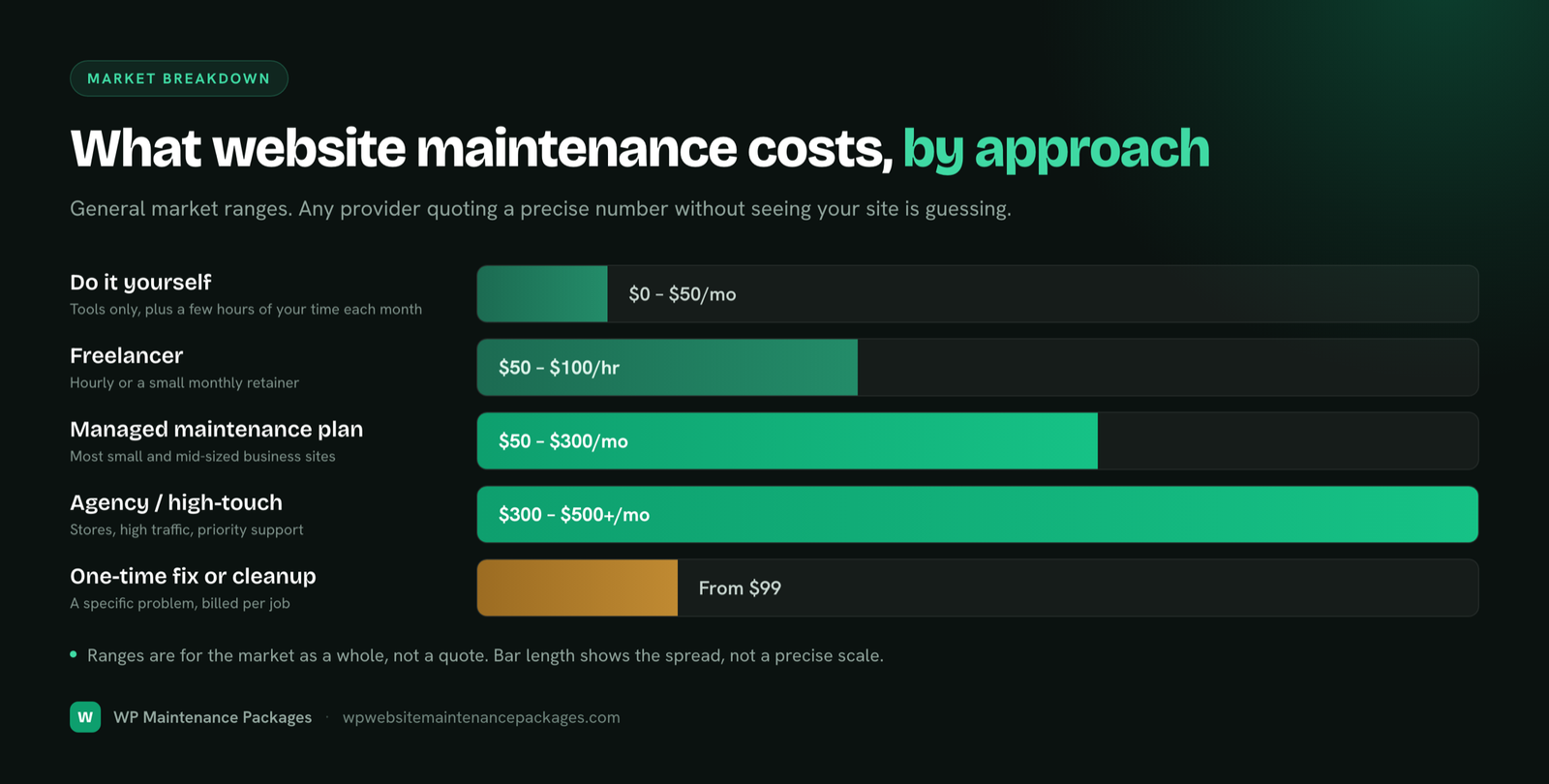
Prices span a huge range because "website maintenance" means very different things depending on who does it and how much your site is worth. Here is where the money sits, from free DIY effort to enterprise-grade care.
| Approach | Typical monthly cost | Best for |
|---|---|---|
| Do it yourself | $0–$30 | Personal sites, hobby blogs, low stakes |
| Plugins-only automation | $20–$60 | Owners comfortable with tech, simple sites |
| Freelancer retainer | $50–$300 | Small sites needing a human, tighter budgets |
| Managed care plan | $60–$500 | Most small and mid-size business sites |
| Agency retainer | $300–$1,000+ | Businesses wanting a team and accountability |
| Ecommerce / enterprise | $1,000–$10,000+ | Stores, high traffic, complex integrations |
Do not anchor on the cheapest number you see. A $20/mo plan that only runs automatic updates leaves you exposed on security, backups and real support. Compare what is included, not just the price.
Every site is different, so a single number is never quite right. Answer four quick questions and this calculator gives you a realistic monthly range based on the 2026 pricing in this guide. It is an estimate to frame your budget, not a quote.
Estimate only, based on typical 2026 market pricing. For an exact number, send your URL for a free audit and we will quote the real figure.
Two sites can differ 10x in price for good reasons. These are the factors that move the number, roughly in order of impact.
The single biggest driver. More plugins means more updates, more conflicts and more that can break.
Stores have checkout, payments and inventory to protect, and far more to lose from downtime.
More visitors means more load, more security exposure and higher stakes when something fails.
Under-4-hour, same-day response costs more than "we'll get to it." You pay for the SLA.
Plans that include monthly edits and dev work cost more than monitoring-only plans.
Basic scanning is cheap; active firewalls, hardening and same-day malware cleanup cost more.
The same tasks cost very different amounts depending on who performs them, and each option trades price against reliability.
| Option | Typical cost | Pros | Cons |
|---|---|---|---|
| DIY | $0–$30/mo | Cheapest in cash; full control | Costs your time weekly; risky updates; no safety net |
| Freelancer | $50–$150/hr | Affordable; personal relationship | Availability risk; single point of failure |
| Agency | $300–$1,000+/mo | Team coverage; accountability; depth | Higher cost; can be less personal |
| Managed care plan | $60–$500/mo | Fixed price; full coverage; real support | Monthly commitment (though usually no contract) |
For most small businesses, a managed care plan hits the sweet spot: the coverage and reliability of an agency at a predictable, flat monthly price. Our WordPress website maintenance services page breaks down exactly what that includes.
"Free" DIY maintenance is not free. If it takes you three hours a month and your time is worth $50/hr, that is $150/mo in opportunity cost, before you factor in the risk of a bad update taking the site down on a Friday night.
DIY looks free because no money leaves your account. But maintenance done properly takes real hours every month, and your time has a value. Here is what a typical small business site costs to maintain yourself, priced at two common hourly rates.
| Task | Hours / month | At $50/hr | At $100/hr |
|---|---|---|---|
| Reviewing & testing updates | 1.5 | $75 | $150 |
| Checking backups ran | 0.5 | $25 | $50 |
| Security scans & monitoring | 1 | $50 | $100 |
| Speed & database cleanup | 1 | $50 | $100 |
| Small fixes & troubleshooting | 1 | $50 | $100 |
| Total | ~5 hrs | $250 | $500 |
So "free" DIY care is realistically worth $250 to $500 a month of your time, more than most managed plans, and that is before the risk. One untested update that breaks your live site on a busy day can cost hours of panic plus a paid emergency fix. DIY genuinely makes sense for low-stakes personal sites and for owners who enjoy the work. For a site that earns money, a plan usually costs less than your own time and removes the risk entirely.
The kind of site you have is one of the clearest predictors of cost, because it maps directly to how much can go wrong.
| Website type | Monthly | Yearly | Why |
|---|---|---|---|
| Personal / portfolio | $0–$40 | $0–$480 | Few plugins, low traffic, low stakes |
| Blog / content site | $30–$100 | $360–$1,200 | Regular publishing, some plugins, SEO to protect |
| Small business site | $60–$300 | $720–$3,600 | Leads on the line, forms, more to keep working |
| Ecommerce / WooCommerce | $500–$3,000 | $6,000–$36,000 | Checkout, payments, inventory, high downtime cost |
| Enterprise / high-traffic | $1,000–$10,000+ | $12,000–$120,000+ | Complex integrations, custom code, SLAs |
Two businesses on the same platform can pay very differently based on what their website does for them. A site that books appointments or takes payments carries more risk, and more revenue, than a simple brochure, so it warrants more care. Here is what different industries typically budget in 2026.
| Industry | Typical monthly | Why |
|---|---|---|
| Local services (HVAC, plumbing, roofing) | $59–$200 | Lead-driven brochure sites; uptime and forms are the priority |
| Dental & healthcare | $100–$400 | Booking, forms and compliance raise the stakes and the care needed |
| Legal & professional services | $100–$400 | Reputation-sensitive; every lead is high value, downtime is costly |
| Restaurants & hospitality | $59–$250 | Menus, hours and reservations must always work, especially on mobile |
| Real estate | $100–$500 | Listing feeds, IDX integrations and heavy media add maintenance load |
| Retail & ecommerce | $300–$3,000+ | Checkout, payments and inventory; downtime is direct lost sales |
| SaaS & tech | $300–$2,000+ | Marketing site plus integrations, often tied to product release cycles |
| Agencies (white-label) | $200–$1,000+ | Many client sites maintained under one roof; volume and SLAs drive price |
The pattern is consistent: the more your website directly touches money, whether through bookings, leads or sales, the more it costs to maintain, because the cost of it failing is higher. A restaurant losing its reservation page on a Friday night and a store losing checkout on Black Friday are paying for the same thing: the assurance that the revenue-critical part never goes dark.
WordPress maintenance costs about the same as any platform, but it has one variable that dominates the bill: plugins. Every plugin is another thing to update, test and secure. A ten-plugin site is genuinely cheaper to maintain than a forty-plugin one, whatever the traffic. WordPress powers a large share of the web, which also makes it the most attacked platform, so security is a bigger line item than on a closed system. You can read more about the platform itself at WordPress.org.
| Task | Cadence | DIY time | Included in a plan? |
|---|---|---|---|
| Core, theme & plugin updates | Weekly | 1–2 hrs/mo | Yes |
| Off-site backups | Daily | Setup + checks | Yes |
| Security & malware scanning | Continuous | Ongoing | Yes |
| Speed & Core Web Vitals | Monthly | 2–4 hrs | Usually mid-tier+ |
| Uptime monitoring | 24/7 | Tooling | Yes |
| Edits & emergency fixes | As needed | Variable | Mid-tier+ |
Keeping Core Web Vitals healthy matters here too: Google uses page speed as a ranking factor, so speed work is maintenance that pays for itself in traffic.
Price only makes sense once you know the work behind it. A genuine maintenance plan runs on a schedule, not on "when we remember." If a provider cannot show you a cadence like this, you are probably paying for automatic updates and little else.
When you compare a $30 plan against a $150 one, this is the real difference: the cheap one usually covers only the first column, while the money problems, security, backups that actually restore, and a human who responds, live in the other three.
The same work is priced four different ways. Which is cheapest depends entirely on how often you need help.
| Model | Typical price | Best when |
|---|---|---|
| Monthly plan | $60–$500/mo | You want ongoing, scheduled care (cheapest per unit of work) |
| Annual plan | 10–20% off monthly | You are committed and want a discount |
| Hourly | $75–$200/hr | Occasional one-off fixes only |
| One-time fix | $99–$500+ | A single problem: a hack, a crash, a broken feature |
Reactive hourly work is almost always the most expensive way to maintain a site, because problems get billed at emergency rates instead of prevented on a schedule. If you just need one thing fixed, though, a one-time fix beats signing up for a plan you will not use.
Maintenance pricing can feel arbitrary until you see the formula behind it. Most providers build a quote from five inputs, and knowing them lets you judge whether a number is fair or padded.
1. Base hours × rate. They estimate the hours your site needs per month and multiply by their rate ($75–$200/hr is typical in the US). A simple site might be 1–2 hours; a complex one, 5–10. 2. A risk premium. Ecommerce, high traffic and custom code add a buffer, because the cost of failure is higher and problems are more likely. 3. Plugin load. More plugins means more update and conflict work, so the count directly moves the price. 4. Response SLA. Guaranteeing a fast fix means holding capacity in reserve for you, which costs more than "best effort." 5. What is bundled. Hosting, developer hours and premium tooling either sit inside the price or bolt on separately.
On a healthy plan, you are not just buying software. Roughly, a monthly fee breaks down into proactive update and testing work, security and monitoring tooling and labour, backup infrastructure, and reserved human time for support and fixes. The cheapest plans strip out the last two, the reserved human time and real security work, which is exactly why they are cheap and exactly why they leave you exposed. When you compare quotes, ask what share of the fee is automation versus actual people, because that ratio is what you feel the day something goes wrong.
The plan price is rarely the whole story. These recurring costs stack on top, and comparing two quotes without them is how people end up overpaying.
| Cost | Typical range | Notes |
|---|---|---|
| Managed hosting | $30–$100/mo | Kinsta, WP Engine, etc. Sometimes bundled, often not |
| Premium plugin licences | $100–$1,000/yr | Forms, SEO, page builders, caching add up fast |
| Premium theme | $0–$100/yr | Renewals for updates and support |
| Domain renewal | $10–$20/yr | Easy to forget until the site vanishes |
| SSL certificate | $0–$100/yr | Free via Let's Encrypt on most managed hosts |
| CDN | $0–$50/mo | Cloudflare has a strong free tier |
| Emergency / malware cleanup | $150–$1,500 | Per incident, if not covered by your plan |
Add a cheap maintenance-only plan, separate hosting, a CDN and one quarterly emergency fix and you frequently spend more than a single bundled plan that covers all of it. Always compare total cost of ownership, not the sticker price.
Premium plugins are a real, recurring line item that maintenance plans usually do not cover, they keep the tools working, but you own the licences. These renew every year, and a feature-rich site can quietly run past $1,000 annually. Here are common plugins and approximate 2026 pricing.
| Plugin | Job | Approx / year |
|---|---|---|
| WP Rocket | Caching / speed | $60–$300 |
| Yoast or Rank Math Pro | SEO | $60–$100 |
| Elementor Pro | Page builder | $60–$400 |
| Gravity Forms / WPForms | Advanced forms | $60–$260 |
| Wordfence Premium | Security firewall | $150+ |
| WPML | Multilingual | $40–$200 |
| WooCommerce extensions | Store features | $50–$300 each |
| Premium theme | Design + support | $0–$100 |
Two takeaways. First, budget for renewals, an expired licence stops receiving security updates, which turns a paid plugin into a liability. Second, every premium plugin is also a maintenance cost, not just a licence cost: it is one more thing to update and one more thing that can break. Culling plugins you do not truly need is one of the fastest ways to cut both your licence bill and your maintenance load.
Abstract ranges only get you so far. Here is what the monthly bill actually looks like for three common situations.
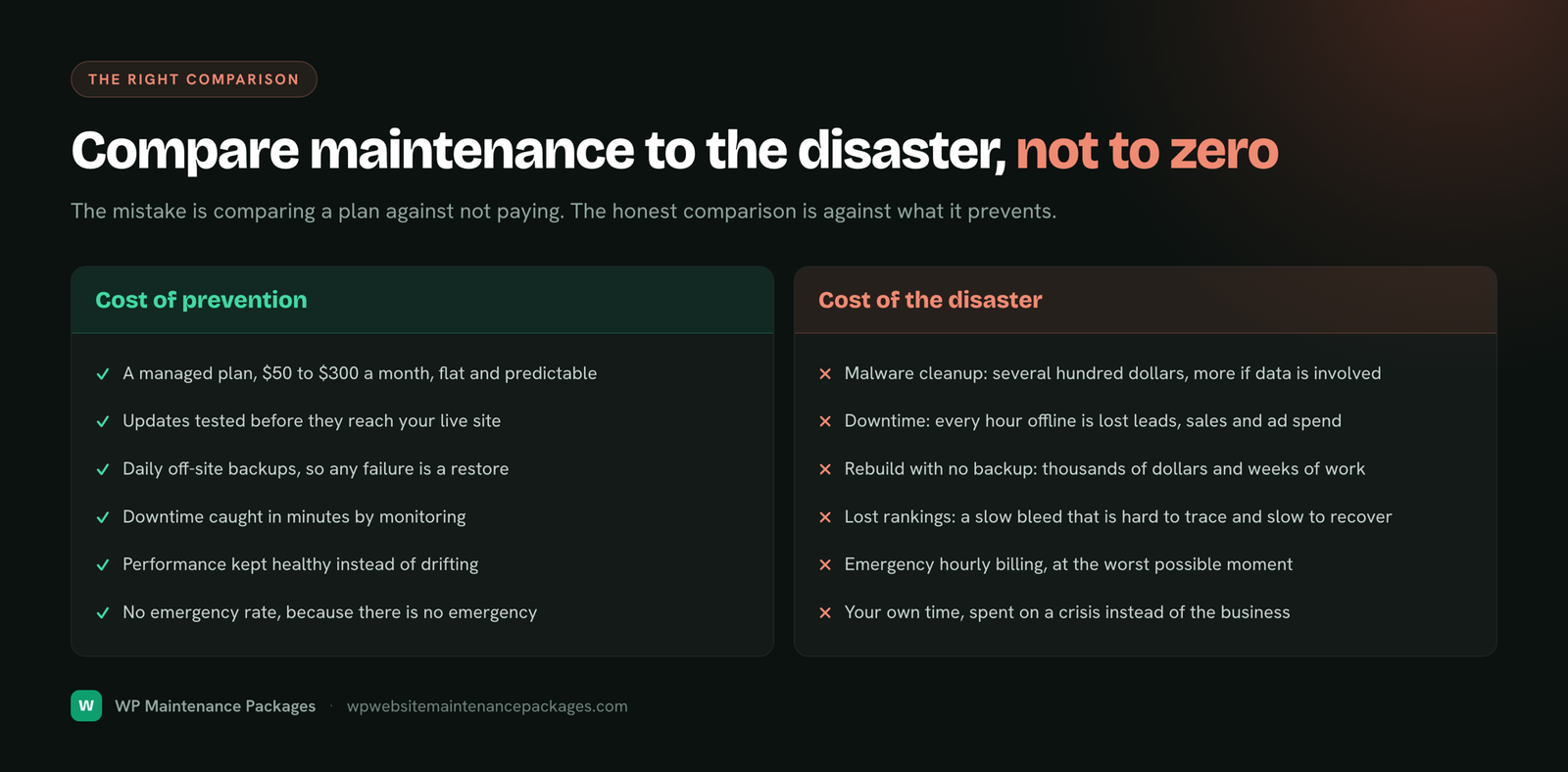
The honest way to judge cost is against the cost of not doing it. Maintenance is cheap and predictable; neglect is expensive and arrives at the worst possible time.
Put simply: maintenance is the cheapest insurance a business website buys, and unlike insurance it also improves the thing it protects by keeping it fast and healthy.
People often lump these together, but they are different budgets. Maintenance is ongoing and keeps your current site healthy. A redesign is a one-time project that rebuilds it. Mixing them up leads to sticker shock in both directions.
| Maintenance | Redesign | |
|---|---|---|
| Cost type | Recurring monthly | One-time project |
| Typical price | $59–$500/mo | $2,000–$15,000+ |
| How often | Every month, ongoing | Every 3–5 years |
| What it does | Keeps the site working | Changes how it looks/works |
Good maintenance actually delays the need for a redesign. A site that is kept fast, updated and secure ages far more gracefully than one left to rot, which means you rebuild less often. In that sense, maintenance is not just a cost, it protects the much larger investment you made building the site in the first place.
You will see maintenance offered from under $10/mo up to thousands, and geography explains part of the gap. Offshore providers often quote a fraction of US rates. That can be great value, or a false economy, depending on what you are protecting.
The sticker price is only half the equation. What decides the real cost is response time, communication and whether the work is actually done to standard. A $15/mo provider who replies in two days while your checkout is broken can cost you more in lost sales than a $129/mo team that fixes it in an hour. For a low-stakes site, cheap and slow is a fine trade. For a site that earns money, you are really buying speed and reliability, and that is where paying a bit more usually pays for itself. Judge a provider on total outcome, not the monthly number alone.
Not every low price is a bargain. Before you sign anything, watch for these signs that a plan is cheap because it does less than it should:
Vague inclusions. "We keep your site updated" with no mention of backups, security or support means it probably does not include them. No backup or restore promise. If they cannot tell you how they would put your site back after a bad update, they cannot really protect you. No response-time commitment. "We'll get to it" is not support. Long contracts up front. Confidence looks like month-to-month. A dashboard instead of a person. Automated updates are not the same as someone who tests them and fixes what breaks. A slightly higher price that covers all six core jobs almost always beats a cheap plan that covers one, the first emergency erases the saving.
You can cut the bill without cutting protection. A few practical moves:
Bundle instead of stitching. One plan that includes hosting, backups and support usually beats paying five vendors separately. Cull plugins. Fewer plugins means less to maintain and fewer conflicts, review quarterly and delete what you do not use. Pick a specialist. A team that only does WordPress works faster and misses less than a generalist. Use managed hosting that handles server security and backups so your plan does not have to. Pay annually if a provider offers 10–20% off and you are committed.
If your site is a low-stakes personal project, earns nothing, and you genuinely enjoy the weekly upkeep, DIY is fine. Do not pay for maintenance out of guilt. Pay for it when the site is worth protecting.
Buying on sticker price alone and missing the hidden costs. Choosing a plan that only automates updates and calls itself "maintenance." Paying hourly for work that recurs every month. Comparing a hosting-included quote against a hosting-excluded one. And picking the cheapest option for a site that actually makes you money, that is where the real cost hides.
Match the plan to what the site is worth, then check five things before you sign:
1. What's included? All six core jobs, or just updates? 2. How fast do they respond? Especially for a site that drives leads or sales. 3. Is hosting included? It changes the total materially. 4. Are developer hours included? Or is every edit billed extra? 5. Who fixes problems? Real people, or a dashboard and a ticket queue? The cheapest plan is rarely the right one; the right one fits your risk.
For transparency, here is our own flat-rate pricing. No hidden fees, no lock-in, and every plan puts a real WordPress developer on your side.
Updates, backups, security & monitoring for small sites.
Full care plus speed work and monthly developer time.
Store support, unlimited small edits, white-label care.
Most websites cost between $20 and $500 per month to maintain in 2026. A simple brochure or personal site sits at the low end ($20–$60/mo), a small business site typically runs $60–$300/mo, and ecommerce or high-traffic sites run $500–$3,000+/mo. The figure depends far more on site complexity and how fast you need help than on the provider.
Annually, budget roughly $0–$360 for a personal site, $700–$3,600 for a small business site, $6,000–$36,000+ for ecommerce, and far more for enterprise. Yearly framing also captures the once-a-year costs people forget: domain renewal, premium plugin licences and annual SSL where it applies.
WordPress maintenance costs about the same as any CMS: $20–$60/mo for DIY-level care, $50–$300/mo for a managed care plan, and $500–$3,000+/mo for WooCommerce and high-traffic stores. WordPress adds one variable most platforms do not: the number of plugins, which is the single biggest driver of how much ongoing work a site needs.
If your site brings in leads or sales, yes. A single hack cleanup, a day of downtime, or a slow slide down the rankings usually costs more than a year of maintenance. For a site that earns nothing, basic DIY care is often enough. The value scales with what the site is worth to you.
A proper plan covers six jobs: software updates, security, backups, speed optimization, uptime monitoring, and fixes. Higher tiers add developer hours, priority support, staging, and store support. Anything cheaper that only does one or two of these is not really maintenance.
It usually is not, relative to the risk it removes. What feels expensive is often a bundle: the plan price plus hosting, premium plugins, a CDN and the occasional emergency fix. Add those up separately and a single bundled plan is frequently cheaper than the piecemeal alternative.
You can, and for a low-stakes personal site it is reasonable. But DIY is not truly free: it costs your time every week, and one untested update on a live site can cost hours or a paid rescue. The real question is whether your time is worth more than the plan.
Freelance WordPress maintenance runs roughly $50–$150 per hour, or $50–$300/mo on a small retainer. Freelancers are cheaper than agencies but carry availability risk: if they are on holiday when your site goes down, you wait.
Agency retainers typically start around $150–$500/mo for standard care and climb into the thousands for ecommerce, enterprise or white-label work. You pay more for a team, coverage, and accountability rather than a single person.
WooCommerce and other stores usually run $500–$3,000+/mo. Stores have more moving parts (checkout, payment gateways, inventory, more plugins) and more to lose from downtime, so they need more hands-on care and faster response.
Hourly ($75–$200/hr) suits occasional one-off fixes. Monthly plans suit ongoing care and are almost always cheaper per unit of work because updates, monitoring and backups happen on schedule rather than being billed reactively at emergency rates.
One-off emergency work (a hacked site, a broken checkout, a white-screen crash) typically costs $100–$500+ per incident, and malware cleanup can run $150–$1,500 depending on severity. A monthly plan usually includes this, which is a large part of why plans pay for themselves.
The line items people forget: managed hosting ($30–$100/mo), premium plugin licences ($100–$1,000/yr), domain renewal ($10–$20/yr), a CDN ($0–$50/mo), and paid backups if not included. Always compare total cost of ownership, not just the sticker price of the plan.
Sometimes, sometimes not, and it makes a big difference to the total. Always confirm whether hosting is bundled or separate before comparing two quotes, or you may be comparing very different things.
Updates should be reviewed at least weekly, backups run daily, and monitoring is continuous. Performance and security audits are usually monthly or quarterly. Consistency is the point: maintenance only protects you if it happens every week without fail.
A typical small business site costs $60–$300/mo for a managed care plan that covers updates, security, backups, monitoring and support. That is usually less than the value of a single lost lead from a day of downtime.
Only if it genuinely covers the six core jobs. Many cheap plans automate updates and nothing else, leaving you exposed on security, backups and real support. Cheap-but-incomplete can cost more than a slightly pricier plan the first time something breaks.
Yes, in three ways: it prevents expensive emergencies, keeps your site fast (which protects rankings and conversions), and bundles costs you would otherwise pay separately and reactively at higher rates.
In order: the number of plugins and integrations, whether it is an ecommerce/transactional site, traffic level, how fast you need support, and how much hands-on developer time you want each month.
Match the plan to what your site is worth. Ask what is included, how fast they respond, whether hosting and developer hours are included, and whether real people or a dashboard handle problems. The cheapest plan is rarely the right one; the right one fits your risk.
Maintenance is the ongoing, recurring work of keeping your existing site secure, updated and fast (a monthly cost). A redesign is a one-time project that rebuilds how the site looks or works, and typically costs $2,000 to $15,000+ depending on scope. You need maintenance continuously; you need a redesign every few years at most.
Good ones do not. The better providers, including us, work month to month with no lock-in, so you can cancel any time. Be wary of any plan that ties you into 12 months up front, especially before you have seen the quality of their work.
Most business sites spend $100 to $1,000 per year on premium plugin licences (forms, SEO, caching, page builders). A lean site might spend under $150; a feature-heavy or ecommerce site can exceed $1,000. Remember these renew annually and are usually separate from your maintenance plan.
Often on the sticker price, yes, offshore rates can be a fraction of US ones. But the total cost depends on communication, response time and quality. A cheap provider who takes two days to answer while your store is down can cost far more than a slightly pricier team that fixes it in an hour.
Most work from a base number of hours per month times an hourly rate, then add a premium for risk (ecommerce, high traffic), the number of plugins, how fast they guarantee to respond, and whether hosting and developer time are included. Understanding that formula is how you tell a fair quote from an inflated one.
Weekly: review and apply updates, check backups ran. Continuously: monitor uptime and scan for threats. Monthly: performance and database cleanup, a plain-English report. Quarterly: a deeper security and plugin audit. If a plan cannot tell you its schedule, that is a red flag.
Yes. Send your URL and we run a full health, security and speed check at no charge, and tell you honestly what shape your site is in and which plan (if any) actually fits.
Founder, ThinkFlow Media & Linkflow.agency · 8+ years in WordPress & SEO
Bhupesh Rathore is the founder of ThinkFlow Media and Linkflow.agency, with 8+ years in WordPress, SEO and website operations. He has built, scaled and maintained WordPress sites across business, ecommerce, SaaS and content niches, and speaks on SEO, most recently at the Chiang Mai SEO Conference 2025. He writes here to share practical, no-nonsense guidance on keeping WordPress sites secure, fast and profitable.
Full profile LinkedIn XSend us your URL. We'll run a full health, security and speed check and tell you honestly which plan fits, even if it's the cheapest one.
Get a free site audit