Every website launches in its best possible state. It is fast, clean, fully patched, and everything works. From that day forward, without maintenance, it only moves in one direction: slower, more vulnerable, more broken. Nothing dramatic happens at first, which is exactly the problem. Neglect is invisible right up until the day it sends you an invoice.
Most owners do not skip maintenance on purpose. They just never see the decay happening, because a website does not announce that a plugin went out of date or that last night’s backup silently failed. It keeps looking fine on the surface while the risk quietly compounds underneath. Then one ordinary day the site gets hacked, or goes down during a sale, or a form stops delivering leads, and the “savings” from skipping maintenance evaporate in a single incident.
This guide lays out exactly why website maintenance is important, in concrete terms rather than vague warnings. Below are the nine real risks of neglect, what each one actually costs, and the flip side, the benefits you gain the moment you take maintenance seriously. If you want the full definition of what the work involves first, start with our guide to what website maintenance is.
What maintenance actually protects
Before the risks, one quick frame. A website is not a static object like a printed brochure. It is live software connected to the internet, built from a core platform, a theme, and plugins, all of which are updated constantly and all of which can be attacked. Website maintenance is the ongoing care that keeps that software secure, current, backed up and fast. When people ask why it matters, what they are really asking is what happens if you leave live software running for a year with nobody watching it. The answer is the nine risks below.
The 9 real risks of neglecting website maintenance
1. Your site gets hacked through a known hole
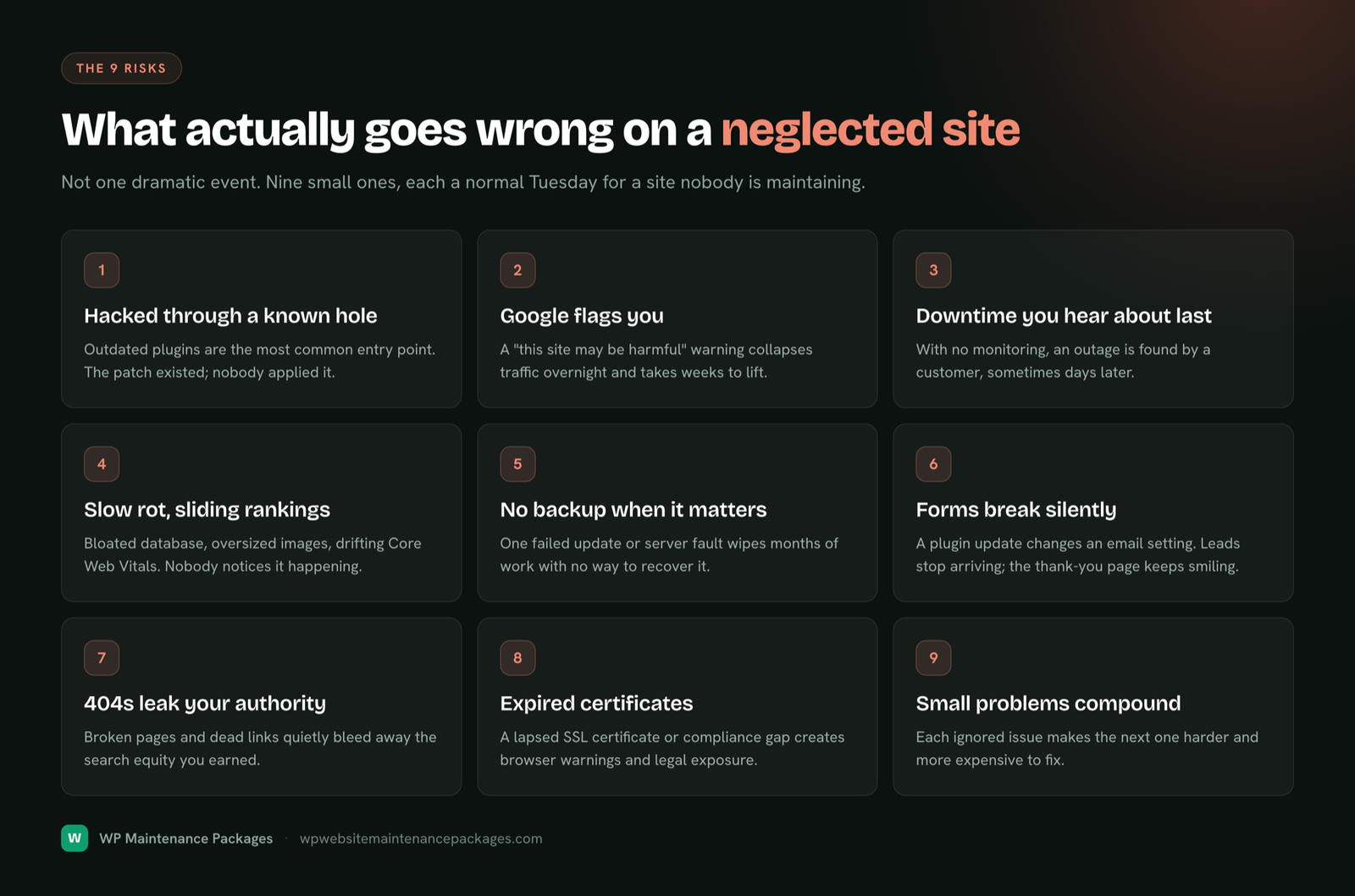
This is the big one, and it is almost always avoidable. The overwhelming majority of website hacks do not come from a genius attacker targeting you personally. They come from automated bots scanning the entire web for sites running a plugin or theme with a publicly known vulnerability, a hole the developer already released a patch for. If you have not applied that patch, you are on the list. The WordPress security documentation is blunt about this: outdated software is the single most common way sites get compromised.
Once in, an attacker can deface your site, inject spam links, redirect your visitors to scam pages, steal customer data, or quietly use your server to attack others. The fix is not exotic. It is applying updates promptly and carefully, which is ordinary maintenance. Skipping it is what leaves the door open.
Warning: “It hasn’t happened yet” is not evidence you are safe. Automated attacks do not care how small or new your site is. Bots hit brand-new sites within days of launch, probing for the same known holes on every target.
2. Google flags you and your traffic collapses overnight
A hack rarely stays a private problem. When Google detects malware or spam injected into your site, it acts to protect its users: it can show a “this site may be harmful” warning in search results, drop your pages, or remove the site from the index entirely. Your organic traffic does not decline gently. It falls off a cliff, often overnight, and browsers may block visitors with a full-screen red warning before they ever reach your homepage.
Recovery is slow. Even after you clean the infection and request review through Google’s hacked-site recovery process, rebuilding the trust that decides your rankings can take weeks. Every day in between is lost traffic, lost leads and lost revenue. Consistent security maintenance is what keeps you off that list in the first place.
3. Downtime you find out about last
Without uptime monitoring, the first person to notice your site is down is usually a customer, and they notice by leaving. Servers hiccup, updates misfire, hosting has outages, SSL certificates expire, domains lapse. Any of these can take a site offline, and if nobody is watching, the outage can run for hours or even days before you stumble onto it yourself.
Every hour offline has a real price: lost leads, abandoned purchases, wasted ad spend driving traffic to a dead page, and the harder-to-measure damage of a visitor who decides your business looks unreliable and never comes back. Monitoring means the site is checked continuously and someone is alerted the moment it stops responding, so most outages are caught and fixed before they cost you anything.
4. Your site slowly rots and rankings slide
This is the most expensive risk precisely because nobody sees it happening. Websites do not stay fast on their own. Databases fill with post revisions and expired data, images get uploaded at full resolution, plugins pile scripts onto every page, and caching drifts out of tune. Month by month the site gets a little slower, and a slower site converts fewer visitors and ranks lower.
Speed is not a soft factor here. Google measures real-world performance through Core Web Vitals and uses it as a ranking signal, and you can check your own scores any time with PageSpeed Insights. A maintained site holds those scores up as it grows. A neglected one drifts down every quarter, bleeding rankings and conversions with no obvious cause, which is why owners so often cannot explain why their traffic quietly faded.
5. A single failure wipes out the site, with no backup to fall back on
One bad update, one corrupted database, one host failure, and a site can be gone. If your only copy lived on the same server that just failed, or if backups were never actually running the way you assumed, there is no undo button. Months or years of content, configuration and customer data can vanish in an afternoon.
Proper backups, daily, automatic, stored off-site, and tested by actually restoring one now and then, are what turn a catastrophe into a twenty-minute fix. Neglect here does not just risk one type of disaster; it removes your recovery option for every other risk on this list. A backup you have never restored is a hope, not a plan.
6. Your forms break and leads vanish silently
For a lead-generation site, the contact form is the entire business, and forms are fragile. A plugin update changes an email-routing setting, an SMTP service expires, a spam filter tightens, and suddenly submissions stop arriving in your inbox. Nothing looks broken. The form still submits, the thank-you page still smiles at visitors, and you keep spending on traffic while the leads quietly evaporate into nowhere.
This one is brutal because there is no alert, no error, no visible symptom. Owners often discover it only when they realise the inquiries dried up weeks ago. Maintenance means testing the full conversion path, form submission through to email delivery, after every change, so a silent break gets caught in days rather than quarters.
7. Broken pages and 404s leak the authority you earned
Over time, sites accumulate broken links and dead pages: a deleted post, a renamed URL, a plugin that stops working, an external link that rots. Each broken internal link wastes the link equity your content earned, and each 404 is a small dead end for both visitors and search crawlers. Individually they are minor. Left unchecked for a year, they add up to a leaky site that frustrates users and quietly bleeds the SEO value you worked to build.
Routine maintenance catches these and fixes or redirects them, keeping your authority flowing to pages that can actually use it. It also keeps your internal linking, the structure that helps Google understand your site, intact as the site grows and changes.
8. Expired certificates and compliance gaps create legal and trust exposure
Some of the quietest failures are the ones with the biggest consequences. An expired SSL certificate turns your padlock into a full-page browser warning that scares off every visitor. A lapsed domain can take the whole site offline or, worse, be snapped up by someone else. Out-of-date privacy or cookie handling can create compliance exposure as regulations shift. And on stores, outdated payment and security components can put customer data at risk.
None of these announce themselves in advance. They are calendar items and monitoring tasks, exactly the kind of unglamorous work that maintenance exists to never let slip. Skipping it means finding out at the worst possible moment.
9. Small problems compound into expensive emergencies
The final risk is the pattern behind all the others. Neglect is not one event; it is a slow accumulation of small, ignored problems that eventually collide. An unpatched plugin plus no backup plus no monitoring is not three minor gaps, it is one hack away from a full-blown crisis with no recovery path and a large repair bill.
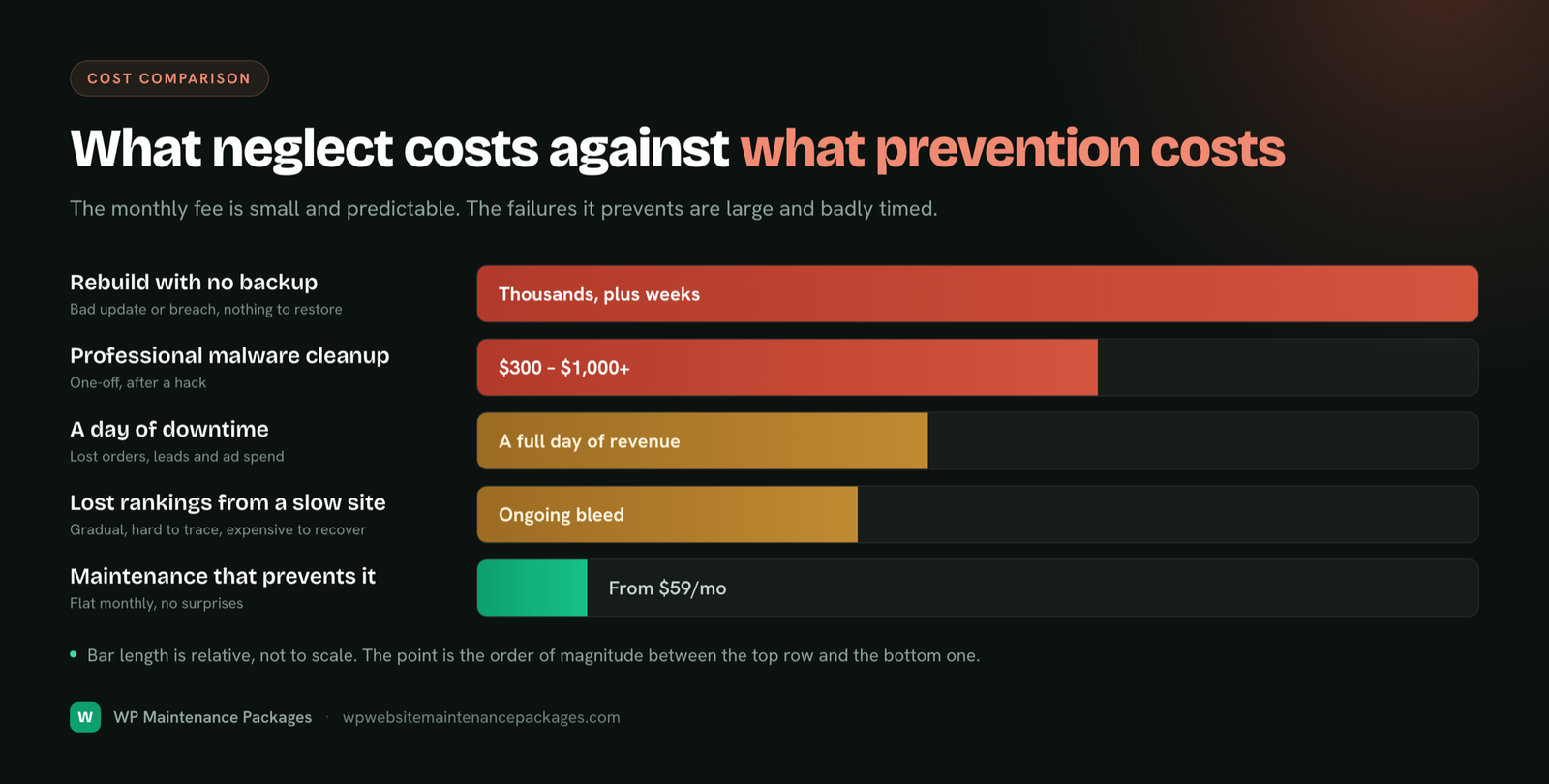
Reactive fixing always costs more than proactive prevention. A professional malware cleanup typically runs several hundred to over a thousand dollars, billed as an emergency, on top of the revenue lost while the site was down or flagged. The routine maintenance that would have prevented it costs a fraction of that and spreads predictably across the year. Neglect does not save money. It defers a bigger bill to a worse time.
The benefits, the same story from the other side
Every risk above has a mirror image, and together they answer the second half of the question: the benefits of website maintenance. This is why maintained sites do not just avoid losses, they quietly compound gains.
- Security and peace of mind. Patched software, a firewall, monitoring and clean backups mean you are not lying awake wondering if today is the day. Most incidents never happen, and the rest are survivable.
- Better rankings, earned quietly. Speed, uptime and clean structure are all inputs Google rewards. A well-maintained site holds and improves its position while neglected competitors drift down.
- More conversions. Faster pages convert better, and working forms and checkouts mean every lead and sale actually lands. Maintenance protects revenue at both ends.
- Reliability that builds trust. A site that is always up, always fast and always current tells visitors your business is serious. Reliability is a brand asset.
- Predictable cost instead of surprise bills. A flat monthly maintenance cost replaces the spiky, stressful pattern of emergency repairs billed at the worst moment.
- Your time back. Someone else owns the update calendar, the monitoring alerts and the 2am firefighting, so you can run your business instead of babysitting software.
What neglect actually costs
It helps to put rough numbers against the risks, because the maintenance decision is really a cost comparison. Here is how the two paths compare over a typical year.
| Scenario | Neglected site | Maintained site |
|---|---|---|
| Malware cleanup | $300 to $1,000+ per incident, billed as emergency | Included, prevented or cleaned same-day |
| Downtime | Discovered late; hours of lost leads and sales | Caught and fixed before it costs you |
| Speed and rankings | Gradual decline, invisible until traffic is gone | Scores held up; rankings protected |
| Data loss | Possible total loss, no recovery | Restore from off-site backup in minutes |
| Lost leads (broken forms) | Silent, can run for weeks undetected | Conversion path tested after every change |
| Yearly cost | Unpredictable, spiky, arrives at the worst time | Flat and predictable, often less than one incident |
Set against any single one of those failures, a maintenance plan is not an expense. For a full market breakdown of what that plan should cost, see our website maintenance cost guide.
Expert tip: If you do nothing else, get reliable off-site backups and basic uptime monitoring in place today. Those two alone convert most website disasters from “catastrophe” into “minor inconvenience,” for very little cost.
Which sites are most at risk?
Every website needs maintenance, but the cost of neglect is not evenly distributed. The sites that get hurt worst are often the ones whose owners assume they are safe.
Brochure and local business sites are the classic trap. They change rarely, so owners assume they need nothing, and because nobody logs in for months, a hack or a broken form goes unnoticed the longest. A small site breached in January can still be serving spam in June. Lead-generation sites are one silent form break away from losing their entire pipeline. Ecommerce and WooCommerce stores carry the highest stakes of all: payment systems, customer data, and a direct dollar cost for every minute of downtime, which is why store maintenance is its own discipline. And any site earning meaningful traffic has real SEO authority to lose to slow decay. If your website does anything for your business, neglect has a price.
How to protect your site
The good news is that everything on this list is preventable with ordinary, consistent care. You have two honest options.
Do it yourself, if you have the technical comfort and, crucially, the discipline to keep it up every single week without fail. Our free website maintenance checklist lays out every task by frequency so nothing slips. The catch is consistency: most owners keep a checklist running for about six weeks before updates start slipping, and slipping is exactly the state these risks exploit.
Or hand it to a team that does it on schedule so you never think about the calendar. That is what managed maintenance is for. Our website maintenance packages cover updates, security, backups, speed, monitoring and support from a flat monthly fee with no contracts, and for security-specific emergencies our malware removal and security service handles cleanup and hardening. Either way, the point is the same: these nine risks are not bad luck. They are the predictable result of leaving live software unattended, and they are just as predictably prevented.
The bottom line
Website maintenance matters because the alternative is not “saving money,” it is quietly accumulating risk until it costs you far more than maintenance ever would. A neglected site gets hacked, drops out of search, goes down unnoticed, loses leads silently, and can disappear entirely with no way back. A maintained site stays secure, fast, reliable and online, and compounds small advantages in rankings and conversions over time. The nine risks above are not scare tactics; they are the ordinary, documented ways unmaintained websites fail. The only real question is whether you would rather prevent them on a schedule or pay for them by surprise.
Frequently asked questions
Why is website maintenance important?
Because a website is live software that decays without care. Left unmaintained, it gets hacked through outdated plugins, slows down and loses rankings, goes offline unnoticed, loses leads through broken forms, and can be lost entirely with no backup. Maintenance prevents all of that on a predictable schedule for a fraction of the cost of a single incident.
What are the benefits of website maintenance?
Stronger security and peace of mind, better and more stable Google rankings, higher conversions from a faster site with working forms, reliability that builds trust, predictable costs instead of surprise emergency bills, and your own time back. Maintenance both prevents losses and actively improves the site.
What actually happens if I don’t maintain my website?
It degrades in predictable ways: outdated software becomes an open door for automated attacks, speed and rankings slide, downtime goes undetected, forms and features quietly break, and without working backups a single failure can wipe the site out. The damage stays invisible until it surfaces as an expensive emergency.
How likely is it that my small site gets hacked?
More likely than most owners think. The majority of hacks are automated bots scanning for known vulnerabilities on any site, regardless of size or traffic. New and small sites get probed within days of launch. Being small does not make you invisible; it often just means the breach goes unnoticed longer.
Isn’t maintenance just an unnecessary cost?
It is the opposite. Neglect defers a bigger, unpredictable bill to a worse time. A single malware cleanup often costs more than a year of maintenance, before counting lost revenue from downtime or a Google flag. Maintenance replaces spiky emergency costs with a small, predictable one, and improves the site while doing it.
Does good hosting mean I don’t need maintenance?
No. Hosting keeps a server running; maintenance keeps your website running. Your host will not update your plugins, test your forms, clean malware from your files, optimise your database or fix a broken layout. Even managed WordPress hosts cover only part of the job. The two are different things.
How much website maintenance is enough to avoid these risks?
The core cadence is weekly tested updates, daily backups, continuous uptime monitoring, monthly performance and database work, and quarterly security audits. For a typical business site that is a few hours of work a month. The exact tasks are laid out in our maintenance checklist; consistency matters more than volume.
Can I fix a neglected site, or is it too late?
Almost always fixable. A neglected site can be audited, cleaned, updated, backed up and brought back to full health, and then kept there with ongoing care. The longer neglect runs the more there is to repair, so the best time to start is now, before the next incident rather than after it.