Automated daily off-site backups, encrypted and monitored, plus fast recovery when something goes wrong. Backups you can actually restore, on your own hosting, so one bad day never becomes a lost website.
Backups are included in every maintenance plan, from $59/mo, no contracts.
Every website is one bad moment away from disaster: a failed update, a hack, a server crash, a mistaken click that deletes the wrong thing. Without a backup, any of those can mean losing months or years of work, content, and customer data with no way to get it back. With a good backup, the same events become a twenty-minute fix instead of a catastrophe.
Backups are the single most important safety net a website has, because they are what make everything else recoverable. A hacked site can be restored clean. A broken update can be rolled back. A crashed server can be rebuilt somewhere else. The backup is the difference between "we had a scare" and "we lost the website." For the wider case on why neglecting this bites, see why website maintenance matters.
A website backup is a complete saved copy of everything your site is made of, kept so it can be restored if the live site is damaged or lost. For it to actually rebuild a working site, a backup has to include both halves of your website.
Miss either half and you cannot restore a working site. It is also worth being clear about what a backup is not. A backup is not security (it does not stop attacks; it helps you recover from them), and a backup is not the same as disaster recovery (the backup is the copy; disaster recovery is the plan for using it). Good backup services join all three: prevention, a reliable copy, and a tested plan to bring the site back.
The right frequency comes down to a simple question: how much work can you afford to lose? If your site changes constantly, you need frequent backups; if it rarely changes, you need fewer. Backing up too rarely risks losing days of data; the answer is matching the schedule to how the site is actually used.
| Type of site | How it changes | Recommended backup |
|---|---|---|
| Brochure / local business | Rarely changes | Daily is plenty |
| Blog / content site | New posts regularly | Daily |
| Lead-gen / service site | Enquiries and updates | Daily, plus before every change |
| WooCommerce store | Orders all day | Real-time or several times a day |
| Membership / course site | Signups and progress | Frequent, with careful restore handling |
A backup service is only as good as its weakest link. Ours is built so that the copy exists, survives a server loss, stays private, and can actually be restored, every part of the chain, not just the easy first step.
Backups run automatically on a schedule that fits your site, so protection never depends on someone remembering to click a button.
Copies are stored securely away from your web server, so your safety net survives even if the server itself is lost, hacked or deleted.
Backups are encrypted in transit and at rest, so your files and customer data stay private even in storage.
We watch that backups actually run and succeed, and step in when one fails, rather than assuming a silent job worked.
We keep a rolling history of recent backups, so you can roll back to before a problem you only noticed days later.
We verify that backups can actually be restored, because an untested backup is a hope, not a guarantee.
When something goes wrong, we restore your site fast from a clean copy and confirm it works, forms, checkout and all.
As part of maintenance, we take a fresh backup before applying updates, so every change is reversible.
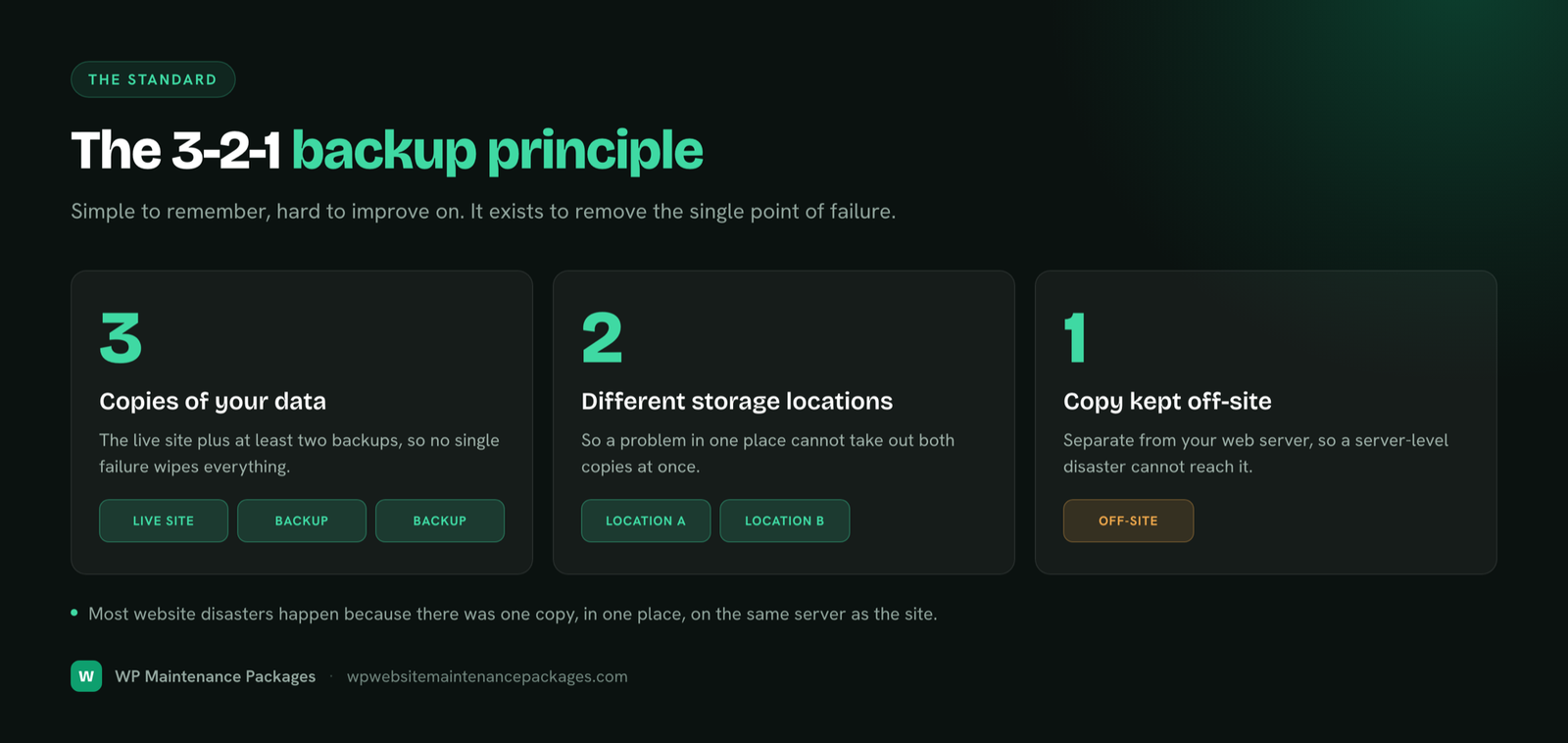
The backup approach trusted across the industry is simple to remember and hard to improve on. It is the standard that protects against nearly every kind of loss.

Most website disasters happen because someone kept a single copy in one place, usually on the same server as the site. The 3-2-1 principle exists precisely to remove that single point of failure, and it shapes how we store your backups.
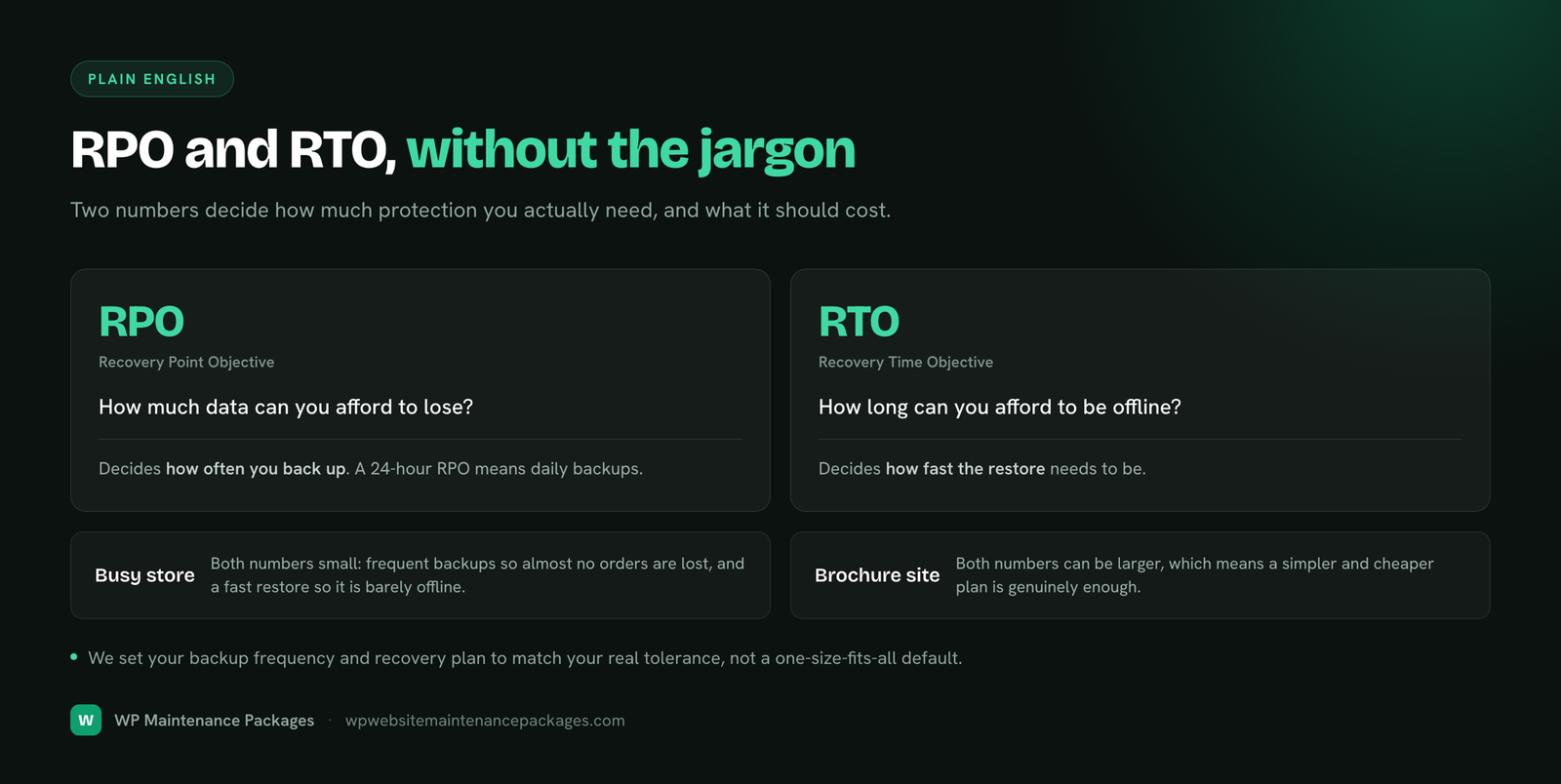
Two simple numbers decide how much protection you actually need. You do not need the jargon, but understanding the idea helps you choose the right backup frequency.

| Term | What it means | What it decides |
|---|---|---|
| RPO (Recovery Point Objective) | How much data you can afford to lose | How often you back up. A 24-hour RPO means daily backups. |
| RTO (Recovery Time Objective) | How long you can afford to be offline | How fast the restore needs to be. |
A busy store wants both numbers small: frequent backups (so it loses almost no orders) and fast restore (so it is barely offline). A brochure site that rarely changes can tolerate larger numbers and a simpler, cheaper plan. We set your backup frequency and recovery plan to match your real tolerance, not a one-size-fits-all default.
Backups are only half the job. What you are really buying is the ability to get back online fast when something goes wrong. Here is how that works.
We configure automated backups at the right frequency, stored off-site and encrypted, matched to how your site is used.
We check that backups run and succeed, keep a rolling set of restore points, and periodically test that a restore actually works.
When disaster strikes, we pick a clean restore point from before the problem and bring the site back, files and database together.
We confirm the restored site works end to end, then, if it was a hack, close the hole that caused it so it does not recur.
WordPress backups have their own quirks. Because a WordPress site is files plus a database, a backup has to capture both in sync, and the database is where your content, settings and users actually live. As part of our WordPress maintenance services, backups run automatically and a fresh one is always taken before updates, so the moment most likely to break a site is also the moment it is most protected. Our WordPress care plans bundle this with the rest of the upkeep.
Stores need extra care. A WooCommerce database changes every time an order comes in, so a once-daily backup can still lose a day of orders and customer records, and restoring an old backup can accidentally erase recent sales. Backing up a store safely means more frequent backups and careful restore handling that preserves recent orders. That specialist work is part of our ecommerce maintenance.
Most "we had backups but still lost the site" stories come down to the same handful of errors. Every one is avoidable.
You can back up a WordPress site yourself with a good plugin, and for a low-stakes site that may be enough. The trade-off is who is responsible when it matters, and whether anyone actually verifies the backups work.
| DIY backups | Managed backup service | |
|---|---|---|
| Best for | Simple sites, low stakes | Business sites, stores, anything you cannot lose |
| Off-site storage | Only if you set it up | Built in and encrypted |
| Monitoring | You have to remember to check | Watched; failures caught |
| Restore testing | Rarely done | Done, so backups are proven |
| When disaster hits | You do the restore, under pressure | We restore it fast for you |
If you prefer the DIY route, our free website maintenance checklist includes the backup tasks worth doing on a schedule.
Put simply, any site you would be upset to lose. That covers more sites than owners assume, because the cost of a lost site is rarely just the rebuild, it is the downtime, the lost customers, and the data you cannot recreate.
We test restores, not just create files. A backup only counts when it can actually bring your site back.
Copies stored securely away from your server, encrypted, following the 3-2-1 principle, so a server loss never takes your safety net with it.
We manage backups for the site on your own hosting account. No reselling, no lock-in; you keep control.
When something breaks, a real person restores your site quickly from a clean copy, not a support queue reading a script.
Backups run alongside updates, security and monitoring, so the whole site stays protected, not just the copy.
Month-to-month plans with no lock-in. We keep you by being reliable when it counts.
Get automated, off-site, tested backups and fast recovery as part of a maintenance plan, from $59/mo with no contracts.
Protect my websiteWebsite backup services are a managed service that automatically saves complete copies of your website (its files and database), stores them somewhere safe and separate from your live server, and can restore the site quickly if something goes wrong. The key word is managed: someone makes sure the backups actually run, keeps them off-site, and can restore them when you need it, rather than leaving it to a plugin nobody checks.
It depends on how often your site changes. A simple brochure site that rarely changes can be backed up daily or even weekly. A blog or business site that publishes regularly should be backed up daily. A busy store taking orders needs backups as often as possible, ideally real-time or several times a day, because every hour of lost orders is real money. We set the frequency to match how much data you can afford to lose.
A complete backup covers everything needed to rebuild the site: all the website files (themes, plugins, uploads and media), the full database (your pages, posts, settings, users and, for stores, orders and customers), and the configuration. A backup that saves only the files or only the database is not a full backup, because you cannot restore a working site from half of it.
An off-site backup is a copy stored somewhere separate from your website's own server, usually secure cloud storage. It matters because a backup that lives on the same server as your site disappears if that server fails, gets hacked or is deleted, exactly the moment you need it. Off-site storage means your safety net survives even a total loss of the original server.
Backup protection is included in our maintenance plans, which run from $59/mo with no contracts, so for most sites there is no separate backup bill. Standalone pricing across the market varies widely depending on frequency, storage and site size. We do not charge a fabricated per-backup fee; the plan covers automated backups, off-site storage and recovery as part of keeping your site healthy.
With a managed service, you do not do it yourself. You tell us what happened, we identify a clean restore point from before the problem, and we restore the files and database, then check the site works. On a well-run backup system a restore takes minutes to a few hours depending on the site's size, which is the whole point of paying for backups you can actually rely on.
Yes, when done properly. Reputable cloud storage encrypts your backups both in transit and at rest, and access is restricted. The security risks with backups usually come from bad practice (storing them on the same server, leaving them unencrypted, or never testing them) rather than from cloud storage itself. We use encrypted, access-controlled off-site storage.
A backup does not prevent a hack, but it is your fastest way to recover from one. If your site is infected, a clean backup from before the infection lets us restore it quickly instead of trying to clean every last malicious file. Backups and security work together: security reduces the chance of an incident, backups make sure any incident is survivable. For active infections, see our malware removal and security service.
A backup is the saved copy of your site. Disaster recovery is the whole plan for getting back online when something goes wrong: which backup to use, how fast you can restore, who does it, and how you verify the site works afterward. A backup is a component; disaster recovery is the strategy that makes the backup actually useful in a crisis.
They are the two numbers that define your backup strategy. RPO (Recovery Point Objective) is how much data you can afford to lose, which sets how often you back up: a 24-hour RPO means daily backups. RTO (Recovery Time Objective) is how long you can afford to be down while restoring. A busy store wants both small (frequent backups, fast restore); a brochure site can tolerate larger numbers. We set both to fit your business.
Good practice is a rolling retention window: several recent restore points kept so you can go back not just to yesterday but to before a problem you only noticed later, such as a slow malware infection. The right window balances how far back you might need against storage cost. We keep enough history to give you real recovery options, not just last night's copy.
Yes. A store's database changes constantly as orders come in, so a once-a-day backup can still lose a day of orders and customer data. Stores need more frequent backups and careful restore handling, because restoring an old backup could wipe recent orders. This is specialist work, and it is part of our ecommerce maintenance.
Often not, and relying on it alone is risky. Host backups are frequently stored on the same infrastructure as your site, may be infrequent, can be hard to restore selectively, and disappear if you leave the host or the account is suspended. They are a bonus, not a strategy. An independent, off-site backup that you control is what actually protects you.
Because a backup that has never been restored is a hope, not a guarantee. Backups can silently fail, corrupt, or save incomplete data, and you do not want to discover that during an emergency. Periodically performing a real restore is the only way to know your backups actually work. Restore testing is part of a serious backup service, not an optional extra.
Bhupesh Rathore is the founder of ThinkFlow Media and Linkflow.agency, with 8+ years in WordPress, SEO and website operations. He has built, scaled and maintained WordPress sites across business, ecommerce, SaaS and content niches, and speaks on SEO, most recently at the Chiang Mai SEO Conference 2025. He writes here to share practical, no-nonsense guidance on keeping WordPress sites secure, fast and profitable.