Free site audit · No lock-in contracts · US-based WordPress team hello@thinkflow.agency Book a call
Managed WordPress care

WordPress Care Plans

Ongoing, done-for-you care that keeps your WordPress website secure, updated, backed up and fast, looked after by real WordPress developers, not a dashboard. Compare what each plan includes, see how we care for your site each month, and pick the fit that matches what your website is worth. No contracts, cancel anytime.

By Bhupesh Rathore, ThinkFlow Media Updated August 2026 Care plans from $59/mo

The short version

A WordPress care plan is a monthly service that looks after your site for you: updates, security, daily backups, speed and a developer on call, all for a flat fee. Ours run from $59/mo for small sites to $249/mo for stores and agencies, with no contracts. This page explains what a care plan really is, how it differs from what your host does, what each plan covers, and how to choose. For general market pricing across all providers, see our website maintenance cost guide, and for the plans framed around "maintenance," our website maintenance plans page.

Start here

What is a WordPress care plan?

A WordPress care plan is an ongoing service that looks after your website after it launches, so it stays secure, current and fast without you having to manage the technical side. For a fixed monthly fee, a team handles the recurring work every live WordPress site needs, and steps in when something goes wrong. Think of it the way you would a service plan for a car: the vehicle runs fine today, but it needs regular attention to keep running, and skipping that attention is how small issues become expensive breakdowns.

The term "care plan" comes from the WordPress community itself. As WordPress grew into the platform behind a huge share of the web, agencies and freelancers began offering monthly retainers to keep client sites healthy, and "care plan" became the friendly name for it, emphasising that a real person cares for your site rather than leaving it to chance. You will see the same service sold as website maintenance plans, WordPress support plans, or managed WordPress care. Underneath the branding, they describe the same commitment: someone reliable keeps your website in good shape, every week, so you do not have to.

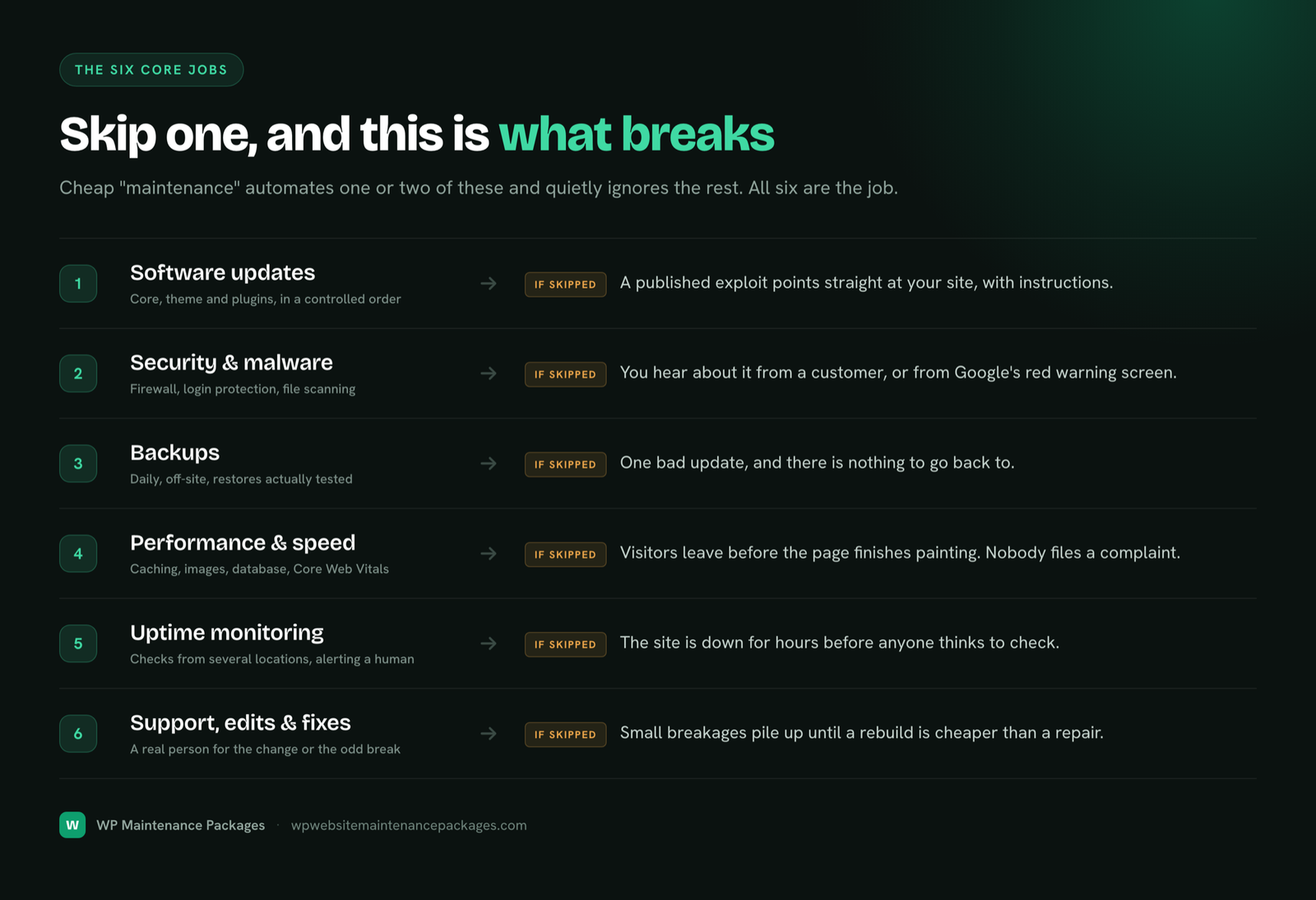
A real care plan is built around six areas of work: keeping WordPress and its plugins updated, defending the site against attacks, backing everything up daily, keeping pages fast, monitoring for downtime, and fixing problems when they appear. The trap to avoid is the cheap "care plan" that only automates updates and calls it done. Automating an update is not the same as caring for a site, because the moment an update conflicts with your theme or a plugin, an automated system just moves on while your site sits broken. Care means a human notices and fixes it.

A common question

Care plan vs maintenance plan: what's the difference?

Honestly, very little. "Maintenance plan" and "care plan" are two names for the same service, and providers use them almost interchangeably. If there is a shade of difference, it is one of emphasis. "Maintenance" leans on the technical upkeep, the updates, patches and backups. "Care" leans on the relationship, the sense that a real person is looking after your site and is there when you need help. Some agencies deliberately choose "care plan" to signal that you are buying attention from humans, not just access to automated tooling.

What actually matters is not the word on the pricing page but the scope of work behind it. A cheap plan called a "care plan" that only runs automatic updates is worse than a well-built plan called a "maintenance plan" that covers all six core jobs. When you compare providers, ignore the label and read the inclusions. Ask what happens when an update breaks something, whether backups are stored off-site, and who actually responds when you have a problem. Those answers tell you far more than whether they picked "care" or "maintenance" for the headline.

Bottom line

Do not overthink the name. Compare what is included, how fast they respond, and whether a real developer stands behind it. That is what separates a plan that protects your site from one that just looks like it does.

Why it matters

Why every WordPress website needs ongoing care

WordPress is powerful precisely because it is extensible, but that same flexibility is what makes ongoing care essential. Every plugin and theme you add is third-party code that needs to stay current, and the numbers from 2025 and 2026 show why leaving it alone is a gamble.

11,000+WordPress vulnerabilities logged in 2025
90%+found in plugins, not core
~5 hrsmedian time to first exploit after disclosure
~$14.5kaverage all-in cost of a hack

The reassuring news is that WordPress core is very secure; only a handful of core vulnerabilities surfaced in all of 2025. The risk lives in the plugins and themes that make your site yours, where researchers catalogued more than eleven thousand vulnerabilities in a single year. Because WordPress runs such a large slice of the web, automated bots scan for these flaws constantly, and the median gap between a vulnerability being disclosed and the first exploit attempt is around five hours. That is the window a care plan closes. Most sites that get hacked were simply running something out of date, the exact thing regular care prevents.

Security is only half of it. Websites also decay in quality over time: databases bloat, images pile up unoptimized, and each new plugin adds weight, so a site that launched fast gradually slows down. Since Google treats speed as a ranking factor and only about a third of mobile WordPress sites currently pass Core Web Vitals, a neglected site quietly loses both rankings and conversions. Ongoing care keeps the site fast as well as safe, which is why a care plan is best understood not as a cost but as protection for an asset that is actively earning for your business.

The big misconception

Isn't my hosting enough?

This is the most common reason people skip a care plan, and it comes from a reasonable misunderstanding of what hosting actually does. Managed WordPress hosts like Kinsta, WP Engine and Cloudways are excellent, and they will keep the server running, often run automatic core updates, and take basic backups. But hosting looks after the server your site sits on, not the site itself. Those are two different layers, and the gap between them is where most problems live.

Here is what even good hosting typically does not do. It does not test updates against your specific combination of theme and plugins, so an automatic update can still break your layout or your checkout. It does not clean malware out of your site if you get infected, that is your problem to solve. It does not optimize your speed beyond server-level caching, so a bloated database or heavy plugins still slow you down. It does not fix your contact form when it stops sending, rebuild a page, or answer at 2am when your site goes white. And host backups are often on the same infrastructure and limited in retention, which is not the off-site safety net you want when something serious happens.

JobYour hostA care plan
Keep the server runningYesNot needed
Test updates against your pluginsNoYes
Clean malware from your siteNoYes
Optimize site speed & Core Web VitalsServer-level onlyYes
Off-site backups you controlSometimes, limitedYes, daily
Fix things & answer questionsNoYes

Good hosting and a care plan are partners, not substitutes. The host protects the foundation; the care plan protects the house you built on it. You want both, and a care plan is the layer most site owners are missing.

The six core jobs

What's included in our WordPress care plans

Every plan is built on the same six foundations. Here is what each involves in practice, so you know exactly what your monthly fee buys.
Updates, done safely

WordPress core, themes and plugins updated weekly, backed up first and tested after, with major updates staged before they touch your live site. Updates that fix problems, not cause them.

Security & malware

Firewall, login protection, file-change monitoring and regular scans, plus cleanup and hardening if anything ever gets through. We follow WordPress and OWASP security best practices.

Daily cloud backups

Automatic daily backups stored off-site, so a server failure can never take your backup with it, and any change is reversible in one click.

Speed & performance

Caching, image optimization and database cleanup to keep pages fast and Core Web Vitals healthy, which protects both experience and rankings.

24/7 monitoring & reports

Round-the-clock uptime monitoring that alerts us the moment your site goes down, plus a plain-English monthly report so you can see the care happening.

A real developer

Small fixes, edits and the occasional emergency handled by a human who knows your site, from a broken form to the dreaded white screen, not a ticket queue.

Choose your care plan

Compare our WordPress care plans

Three plans, no hidden fees, no lock-in. Each puts a real WordPress developer on your side for less than the cost of a single emergency call-out.

Essential Care

The safety net for small sites that need to stay secure and online.

$59/mo
  • Weekly core, theme & plugin updates
  • Daily off-site backups
  • 24/7 uptime monitoring
  • Security hardening & malware scans
  • Monthly health report
  • 1 SEO blog post per month
Start Essential
Most popular

Growth Care

Full care plus speed work and real developer time every month.

$129/mo
  • Everything in Essential
  • Speed & Core Web Vitals tuning
  • Advanced firewall + same-day malware cleanup
  • Priority support (under 4-hr response)
  • 2 hours of edits / dev work monthly
  • Staging-tested updates + 2 blog posts
Start Growth

Pro / Agency Care

Hands-on care for stores, high-traffic sites and agencies.

$249/mo
  • Everything in Growth
  • Unlimited small content edits
  • WooCommerce & payment gateway support
  • Dedicated account manager
  • White-label monthly reports
  • Priority emergency support + 3 blog posts
Talk to us

Prefer to see these framed as maintenance, or need the full service breakdown? Visit our maintenance plans and WordPress maintenance services pages.

Side by side

Care plan feature matrix

The exact differences between the plans, so you can see what you get at each tier at a glance.

FeatureEssential
$59
Growth
$129
Pro
$249
Weekly updates (core, theme, plugins)
Daily off-site backups
24/7 uptime monitoring
Security hardening & malware scans
Monthly health report
Speed & Core Web Vitals tuning
Same-day malware cleanup
Priority support (under 4 hrs)
Staging-tested updates
Developer / edit time2 hrs/moUnlimited small
WooCommerce / store support
Dedicated account manager
White-label reports (agencies)
SEO blog posts / month123
ContractNoneNoneNone
How we care for your site

Our monthly WordPress care process

Care only works if it happens on a schedule, not when someone remembers. Here is the rhythm we run for every site on a plan.

1

Onboard & audit

We audit your site, take a full backup, harden security and bring everything current before day-to-day care begins.

2

Update & protect

Weekly tested updates, continuous monitoring and security scanning keep the site safe and current every week.

3

Optimize

Monthly speed passes, database cleanup and health checks keep the site fast and Core Web Vitals healthy.

4

Report & improve

A plain-English monthly report shows what we did, what we blocked, and where your site can improve next.

The work, on a schedule

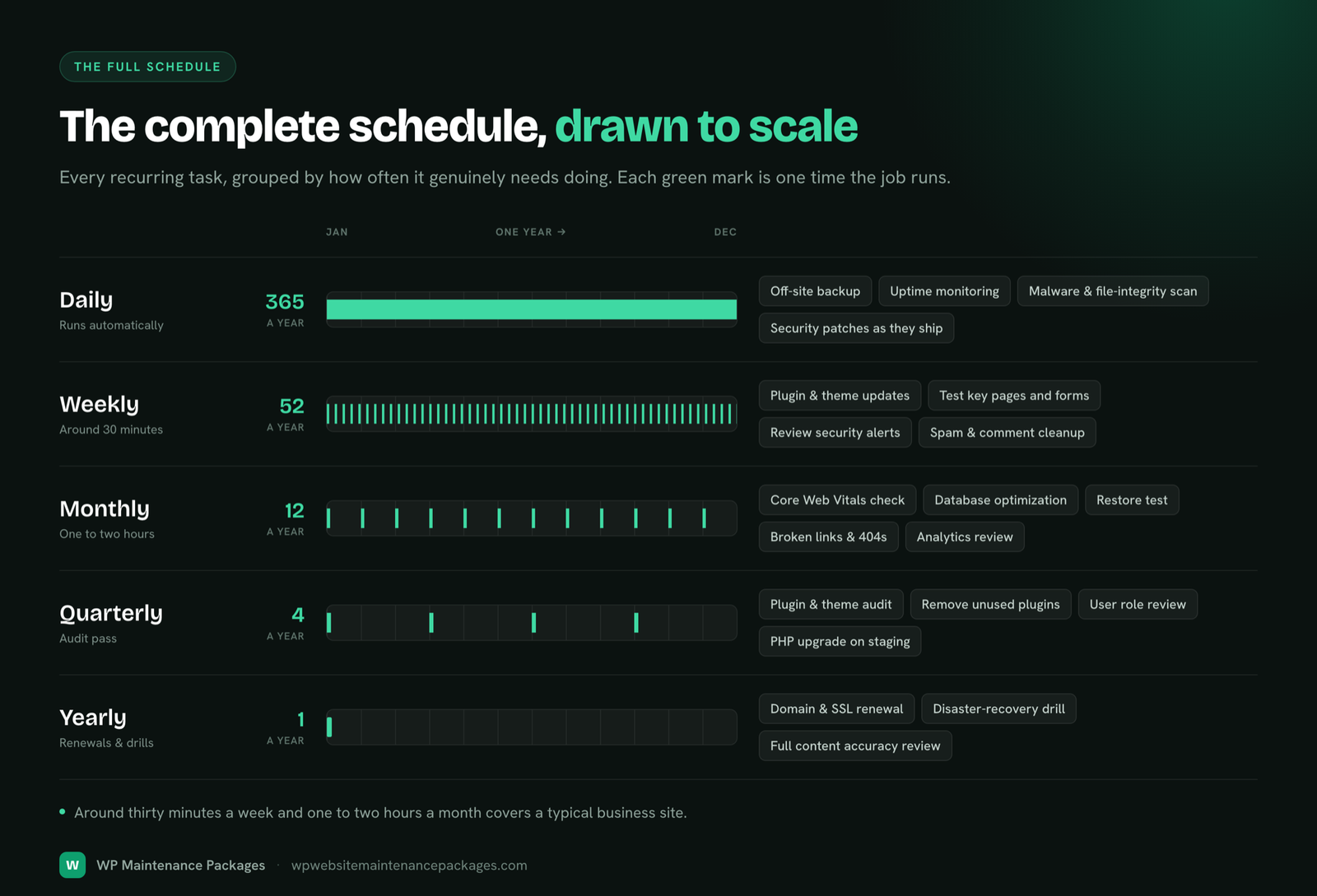
Your WordPress health checklist

This is the cadence behind the care, the same routine a good in-house team would run, handled for you.

Weekly

  • Review & apply updates
  • Back up first
  • Test after updating
  • Verify backups ran

Continuous

  • Uptime monitoring
  • Firewall & login defense
  • Malware scanning
  • Break alerts

Monthly

  • Speed & CWV check
  • Database cleanup
  • Broken-link review
  • Health report

Quarterly

  • Deep security audit
  • Remove unused plugins
  • Licence & SSL checks
  • Backup strategy review
Match it to your site

Which care plan is right for you?

The right plan matches what your site is worth and how much it does. Overpaying for coverage you will not use is as much a mistake as leaving a valuable site underprotected. Here is a simple guide.

Your siteBest planWhy
Personal / brochure siteEssentialNeeds protection and uptime, not ongoing dev time
Small business (leads & forms)Essential → GrowthGrowth adds speed work and monthly edits
Blog / content siteGrowthSpeed and regular edits protect SEO traffic
WooCommerce / storeProStore support and fast response protect sales
High-traffic / SaaSPro or customComplexity and uptime stakes justify hands-on care
Agency (many client sites)Pro / AgencyWhite-label reports and volume-friendly care

Still unsure? Send your URL for a free audit and we will recommend the honest fit, even if that is the cheapest plan. To sanity-check the price against the wider market first, our cost guide lays out 2026 pricing by site type.

Care plan vs going it alone

DIY vs a professional care plan

You can care for a WordPress site yourself, and for a low-stakes personal project that is a fine choice. The question for a business site is whether DIY is actually cheaper once you count your time and the risk. Proper care runs around five hours a month: reviewing and testing updates, checking backups, running scans, cleaning the database and handling small fixes. Valued at even a modest rate for your own time, that is $250 or more a month, and it assumes nothing goes wrong. One untested update on a live site, or one missed patch during that five-hour exploit window, can turn a quiet afternoon into a paid emergency.

What you getProfessional care planDIY
Weekly tested updatesIncludedYour time, ~5 hrs/mo
Daily off-site backupsIncludedPlugin + setup + checks
24/7 monitoringIncludedRarely set up properly
Same-day fix when it breaksIncludedPanic + paid emergency
Real costFrom $59/mo$250–$500/mo of your time + risk

For a site that earns money, a care plan almost always costs less than your own hours and removes the downside entirely. That is why most owners who start out doing it themselves eventually hand it over.

Website health monitoring

What we watch on your site, around the clock

A big part of care is catching problems before they become emergencies, and that only works if someone is actually watching the right signals. Automated monitoring runs continuously in the background, and anything that looks wrong triggers an alert to a real person, not just a log entry nobody reads. Here is what we keep an eye on.

Monitoring is the difference between a care plan that reacts and one that prevents. Most of the problems we handle are resolved before the site owner is even aware anything happened, which is exactly how good care should feel: quiet.

Proof it's working

What's in your monthly care report

Care you cannot see is easy to doubt, so every month you get a plain-English report, no jargon, that shows exactly what happened and where your site stands. It is a one-page answer to "what am I actually paying for?" and it typically covers:

The report does two jobs. It proves the work is happening, and it keeps a running record of your site's health over time, which is invaluable if you ever sell the site, switch providers, or just want to understand how it is trending.

The long game

What consistent care does over a year

The value of a care plan is easy to miss month to month, because when it is working, nothing dramatic happens. That is the point. Zoom out to a year, though, and the compounding effect is real. A cared-for site stays continuously patched, so it never joins the majority of hacked sites that were simply running something out of date. It stays fast, so it holds or improves its search rankings instead of slowly sliding as competitors speed up. It accumulates a year of clean, tested backups, so any mistake is a one-click fix rather than a crisis. And it avoids the expensive catch-up work, the several thousand dollars it typically takes to safely revive a site neglected for six months or more.

Put simply, a year of care costs a predictable, modest amount and quietly prevents the handful of expensive, stressful events that hit neglected sites. It is the cheapest insurance a business website buys, and unlike insurance, it also actively improves the asset it protects. For most owners, the honest math is not "can I afford a care plan?" but "can I afford the emergency that a care plan would have prevented?"

Is it for you?

Who needs a WordPress care plan?

If your website does a job for your business, it needs care, and the more directly it touches revenue, the more that care matters. Local service businesses (HVAC, plumbing, dental, legal) depend on their site to capture leads, so uptime and working forms are critical. WooCommerce stores have the most at stake, since every minute of downtime is lost sales and checkout has many moving parts. Content and blog sites rely on speed and consistency to protect hard-won SEO traffic. Membership, LMS and booking sites have complex integrations that break quietly without upkeep. And agencies need reliable white-label care so they can look after client sites without doing every update themselves.

The honest exception: a low-stakes personal site that earns nothing and rarely changes may not need a paid plan at all. Do not buy care out of guilt, buy it when the site is worth protecting. For everyone whose website is part of how they make money, a care plan is one of the highest-return, lowest-drama expenses in the business.

Why us

Why choose our WordPress care plans

WordPress specialists

We work on WordPress and WooCommerce only, so we catch what generalists miss.

No contracts

Month to month, cancel anytime. We earn your business every month.

Fast response

Priority and same-day support on higher plans, with monitoring that catches issues first.

Real developers

A human who knows your site handles fixes, not a ticket queue or a bot.

Our promise: if we break it, we fix it. Same day. No charge.

Every update is backed up and tested. If anything ever goes wrong on our watch, we roll it back and make it right at no cost, every plan, every time.

How we work

The best practices behind our care

Good care is not just doing the tasks; it is doing them the right way, so the work never becomes the thing that breaks your site. A few principles guide everything we do, and they are worth asking any provider about before you hand over your website.

These are not glamorous, but they are exactly what separates care that protects a site from care that occasionally breaks one. The discipline is the product.

Getting started

How to start a care plan

Onboarding is simple and takes about a day, with no long forms and no pressure.

1

Free audit

Send your URL. We run a full health, security and speed check and tell you honestly what shape your site is in.

2

Pick a plan

Choose the tier that fits, or take our recommendation. Month to month, no contracts.

3

We take over

Give us secure access. Within 24 hours we audit, back up, harden and bring everything current.

4

You relax

We care for the site on autopilot, and you get your time back plus a clear report each month.

Only need one thing fixed? We also handle one-time WordPress fixes from $99, no plan required.

Answers

WordPress care plan FAQ

What is a WordPress care plan?

A WordPress care plan is an ongoing monthly service that looks after your WordPress website after it launches, keeping the software updated, the site secure, backups running, pages fast, and a real developer on hand to fix things. "Care plan" is simply the WordPress community\u2019s name for a maintenance retainer. The label matters less than what is inside: a genuine care plan covers security, updates, backups, speed, monitoring and support, not just automatic updates.

What is the difference between a maintenance plan and a care plan?

In practice, nothing, they are two names for the same thing. "Maintenance plan" emphasises the technical upkeep; "care plan" emphasises the ongoing relationship and support. Some providers use "care plan" to signal that a real person looks after your site rather than just automated tooling. What actually matters is the scope of work included, not which of the two names a provider chooses.

What is included in a WordPress care plan?

A proper care plan covers six things: weekly core, theme and plugin updates; active security with malware scanning and cleanup; daily off-site backups; speed and Core Web Vitals optimization; 24/7 uptime monitoring; and fixes from a real developer. Higher tiers add staging, priority support, monthly developer hours and WooCommerce support. Anything that only automates updates is not a real care plan.

How much do WordPress care plans cost?

Most WordPress care plans run $20 to $500 per month in 2026, with stores and high-traffic sites higher. Ours are $59/mo for essential care, $129/mo for full care with speed work and developer time, and $249/mo for stores and agencies. For how that compares across the whole market, see our website maintenance cost guide.

Do I need a care plan if my host already does backups and updates?

Usually yes. Managed hosting looks after the server, and often runs automatic core updates and basic backups, but it does not test updates against your specific plugins, clean malware from your site, optimize your speed, or fix things when they break. Hosting protects the server; a care plan protects your website. They cover different layers, and the gap between them is exactly where most problems live.

Which care plan is right for my website?

Match the plan to what your site is worth. Brochure and small business sites fit Essential or Growth; content sites that publish regularly fit Growth for its speed work and edits; stores, high-traffic sites and agencies fit Pro for store support and fast response. If you are unsure, send your URL for a free audit and we will recommend the honest fit, even if it is the cheapest one.

Is there a contract, and can I cancel any time?

No lock-in contracts. Every care plan is month to month, and you can upgrade, downgrade or cancel any time, with changes taking effect at your next billing cycle. Annual billing is available at a discount if you want it, but it is never required.

Bhupesh Rathore, founder of ThinkFlow Media
Written & reviewed by

Bhupesh Rathore

Founder, ThinkFlow Media & Linkflow.agency · 8+ years in WordPress & SEO

Bhupesh Rathore is the founder of ThinkFlow Media and Linkflow.agency, with 8+ years in WordPress, SEO and website operations. He has built, scaled and maintained WordPress sites across business, ecommerce, SaaS and content niches, and speaks on SEO, most recently at the Chiang Mai SEO Conference 2025. He writes here to share practical, no-nonsense guidance on keeping WordPress sites secure, fast and profitable.

Full profile LinkedIn X
Free, no obligation

Give your WordPress site the care it needs

Send us your URL for a free health, security and speed audit, and we'll recommend the care plan that actually fits, even if it's the cheapest one.

Get a free site audit
Packages Book a call