Free site audit · No lock-in contracts · US-based WordPress team hello@thinkflow.agency Book a call
Free · interactive · printable

The Complete Website Maintenance Checklist

Every task that keeps a WordPress site secure, fast, backed up and working, organised by how often to do it. Tick items off as you go (your progress saves automatically), print it, or use it to check whether your current provider is doing a thorough job. Updated for 2026.

By Bhupesh Rathore, ThinkFlow Media Updated August 2026

How to use this checklist

Maintenance is not one big job, it is a rhythm. Work through the daily, weekly, monthly, quarterly and annual lists below on their schedule, and use the specialized lists (security, backup, speed, SEO, WooCommerce) when you need a focused deep-dive. Tick boxes as you complete them, your progress is saved in your browser, and hit print to save a PDF copy. Prefer to skip the work entirely? Our maintenance plans run this whole checklist for you from $59/mo.

The rhythm

The website maintenance schedule at a glance

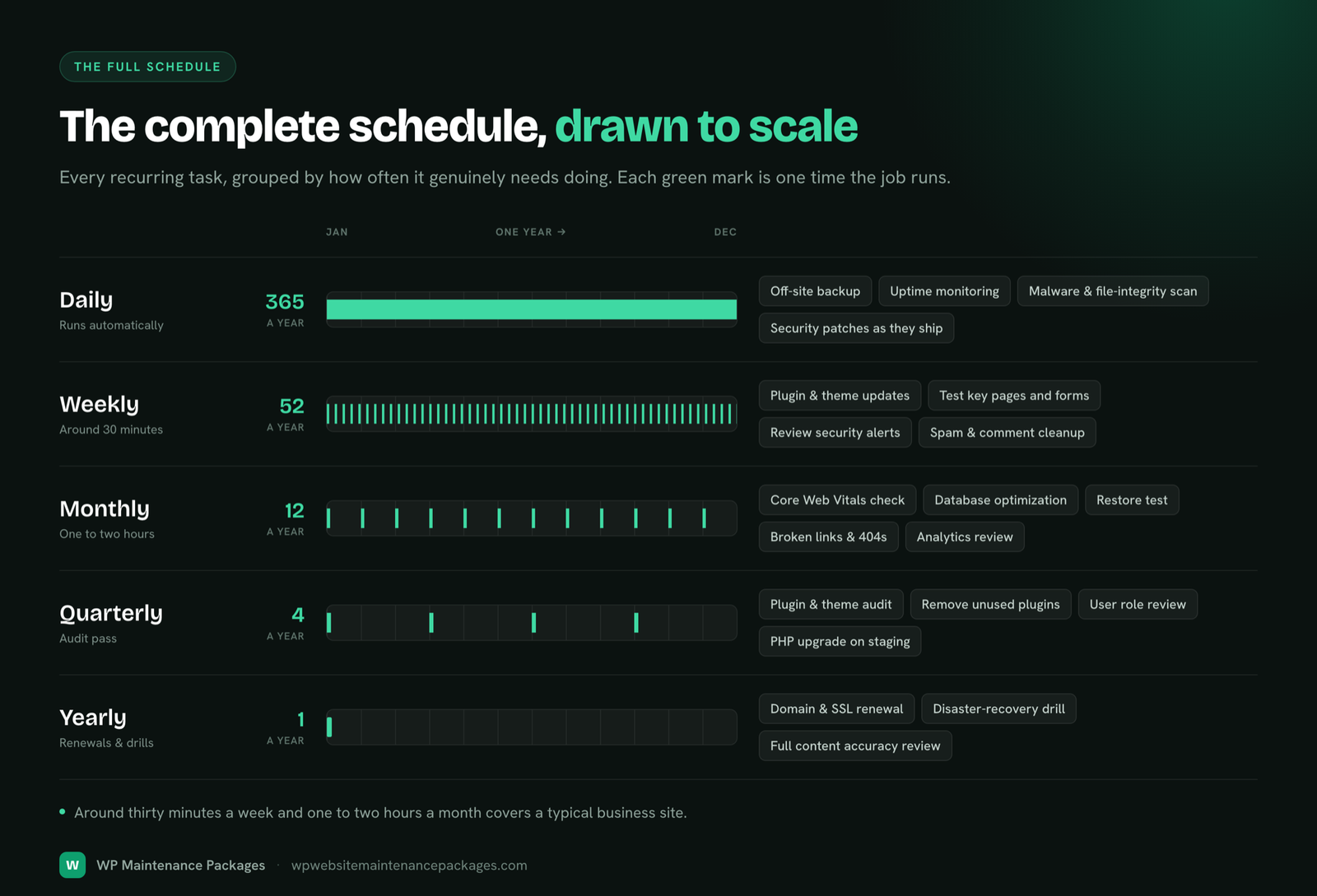
Before the full interactive list, here is the shape of a healthy maintenance routine. The core idea is simple: frequent, low-effort checks catch problems early, while deeper reviews happen less often. Match the effort to the risk and nothing important gets neglected.

FrequencyFocusRoughly
DailyUptime, backups ran, security alertsMinutes, mostly automated
WeeklyUpdates, scans, form and speed checksThe core upkeep
MonthlyRestore test, Core Web Vitals, database, Search ConsoleDeeper health checks
QuarterlySecurity audit, plugin cleanup, SEO and content auditsBigger reviews
AnnuallyDomain and hosting renewal, disaster-recovery drill, full auditThe costly-to-forget essentials
Why bother

Why website maintenance matters

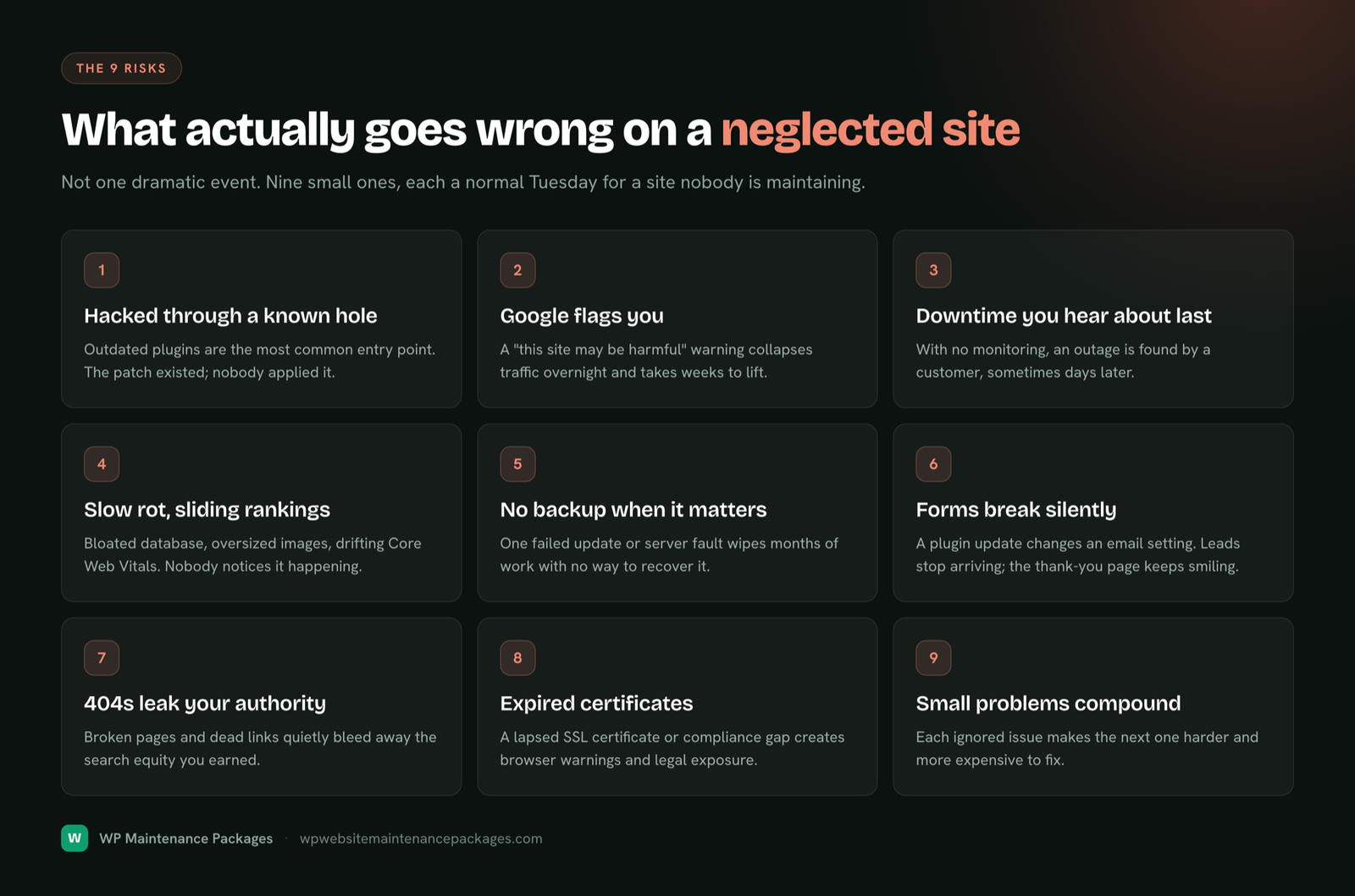
It is worth being clear about why any of this matters before you start ticking boxes, because the payoff is easy to underrate. Maintenance is invisible when it works. Nobody praises a website for not getting hacked or for loading quickly, so the temptation is always to skip it and hope. The problem is that the cost of skipping does not disappear, it accumulates quietly and then arrives all at once.

The security picture makes the point plainly. Researchers logged more than eleven thousand WordPress vulnerabilities in 2025, and over ninety percent of them were in plugins and themes rather than the core software. Once a vulnerability is public, automated attacks often begin probing for it within hours, and bots make up a large share of all web traffic, scanning constantly for sites that have not patched. None of that is targeted or personal; it is just machines finding the sites that fell behind. The maintenance tasks on this page, especially updates, backups and a firewall, are what keep your site out of that group.

And it is not only security. A site that is not maintained gets slower as it accumulates images, plugins and database bloat, and a slower site both ranks lower and converts fewer of the visitors it does get. Links break, forms silently stop working, SSL certificates lapse. Each of these is small on its own and quietly costly in aggregate. Maintenance is how you stop a hundred small neglects from compounding into one expensive emergency, and it keeps the site fast enough to actively earn while it protects. That is the case for the checklist below: a small, regular investment that prevents disproportionately large problems.

Your interactive maintenance checklist

0%

Daily tasks

0/6

A few quick, mostly automated checks that catch disasters early.

Weekly tasks

0/9

The core upkeep that keeps the site secure and current.

Monthly tasks

0/10

Deeper health checks and optimization.

Quarterly tasks

0/8

Bigger reviews you do a few times a year.

Annual tasks

0/8

The once-a-year essentials that are costly to forget.

Focused deep-dives

Specialized checklists

Use these when you want to focus on one area, a security review, a backup check, a speed pass, or before a launch or migration. They feed into the same overall progress above.

Security

0/14

Backup

0/8

Performance

0/10

Technical SEO

0/11

WooCommerce

0/10

Launch

0/9

Emergency / recovery

0/8

Migration

0/8
Why each task matters

The key tasks explained

Ticking boxes is easy; understanding why each one matters is what turns a checklist into good judgement. Here are the tasks that do the most to keep a site healthy, and why they earn their place.

Updates: core, plugins and themes

Updates are the single most important maintenance task, because outdated software is how the overwhelming majority of sites get hacked. WordPress core is very secure; the risk lives in plugins and themes, where thousands of vulnerabilities are found every year. The nuance is that updating carelessly on a live site can occasionally break something, so the professional approach is prompt but tested: back up first, ideally apply updates on a staging copy, then test the live site after. Fast enough to close security holes, careful enough not to cause the very outage you are trying to prevent.

Backups: your ultimate safety net

Backups are what make everything else survivable. A daily, off-site, tested backup means that whatever goes wrong, a bad update, a hack, a server failure, you can get back to a working site fast. Two details separate a real backup from a false sense of security: it must be stored somewhere other than the server it protects, and it must actually have been restored at least once to prove it works. A backup nobody has ever tested is a guess, and the day you need it is the worst day to discover it was empty.

Security: layered and ongoing

Security is not one setting, it is a stack of protections maintained over time: a firewall filtering bad traffic, patched software, strong logins with two-factor authentication, malware scanning, and hardening of the parts attackers target. No single layer makes a site secure, but together and kept current they make it a hard, unrewarding target. Guidance from sources like WordPress.org, OWASP and Cloudflare underpins the practices in the security checklist above. For a deeper treatment, see our malware removal and security guide.

Speed and Core Web Vitals

A fast site keeps visitors and ranks better, and Google measures real-world speed through Core Web Vitals, which feed into rankings. Sites slow down naturally as they accumulate images, plugins and database bloat, so speed is a maintenance task, not a one-time setup. Caching, image compression, a lean database and a good host do most of the work; measuring against PageSpeed Insights keeps the gains honest.

SEO and technical health

Maintenance protects the SEO you have worked for. Broken links leak authority, a slow or hacked site loses rankings, and an accidental noindex or a broken sitemap can quietly de-index pages. The monthly and quarterly SEO checks, Search Console review, broken-link scans, redirect and sitemap checks, catch these before they cost you traffic. Maintenance and SEO are not separate disciplines; a well-maintained site is a foundation that makes every other marketing effort work harder.

Ecommerce and WooCommerce

Stores carry extra risk because a broken checkout costs money immediately and silently. The WooCommerce checklist adds the store-specific essentials: test the full purchase flow after every update, verify order emails and payment gateways, and prepare for peak-traffic sales. For the complete store version, see our ecommerce maintenance guide.

Most common mistake

Auto-updating a live site with no backup. It works fine ninety-nine times, and the hundredth takes your site down with no way back. Always back up first, and test on staging for anything that earns money.
Learn from these

Common website maintenance mistakes

Even people who mean to maintain their site well tend to trip on the same handful of mistakes. Knowing them is half the battle.

Plan the year

Your annual maintenance calendar

Zooming out, here is how the routine spreads across a year, so the bigger tasks have a home and never pile up unexpectedly.

WhenWhat to focus on
Every weekUpdates, backups, malware scan, form and speed checks
Start of each monthRestore test, Core Web Vitals, database cleanup, Search Console review
Q1Full security audit; review last year\u2019s analytics; set goals
Q2Plugin audit and cleanup; accessibility review
Q3Technical SEO and content audit; hosting resource review
Q4Peak-season readiness (especially stores); disaster-recovery drill
AnnuallyDomain and hosting renewal; legal pages review; major-version planning
Tailor it

How the checklist changes by business type

The core routine is the same for everyone, but where you put the emphasis shifts with the kind of site you run.

TypeExtra emphasis
Small business / localUptime and working forms, so every lead gets through. See small business maintenance.
Ecommerce / WooCommerceCheckout and payment testing, peak-traffic prep, more frequent backups.
Blogs / content sitesSpeed, broken links, content freshness and SEO health.
AgenciesA repeatable process across many client sites; white-label reporting.
Membership / SaaS marketingCareful restore strategy and update timing around release cycles.
Expert tip

If you only ever do three things from this entire checklist, make them: daily off-site backups, prompt tested updates, and a firewall. Those three prevent the large majority of website disasters on their own.

Make it stick

Building a maintenance routine that actually happens

A checklist only helps if you use it, and the honest truth is that most DIY maintenance fails not because the tasks are hard but because they slip. Here is how to make the routine stick. Tie each group of tasks to a fixed trigger rather than good intentions: the weekly list to a set day (many owners pick Monday morning or Friday afternoon), the monthly list to the first of the month, the quarterly and annual reviews to calendar reminders you actually keep. Attach the work to a time, not to a mood.

Second, lower the effort. Automate what can be automated, backups, uptime monitoring and scanning should all run on their own, so your active time goes to the checks that need judgement. Use the interactive checklist above so you can see progress and pick up where you left off. And be realistic about your own follow-through: if you already know the weekly update never quite happens, that is not a character flaw, it is a sign the job belongs with someone whose actual job it is. There is no prize for doing this yourself, only for it getting done.

Do it or delegate

DIY vs a maintenance plan

This checklist works whether you do the work yourself or hand it over, and both are legitimate choices. Doing it yourself makes sense if you have the time, the comfort with the technical side, and the discipline to keep it up every week and month without fail. The checklist is your complete playbook for that.

A maintenance plan makes sense when your time is worth more spent on your business than on WordPress upkeep, when the technical side is not something you want to own, or when you have simply watched the routine slip one too many times. In that case the checklist becomes something else useful: a yardstick. It tells you exactly what a good provider should be doing, so you can judge whether the one you have (or are considering) is thorough or cutting corners. Our own maintenance plans run this entire checklist for you from $59/mo, and you can compare the wider market in our cost guide. Either way, the goal is the same: a site that stays secure, fast and working.

Answers

Website maintenance checklist FAQ

What is a website maintenance checklist?

It is a structured list of the recurring tasks that keep a website secure, fast, backed up and working, organised by how often each one needs doing. A good checklist turns website upkeep from a vague worry into a clear routine, so nothing important gets forgotten until it becomes a problem.

How often should I do website maintenance?

Maintenance happens on a schedule, not all at once. Some checks are daily (uptime, backups, security alerts), the core upkeep is weekly (updates, scans, form tests), deeper health checks are monthly, bigger reviews are quarterly, and a few essentials are annual (domain renewal, disaster-recovery drills). The checklist on this page is organised exactly that way.

What does WordPress website maintenance include?

The essentials are updates (core, plugins, themes), security (firewall, scanning, hardening), backups (daily, off-site, tested), speed optimization, uptime monitoring, and fixing problems as they appear. Around those sit periodic jobs like SEO checks, accessibility reviews, database cleanups and content refreshes.

Can I do website maintenance myself?

Yes, if you have the time and comfort to follow a checklist like this one consistently. The hard part is not any single task, it is doing them reliably every week and month without letting it slip. Many owners start DIY and later hand it over once they realise the upkeep keeps falling to the bottom of the to-do list.

How long does website maintenance take each month?

For a small site done properly, budget three to five hours a month across the weekly and monthly tasks, more for a store or a large site. Most of that is the disciplined, unglamorous work of testing updates safely and checking things actually still function.

What happens if I skip website maintenance?

Nothing, until suddenly something big goes wrong: an outdated plugin gets your site hacked, a slow site quietly loses rankings and customers, or a crash hits with no working backup to restore. The cost of neglect is invisible right up to the moment it becomes an expensive emergency.

How often should I update WordPress plugins?

Check weekly and apply updates promptly, but on a business site always back up first and ideally test on staging, since an update can occasionally conflict with another. Prompt-but-tested is the balance: fast enough to close security holes, careful enough not to break the live site.

How often should I back up my website?

Daily at minimum for most sites, stored off-site (not on the same server), and always immediately before any update or migration. Busy stores taking many orders a day benefit from more frequent backups so a restore costs fewer transactions.

What is the difference between weekly and monthly maintenance?

Weekly tasks are the frequent essentials that keep the site current and safe, updates, scans, form tests. Monthly tasks are deeper checks that do not need doing as often, like testing a full restore, reviewing Core Web Vitals, optimizing the database and reviewing Search Console.

Do static or small websites need maintenance?

Yes, arguably more, because a site nobody logs into is where a hack or a broken form goes unnoticed longest. Even a site whose content never changes still runs software that needs patching, backups that need taking, and security that needs monitoring.

What should be on an ecommerce maintenance checklist?

Everything on a standard checklist plus store-specific tasks: testing the full checkout and payment flow after every update, verifying order emails, confirming gateways and stock, and preparing for peak-traffic sales. See our ecommerce maintenance page for the full store version.

How do I know if my website needs maintenance right now?

Warning signs include a site that feels slow, uncertainty about when it was last backed up or updated, forms you have not tested recently, or nobody currently responsible for the site\u2019s upkeep. If any of those apply, running through this checklist is a good place to start.

Is a security plugin enough on its own?

No. A security plugin is a useful tool, but it only helps if someone acts on its alerts and keeps the rest of the site patched and backed up. Security is a maintained practice across several layers, not a single plugin you install and forget.

Should I use staging for updates?

For any site that earns money, yes. A staging site is a private copy where you can test updates before they touch the live site, which turns risky updates into safe, routine ones. It is the single biggest safeguard against an update breaking your live site.

What is the best way to keep track of maintenance?

A recurring checklist tied to a schedule, exactly like the interactive one on this page. Tick tasks as you complete them, and let the schedule (daily, weekly, monthly, quarterly, annual) tell you what is due. Or hand the whole routine to a maintenance plan so it simply gets done.

Do I still need this if I have a maintenance plan?

A good maintenance plan does all of this for you, so the checklist becomes a way to understand and verify what your provider should be handling. It is equally useful as a DIY routine or as a yardstick for judging whether your current provider is doing a thorough job.

Bhupesh Rathore, founder of ThinkFlow Media
Written & reviewed by

Bhupesh Rathore

Founder, ThinkFlow Media & Linkflow.agency · 8+ years in WordPress & SEO

Bhupesh Rathore is the founder of ThinkFlow Media and Linkflow.agency, with 8+ years in WordPress, SEO and website operations. He has built, scaled and maintained WordPress sites across business, ecommerce, SaaS and content niches, and speaks on SEO, most recently at the Chiang Mai SEO Conference 2025. He writes here to share practical, no-nonsense guidance on keeping WordPress sites secure, fast and profitable.

Full profile LinkedIn X
Skip the checklist

Let us run this checklist for you

Every task on this page, done for you every week and month, from $59/mo. No contracts, and a free audit to start.

See maintenance plans
Packages Book a call