Free site audit · No lock-in contracts · US-based WordPress team hello@thinkflow.agency Book a call
Malware removal + ongoing protection

WordPress Malware Removal & Security

Hacked, flagged by Google, or just want to stay that way, safe? We remove malware, restore your site, and close the hole that let it in, then keep it protected with ongoing website security maintenance. Clear process, honest timelines, no scare tactics. Free security scan to start.

By Bhupesh Rathore, ThinkFlow Media Updated August 2026 WordPress security specialists

Site hacked right now?

Send your URL for an urgent scan. Emergency cleanups are prioritised, the sooner we start, the less spreads.

Get urgent help

In short

There are two jobs here. Malware removal cleans a site that is already hacked: we find and remove the malicious code and backdoors, restore the site, close the vulnerability, and help lift any Google or host blacklisting. Website security maintenance is what stops it happening again: patched software, a firewall, scanning, monitoring and clean backups, running continuously. Removal is the emergency; maintenance is the cure. Ongoing protection is included in our plans from $59/mo.

11,000+WP vulnerabilities in 2025
90%+found in plugins & themes
~5 hrsto first exploit after disclosure
DailyClean off-site backups
Start here

What is website security maintenance?

Website security maintenance is the ongoing practice of keeping a site protected from hacks, malware and downtime, as opposed to a one-time fix after something has already gone wrong. It is the difference between cleaning up a break-in and actually keeping the doors locked, the alarm on, and someone watching.

It matters because a website is live software exposed to the whole internet, and security is not a state you reach once, it is a moving target. New vulnerabilities are discovered constantly, mostly in the plugins and themes that make WordPress so flexible, and automated attacks probe every site on the web looking for the ones that have fallen behind. A site that was perfectly secure last month can be exposed today simply because a flaw was found in something it runs. That is why one-off hardening is not enough on its own; protection has to be maintained.

In practice, website security maintenance combines several layers that work together: keeping everything patched, filtering malicious traffic with a firewall, scanning for malware, monitoring for suspicious changes and logins, hardening the parts attackers target, and keeping clean backups ready so recovery is fast if anything ever gets through. No single one of those makes a site secure. Together, maintained over time, they make it a hard, unrewarding target, which is what real-world security looks like. It pairs naturally with general website maintenance, since patching and backups serve both.

Do you have a problem?

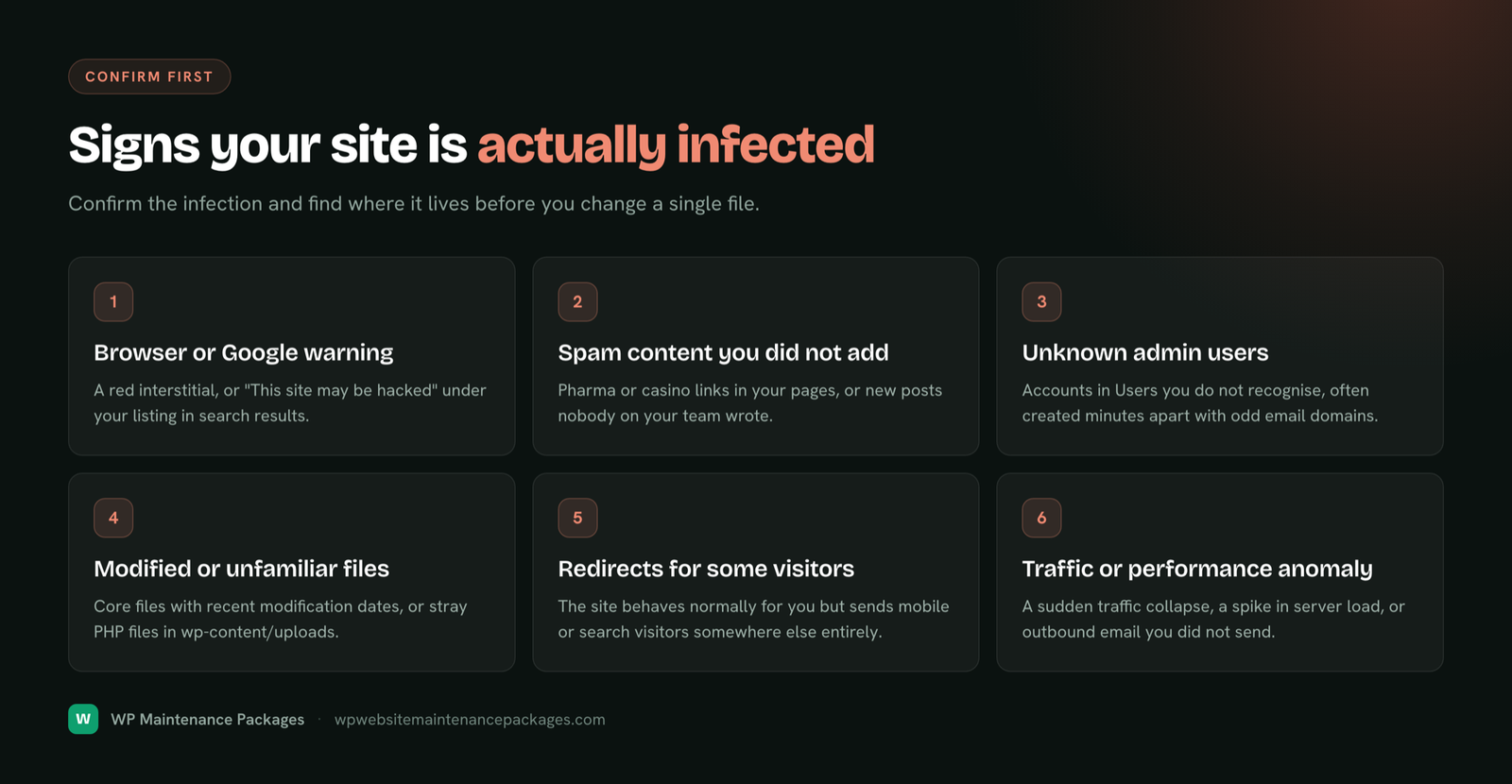
Signs your website has malware

Malware is not always obvious, some infections hide deliberately so they can keep working. But these are the common warning signs. If you spot any, treat it as urgent, because the longer malware sits, the more it spreads and the harder cleanup gets.

Not sure?

A free security scan settles it quickly. Send your URL and we will tell you honestly whether the site is clean or compromised, with no pressure either way.

First aid

What to do right now if your site is hacked

If you have just discovered your site is compromised, take a breath, panic causes more damage than the hack. Here is what actually helps in the first hour, and what to avoid.

The fastest safe path is usually to hand it to someone who cleans hacked WordPress sites regularly. Send us your URL and we will scan it, tell you honestly how bad it is, and start cleanup right away.

Know your enemy

How WordPress websites actually get hacked

There is a comforting myth that getting hacked means someone targeted you personally. For the vast majority of small and mid-sized sites, that is not what happens. The reality is more mundane and more preventable: automated bots scan the entire web for sites running software with known vulnerabilities, and exploit whatever they find. It is not personal, it is a numbers game run by machines, and an unpatched site is simply a number that came up.

WordPress core itself is very secure, maintained by a large security team and hardened over years. The risk lives almost entirely in the ecosystem around it. Researchers logged over eleven thousand WordPress vulnerabilities in 2025, and more than nine in ten were in plugins and themes, not core. Once a vulnerability is publicly disclosed, exploit attempts often begin within hours, because the same disclosure that lets you patch also tells attackers exactly what to look for. Here is where the doors actually are:

How they get inWhat prevents it
Outdated plugins & themesPrompt, tested updates, the single biggest protection
Weak or reused passwordsStrong passwords and two-factor login
Brute-force login attemptsLogin limits, a firewall, and 2FA
Nulled (pirated) plugins/themesNever using them; they often ship with hidden malware
No firewallA web application firewall filtering bad traffic
Abandoned pluginsAuditing and replacing software that is no longer maintained
Shared hosting cross-contaminationGood hosting and site isolation

The pattern is clear: most hacks exploit known, fixable weaknesses. That is genuinely good news, because it means most hacks are preventable with maintained, layered protection rather than luck.

Why it matters

What a hack really costs a business

It is tempting to treat security as optional until something happens. The problem is that the bill for "something happening" is steep, and it lands all at once. Understanding the true cost is what makes ongoing protection an easy decision.

A compromised site rarely costs just the cleanup. There is the downtime while it is offline or flagged, every hour of it lost business. There is the reputation damage when Google shows visitors a warning that your site is dangerous, which lingers even after the malware is gone. There is the SEO hit, as search rankings drop when Google de-lists a flagged site, sometimes undoing months of work. For stores, there is the nightmare of stolen customer payment data and the trust that destroys. Industry analyses put the average all-in cost of a hacked website in the thousands of dollars once downtime, cleanup, lost sales and recovery are counted, a serious hit for a small business, and an avoidable one.

Against that, ongoing security maintenance is a small, predictable cost that dramatically lowers the odds of ever paying the big one. That is the honest value proposition: not fear, just math. Prevention is cheaper than cure, and with hacks it is not close.

If you're already hit

Our malware removal process

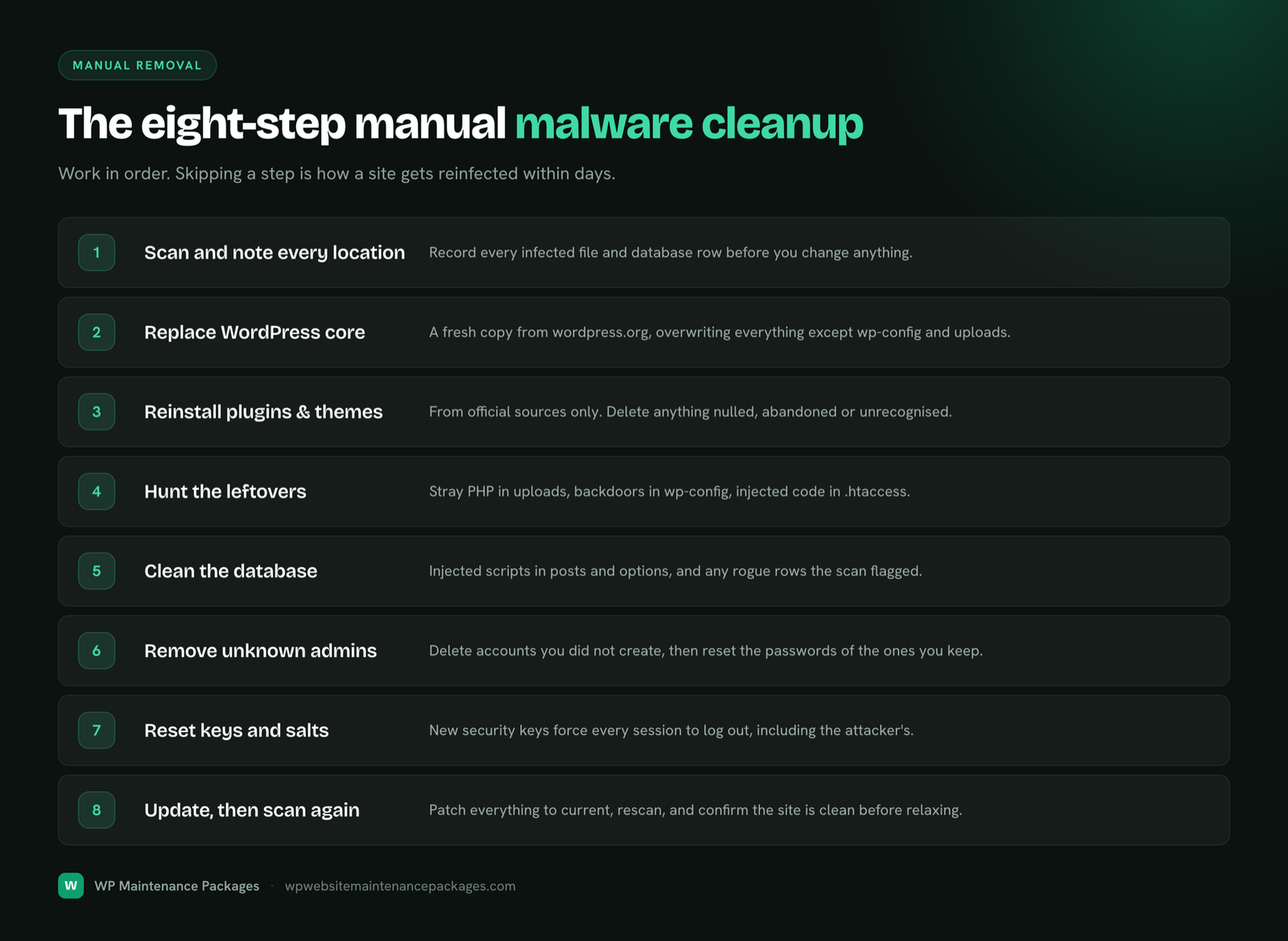
If your site is hacked, here is exactly how we clean it. The order matters: cleaning the visible mess without finding the entry point and the backdoors just gets you reinfected within days, which is why thoroughness beats speed.

1

Scan & assess

We scan the full site and server, identify the infection and its spread, and give you an honest picture and timeline.

2

Backup & clean

We take a copy of the current state, then remove malicious code from files and database, and clean or replace infected files.

3

Close the door

We remove attacker backdoors and hidden admin accounts, and fix the vulnerability that let them in, so it cannot simply happen again.

4

Harden & recover

We harden the site, help lift any blacklisting, and set up protection so it stays clean going forward.

StageWhat happensTypical timing
AssessmentFull scan, infection identified, honest timeline givenFast, same day
RemovalMalware, backdoors and rogue users removed; files cleanedOften within hours to a day
HardeningVulnerability closed, security layers appliedSame visit
Blacklist reviewClean site submitted for Google/host review1 to 2 days (Google controls final timing)
Getting un-flagged

Blacklist and Google Safe Browsing recovery

One of the most damaging parts of a hack is not the malware itself but the fallout: Google flags your site with a warning, or your host suspends it, and suddenly visitors are met with a red screen telling them your site is dangerous. That warning can tank your traffic and your reputation even after the malware is gone, so clearing it is a priority.

The critical thing to understand is that these reviews only succeed on a genuinely clean site. Submitting for review while any malware or backdoor remains gets the request rejected and can lengthen the penalty, which is why we never rush this step ahead of a thorough cleanup. Once the site is verified clean, we help submit it through Google Search Console for a Safe Browsing review and coordinate with your host to lift any suspension. Google controls the final timing, but a clean site typically clears within a day or two. We also make sure the underlying issue is fixed first, because a site that gets reflagged for reinfection is far harder to recover the second time.

Staying protected

How we secure and harden your website

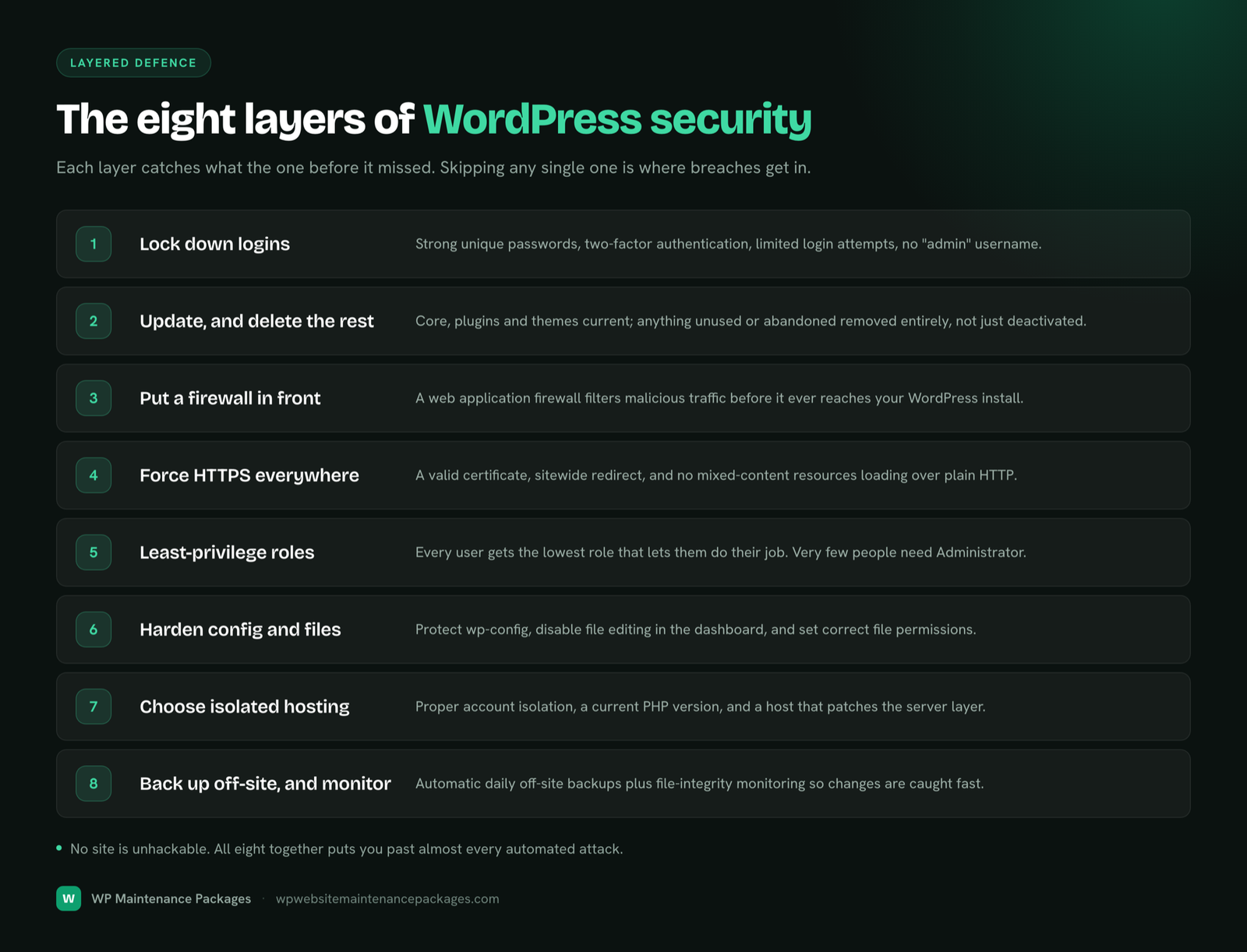
Whether we are cleaning up after a hack or protecting a healthy site, security is built in layers. No single measure is enough on its own, but stacked together and maintained, they turn your site from an easy target into one most automated attacks give up on.

Web application firewall

Filters malicious traffic and known attack patterns before they reach your site.

Patch management

Prompt, tested updates to core, plugins and themes, the single biggest defence.

Login security & 2FA

Brute-force protection, strong passwords and two-factor authentication on admin logins.

Malware & integrity scanning

Continuous scanning and file-integrity monitoring to catch changes fast.

Hardening

Locking down file permissions, disabling risky functions, and user-permission audits.

SSL & Cloudflare

Valid SSL kept current, with Cloudflare for an added edge layer of protection.

Clean backups

Daily off-site backups so recovery from any incident is fast and reliable.

WooCommerce security

Extra care for stores, including checkout-integrity checks against payment skimming.

Incident response

A clear plan and a real person if something ever gets through.

Our approach follows established security guidance from sources like WordPress.org, OWASP and Cloudflare, applied practically rather than as a checklist. For stores specifically, see ecommerce maintenance; for the hosting-layer view, see hosting and maintenance.

Always watching

Website security monitoring

Protection is only half the job; the other half is knowing the instant something is wrong. Monitoring is what turns a potential disaster into a minor, quickly-handled event. We watch your site around the clock for the signals that matter: downtime, file changes that should not be happening, malware signatures, suspicious login activity, and SSL or domain issues that can take a site offline without warning.

The value of monitoring is time. Most serious website damage comes not from the initial intrusion but from how long it goes unnoticed, malware spreading, a defacement sitting live, a skimmer quietly harvesting card details for weeks. When monitoring catches a problem in hours instead of days, the difference in damage, cleanup cost and reputation is enormous. It is the layer that means you usually hear about a problem from us, already being handled, rather than from an angry customer or a Google warning.

Common worry

Does security slow my website down?

A fair question, since some owners worry that firewalls and scanning will bog the site down. Done properly, the opposite is true: good security and good speed work together, and a well-configured security setup often makes a site faster, not slower.

A web application firewall like Cloudflare sits in front of your site and blocks bad traffic before it ever reaches your server, which frees up server resources for real visitors. Blocking the constant flood of malicious bots and brute-force attempts means your server spends its energy serving customers instead of fighting attackers. Scanning is scheduled to run without impacting live visitors. The one thing that genuinely does slow a site is a hack, injected code, spam redirects and crypto-mining scripts all drag performance down, so keeping the site clean is itself a speed measure. Handled by someone who knows what they are doing, security and performance are allies, not a trade-off.

Transparent pricing

Security maintenance plans

Ongoing website security is built into our regular maintenance plans, which is by far the most cost-effective way to stay protected, prevention is a fraction of the cost of repeated cleanups. One-off emergency malware removal for an already-hacked site is quoted after a quick scan, since the effort depends on the infection.

PlanPriceSecurity you get
Essential Care$59/moFirewall, updates, scanning, monitoring, daily backups
Growth$129/moEverything above plus deeper hardening & developer time
Pro / Agency$249/moFull protection for stores & high-traffic sites, priority response

See full inclusions on the plans page, or the wider market in our cost guide. Already hacked and need a one-off cleanup? Contact us for a quote after a free scan.

What good looks like

The WordPress security checklist

This is the security routine a well-protected WordPress site actually follows. Use it as a benchmark whether you handle security yourself or have us handle it.

FrequencySecurity tasks
ContinuousFirewall active; malware & file-integrity scanning; uptime and login monitoring
DailyOff-site backup taken; security alerts reviewed; failed-login patterns checked
WeeklyBack up, then apply tested updates to core, plugins and themes; malware scan
MonthlyUser & permission audit; remove unused plugins/themes; test a restore; review SSL & domain expiry
QuarterlyFull security review; check for abandoned plugins; rotate keys/passwords where needed; hardening review
Compare your options

DIY vs professional website security

What mattersProfessional (us)DIY / plugin only
Someone acting on alertsYes, a real personAlerts pile up unread
Patching kept currentWeekly, testedEasy to fall behind
If hackedWe clean & recoverPanic or costly rescue
Blacklist removal helpHandledConfusing to do alone
Layered protectionMaintained stackOne plugin, limited
Backups to recover fromDaily, off-siteOften missing when needed

A security plugin is a useful tool, but a tool is not a strategy. Its alerts only help if someone reads and acts on them, and it does nothing about the outdated plugin next door or the backup you never set up. Professional security is not really about better software, it is about a person owning the whole picture and keeping it maintained.

Avoid these

Common website security mistakes

Almost every hacked site we clean shares one or more of these mistakes. Avoiding them prevents the large majority of infections.

Why us

Why choose us for security

WordPress specialists

We know how WordPress sites get hacked and how to lock them down properly.

Honest, no fear tactics

A straight assessment and honest timelines, not a scare-driven upsell.

US-based team

Same-country support in your hours when it matters most.

Cleanup + prevention

We fix the hack and close the door, then keep it protected.

Our promise: if we break it, we fix it. Same day. No charge.

We are honest about security: no one can promise a site is unhackable forever. What we promise is thorough cleanup, real ongoing protection, and that anything we break, we fix free.

Answers

Website security & malware removal FAQ

What is website security maintenance?

Website security maintenance is the ongoing work that keeps a site protected from hacks and malware over time, rather than a one-off fix. It includes keeping software patched, running a firewall, scanning for malware, monitoring for suspicious changes, hardening login and file permissions, and keeping clean backups ready. Removal cleans up an infection that already happened; security maintenance is what stops the next one.

How do I know if my WordPress site has malware?

Common signs include: Google showing a "this site may be harmful" warning, your host suspending the account, spammy pop-ups or redirects to strange sites, unfamiliar admin users or files, a sudden traffic drop, pages defaced or showing content you did not add, or customers reporting warnings. If you see any of these, treat it as urgent, malware often spreads and does more damage the longer it sits. A free security scan will confirm it either way.

How did my WordPress site get hacked?

The overwhelming majority of WordPress hacks come through outdated plugins or themes with known vulnerabilities, not through some sophisticated targeted attack. Automated bots constantly scan the web for sites running software with published flaws and exploit them at scale. Weak passwords, no firewall, and nulled (pirated) plugins are the other common doors. It is rarely personal, it is just a site that was reachable and behind on patches.

Can you remove malware from my hacked WordPress site?

Yes. We locate and remove the malicious code, clean infected files and the database, remove any backdoors the attacker left so they cannot walk back in, and restore your site to a clean, working state. Then we close the vulnerability that let them in, because cleaning a site without fixing the entry point just invites reinfection. We also help get any Google or host blacklisting lifted once it is clean.

How long does malware removal take?

Most straightforward infections are cleaned within a day, often within hours of starting. More complex cases, a store, a large site, or an infection that spread widely, can take longer, and severe cases sometimes need a rebuild from a clean backup. We give you an honest timeline once we have scanned the site and can see what we are dealing with, rather than a vague promise up front.

My site is flagged by Google or blacklisted. Can you get that removed?

Yes. Once the site is genuinely clean, we help submit it for review to have the Google Safe Browsing warning lifted and work with your host to clear any suspension. The key word is clean, review requests fail if any malware remains, which is why thorough removal comes first. Blacklist recovery usually follows within a day or two of a clean review, though Google controls the final timing.

Will the malware come back after you remove it?

It should not, because we do not just clean the symptoms, we close the door that let the attacker in and remove any backdoors they planted. That said, no honest provider can promise a site will never be attacked again, the web is full of automated attacks. What reliably prevents reinfection is ongoing protection: patched software, a firewall and monitoring. That is exactly what our security maintenance plans provide after cleanup.

Do you guarantee malware removal?

We are honest about this rather than making a marketing promise. We work until your site is clean and verified, and we close the vulnerability behind the hack. What no one can truthfully guarantee is that a site will never be targeted again, anyone claiming a permanent "100% hack-proof" guarantee is overselling. Our real guarantee is our standard one: if we ever break something on your site, we fix it the same day at no charge. Ongoing security is a practice, not a one-time promise.

How much does malware removal and website security cost?

Ongoing website security maintenance is included in our regular plans, from $59/mo, which is the affordable way to stay protected. One-off emergency malware removal for a site that is already hacked is quoted after a quick scan, since the work depends on how bad the infection is. For most owners, an ongoing plan is far cheaper than repeated emergency cleanups. See our cost guide for the wider picture.

What do you do to keep my site secure after cleanup?

We keep everything patched, run a web application firewall, scan continuously for malware, monitor for file changes and suspicious logins, enforce strong login security, and keep clean off-site backups ready for fast recovery. Security is layered and ongoing, one setting does not make a site secure, but a maintained stack of protections makes it a far harder and less rewarding target.

Do I still need a security plugin if I have you?

We use proven security tools as part of the service, so you are not paying for and juggling plugins yourself. More importantly, a security plugin alone does very little if nobody acts on its alerts or keeps the rest of the site patched. The value is not the plugin, it is a person watching and maintaining the whole picture, which is what you get with us.

Is my WooCommerce store\u2019s payment data safe?

The safest setup keeps card data with your payment gateway (Stripe, PayPal and similar) so it never touches your server, which we help ensure alongside valid SSL and current software. The specific store threat we watch for is payment skimming, injected code that captures card details at checkout, so after any incident on a store we verify the checkout and payment path is clean. See our ecommerce maintenance page for the full store-security picture.

Do you offer emergency help if my site is down or hacked right now?

Yes. If your site is actively hacked, defaced or flagged, reach out straight away and mark it urgent, and send your URL for an immediate scan. The sooner we start, the less damage spreads and the faster you are back online. Emergency cleanup is prioritised ahead of routine work.

How do I get started?

For an active hack, contact us now and send your site URL for an urgent security scan. If you just want to stay protected, request a free security scan and we will report what shape your site is in and recommend the right plan. Either way, you get an honest assessment first, no scare tactics.
Bhupesh Rathore, founder of ThinkFlow Media
Written & reviewed by

Bhupesh Rathore

Founder, ThinkFlow Media & Linkflow.agency · 8+ years in WordPress & SEO

Bhupesh Rathore is the founder of ThinkFlow Media and Linkflow.agency, with 8+ years in WordPress, SEO and website operations. He has built, scaled and maintained WordPress sites across business, ecommerce, SaaS and content niches, and speaks on SEO, most recently at the Chiang Mai SEO Conference 2025. He writes here to share practical, no-nonsense guidance on keeping WordPress sites secure, fast and profitable.

Full profile LinkedIn X
Free security scan

Get your website checked, or cleaned up fast

Hacked and need help now, or just want to know where you stand? Send your URL for a free security scan and an honest assessment, no scare tactics, no pressure.

Get a free security scan
Packages Book a call